
Lesson
AI Function Calling: Practical Tool Use for Business Systems
Learning Objectives
By the end of this lesson, you should be able to:
- Define AI function calling, tool use, tool schema, tool call, and tool result in plain English.
- Explain the tool-use loop from user request to model tool request to application execution.
- Distinguish function calling from structured outputs, RAG, direct API calls, deterministic workflow steps, and autonomous agents.
- Identify business use cases where AI tool calling is appropriate.
- Design a basic tool contract with inputs, outputs, permission boundaries, validation rules, error handling, and audit logging.
Prerequisites
Helpful background: basic familiarity with LLMs, APIs, JSON, business systems such as CRMs or helpdesks, and the idea that production AI workflows include more than a single model response. No advanced machine learning knowledge is required.
Main Lesson Body
Why AI Function Calling Matters in Real Business Systems
AI function calling is a pattern where a model returns a structured request to use a named tool with specific arguments. The model does not directly execute the business action. Trusted application code validates the request, checks permissions, calls the API or function, handles errors, logs the result, and decides what happens next.
That distinction matters because businesses do not only need fluent text. They need AI systems that can safely work with live data, deterministic calculations, workflow triggers, permissions, and audit trails. Function calling is one of the practical mechanisms that lets an AI assistant move from “answering” to “participating in a workflow” without pretending the model itself owns the system.
A common failure pattern is to see a demo where an assistant “updates a CRM record” and conclude that the model performed the update. In a production design, the safer interpretation is different: the model requested a structured action, and the surrounding software decided whether that action was allowed.
If you remember one mental model, use this:
Function calling is a governed request counter between probabilistic model reasoning and deterministic business systems.
The model can suggest which counter to approach and what form to fill out. The business system still needs identity, authorization, validation, execution logic, exception handling, and records.
For a broader comparison between autonomy and deterministic flow design, see AI Agents vs Workflows: A Practical, Reliable Decision Guide.
Activate Prior Knowledge: Forms, APIs, and Workflow Approvals
Most business readers already understand controlled requests.
An employee does not usually change a customer credit limit by writing a paragraph. They open a system, choose an approved action, fill in required fields, submit the request, and sometimes wait for approval.
Engineers will recognize the same pattern in API contracts. A service exposes a known endpoint. Callers send typed inputs. The backend validates them, uses trusted credentials, returns a response, and records the event.
AI function calling sits between those two ideas.
The model sees a list of available tools, such as:
get_customer_statuslookup_ordercalculate_refund_estimatecreate_ticket_draftpropose_crm_update
When the user asks a question that needs live data or an action, the model may return a structured tool call instead of a final answer. The application then decides what to do with that request.
This is also why function calling often appears alongside structured outputs, RAG, workflow automation, and AI agents. Structured outputs make model responses machine-readable. RAG retrieves knowledge. APIs connect systems. Agents may choose actions. Function calling is the structured mechanism that lets a model ask the application to use an approved tool.
For related workflow integration patterns, see AI Integration: 7 Reliable CRM Helpdesk Patterns and Event-Driven AI Workflows: 7 Reliable Patterns.
Direct Definitions
AI function calling
AI function calling is a model capability and application pattern where the model returns a structured request to use a named function or tool. The request usually includes a tool name and arguments that match a declared schema.
Example: instead of saying “The customer is active,” the model may request:
{
 "tool": "get_customer_status",
 "arguments": {
 "customer_id": "cus_12345"
 }
}
The application receives that request and decides whether to execute the lookup.
Tool use in AI
Tool use in AI is the broader idea of giving an AI system access to external capabilities. A tool might query a database, search documents, calculate a value, create a draft, call an internal API, or trigger a workflow.
Different providers use slightly different terms, including function calling, tool calling, tool use, client tools, server tools, and function declarations. The architectural question is the same: who selects the tool, who executes it, what permissions apply, and what gets logged?
Tool schema
A tool schema describes the tool’s name, purpose, allowed inputs, expected types, required fields, and sometimes output shape. Many implementations use JSON Schema concepts to describe valid arguments.
A schema helps the model produce structured arguments, but a schema is not a security control by itself. You still need server-side validation, authorization, rate limits, and business rules.
Tool call
A tool call is the structured request emitted by the model. It usually contains a tool name and arguments.
A tool call should be treated as untrusted input until validated by your application.
Tool result
A tool result is the output returned after the application or provider executes the tool. It may contain live data, a calculation result, an error, a confirmation, or a structured object. The result can be returned to the model so it can produce a final answer or decide whether another workflow step is needed.
Orchestration
Orchestration is the surrounding control layer that manages the workflow: model calls, tool calls, retries, timeouts, validation, approvals, logging, and next-step decisions.
In business AI systems, orchestration is often more important than the model prompt. It is where reliability and governance become real.
The Tool-Use Loop
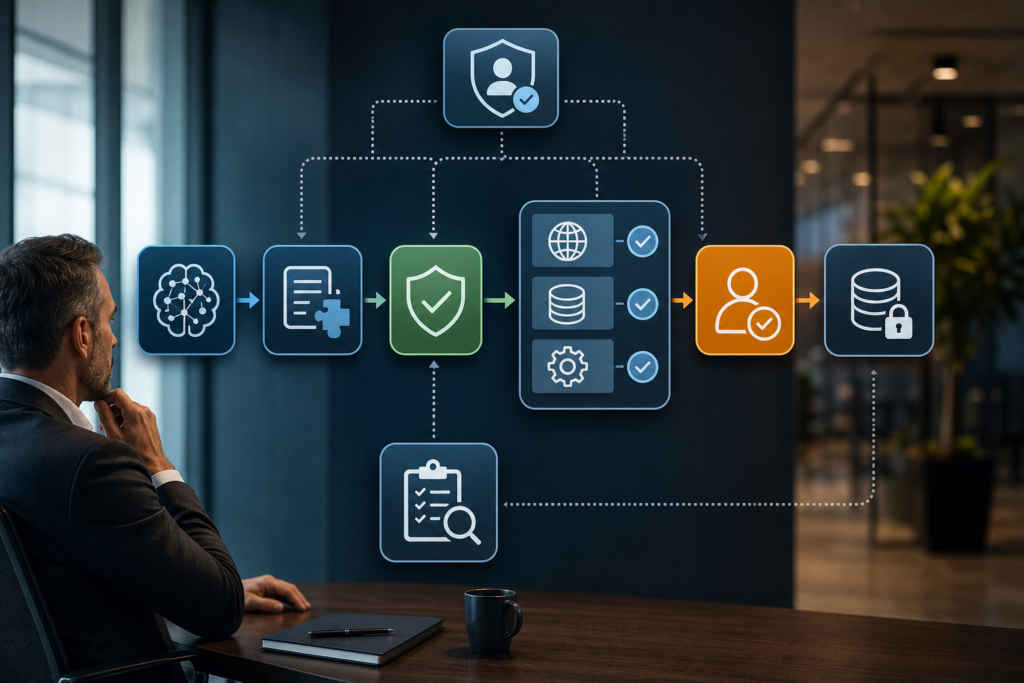
A typical AI function calling loop looks like this:
- A user asks for something.
- The application sends the model the user request plus a list of available tools.
- The model decides whether a tool is needed.
- If needed, the model returns a structured tool call.
- The application validates the tool name and arguments.
- The application checks permissions and business rules.
- Backend code executes the real function, API call, or workflow step.
- The application records the request, result, latency, user, and decision path.
- The tool result is returned to the model or workflow.
- The model responds, requests another tool, or the workflow routes to human review.
That loop is simple on paper. Production adds constraints.
Real systems have stale data, partial failures, slow APIs, duplicate requests, rate limits, inconsistent records, permission boundaries, customer impact, legal retention rules, and teams that need to explain what happened later.
This is why function calling should not be treated as a prompt trick. It is an integration design pattern.
What the Model Controls and What the Application Controls
A safe design separates the model’s responsibility from the application’s responsibility.
| Layer | What It Does | What It Does Not Do | Business Implication |
|---|---|---|---|
| Model | Interprets request, selects possible tool, proposes arguments | Should not be trusted to authorize or execute sensitive actions | Useful for flexible routing, not enough for governance |
| Tool schema | Describes allowed input structure | Does not prove the action is allowed | Helps consistency, but cannot replace permissions |
| Application | Validates, authorizes, executes, handles errors, logs | Should not blindly trust model arguments | Main control point for production safety |
| Backend/API | Performs deterministic lookup or action | Should not expose broad capabilities by default | Needs least-privilege credentials and clear contracts |
| Workflow/orchestrator | Controls sequence, review gates, retries, rollback | Should not hide failures from operators | Determines reliability, auditability, and cost control |
This separation also helps executives ask better questions.
Instead of asking, “Can the AI do this?” ask:
- What tool is exposed?
- Is it read-only, draft-only, or write-capable?
- Who authorized the call?
- What happens if the model chooses the wrong tool?
- What happens if the API fails halfway through?
- Can we reverse the action?
- What is logged for audit and debugging?
When AI Function Calling Is the Right Pattern
Function calling is most useful when the model needs to request something outside its own generated text.
Good use cases include:
- Live lookup: customer status, order history, subscription plan, inventory level, ticket state.
- Deterministic computation: refund estimate, tax calculation, discount eligibility, SLA deadline.
- Workflow drafting: create a draft CRM update, draft support response, draft internal note.
- Controlled write-back: update a field, create a ticket, assign a task, trigger a notification.
- Multi-step assistance: gather data from approved tools before recommending a next action.
Use function calling when the model’s flexible interpretation is helpful, but the actual data access or action must remain controlled.
Do not use function calling simply because it sounds advanced. A normal deterministic API call is better when the application already knows exactly what data it needs.
For example, if every support ticket screen always displays customer status, there is no reason to ask a model whether to call get_customer_status. Just call the API deterministically as part of the workflow. Save model-selected tool use for cases where the need depends on the user’s request or context.
Function Calling Compared With Related Concepts
| Concept | What It Does | What It Does Not Do | Business Implication |
|---|---|---|---|
| Structured outputs | Makes the model answer in a defined structure | Does not fetch live data or execute actions | Good for classification, extraction, routing, and UI-ready responses |
| AI function calling | Lets the model request a named tool with arguments | Does not mean the model safely executes the tool | Good for live lookup, calculations, and controlled workflow actions |
| RAG | Retrieves relevant content for grounding an answer | Does not update systems or perform business actions | Good for knowledge assistants and policy-grounded responses |
| Direct API call | Application code calls a known API step | Does not require model-selected tool choice | Best when the workflow already knows what to call |
| Deterministic workflow | Executes a predefined sequence with rules and checks | Does not adapt freely unless designed to branch | Best for reliability, SLAs, and auditability |
| Autonomous agent | Chooses actions toward a goal, often across tools | Does not remove the need for permissions and monitoring | Useful only when autonomy justifies added risk and complexity |
The easiest mistake is to confuse “the model can request a tool” with “the system is now an agent.” Function calling can be part of an agent, but it can also be part of a tightly controlled deterministic workflow.
For a deeper comparison of RAG, fine-tuning, and tool use, see RAG vs Fine-Tuning: 3 Reliable AI Choices for Business.
Designing Tool Contracts for Business AI Systems
A tool contract is the agreement between the AI workflow and the business capability it can request.
A useful contract answers:
- What is the tool allowed to do?
- What inputs are required?
- What inputs are forbidden?
- What output does it return?
- What permissions are needed?
- What business rules apply?
- What errors can happen?
- Is the action reversible?
- What must be logged?
- Does a human need to approve the result?
For example, a safe support tool might be:
{
 "name": "create_ticket_draft",
 "description": "Create a draft internal support note. Does not send a customer-facing message.",
 "input_schema": {
 "type": "object",
 "properties": {
 "ticket_id": { "type": "string" },
 "summary": { "type": "string" },
 "suggested_queue": {
 "type": "string",
 "enum": ["billing", "technical_support", "security", "customer_success"]
 },
 "risk_level": {
 "type": "string",
 "enum": ["low", "medium", "high"]
 }
 },
 "required": ["ticket_id", "summary", "suggested_queue", "risk_level"],
 "additionalProperties": false
 }
}
This schema is illustrative rather than production-ready. A real implementation would also need server-side validation, authentication, authorization, idempotency controls, logging, and tests.
Notice the narrow scope. The tool creates a draft internal note. It does not send a customer email, issue a refund, close an account, or change billing terms.
That is the safer default: start with read-only or draft-only tools, then expand only when evidence supports it.
Business Decisions Shaped by Tool Access
Tool access is a business decision disguised as a technical feature.
A CRM lookup tool has a different risk profile from a CRM update tool. A draft refund recommendation is different from issuing a refund. A generated email draft is different from sending a customer-facing message.
Use this decision table before exposing a tool:
| Tool Type | Example | Safer Starting Mode | Review Needed Before Scaling |
|---|---|---|---|
| Read-only lookup | Get customer status | Allow with least-privilege access | Monitor access logs and data exposure |
| Calculation | Estimate refund amount | Allow if deterministic and tested | Validate formula ownership and edge cases |
| Draft creation | Draft support note | Allow with human review | Track acceptance, edits, and policy errors |
| Write-back | Update CRM field | Require approval or narrow automation | Log diffs, permissions, rollback path |
| External action | Send email or issue refund | Human approval by default | Require strong evaluation and exception handling |
The higher the business impact, the less you should rely on model judgment alone.
Function calling becomes valuable when teams treat tools as governed workflow interfaces, not shortcuts for giving a model unchecked access to business systems.
Technical Controls That Change the Outcome
Business outcomes depend on technical controls. The following controls are not optional in serious implementations.
Validation
Validate tool arguments on the server side. Reject unknown tools, missing required fields, invalid enum values, malformed IDs, unexpected properties, and unsafe strings.
Do not assume the model will always follow the schema. Even when a provider supports stricter schema adherence, your application should still validate.
Authorization
Tool schemas describe shape. Permissions decide access.
The application should check the end user, the workflow context, the tenant, the requested action, and the data boundary before execution. Use least-privilege credentials. Avoid giving a tool broad admin access when it only needs a narrow capability.
Idempotency
If the same tool call is retried, will it create duplicate tickets, send duplicate emails, or apply the same credit twice?
Write-capable tools should use idempotency keys or equivalent controls so retries do not create duplicate side effects.
Timeouts and retries
Tools fail. APIs slow down. Networks break.
Define timeouts, retry limits, fallback behavior, and user-facing messages. Retries should be safe for the tool’s side effects.
Human review
Human review is not a sign of failure. It is a control surface.
Use review for irreversible, customer-impacting, financial, regulated, sensitive, or low-confidence actions. A good review UI shows the original request, tool arguments, tool result, model rationale if captured, evidence, proposed change, and approval history.
Audit logging
Log enough to explain what happened:
- User request
- Model version or configuration identifier
- Available tools
- Selected tool
- Arguments
- Validation result
- Authorization result
- Execution result
- Human approval or rejection
- Latency and cost where available
- Error state and fallback path
If a customer asks why an account field changed, the team should not have to reconstruct the answer from scattered logs.
Post-call validation
A tool result can be wrong, incomplete, stale, or unsafe to show.
Validate the returned data before giving it back to the model or user. For example, redact sensitive fields, filter records by tenant, check status codes, and avoid letting tool output become an unchecked instruction source.
This matters for prompt injection risk. Retrieved documents, web pages, tickets, emails, and tool outputs can contain hostile or misleading text. Treat external content as data, not authority.
Where Function Calling Fits With MCP and AI Agents
Model Context Protocol, often shortened to MCP, is an open protocol for connecting LLM applications with external data sources and tools. It addresses a related but broader connector problem: how AI applications discover and interact with tools and context through a common protocol.
Function calling and MCP are not the same layer.
Function calling describes a model or application interaction pattern: the model requests a tool call and the system handles execution.
MCP describes a protocol for exposing tools, resources, and prompts between clients and servers.
In a business architecture, an AI application might use model function calling to request a tool, while an MCP server exposes the underlying connector. The risk questions remain the same: what can the tool do, who approved it, how is it validated, and what happens when it fails?
Agents add another layer. An agent may use function calling repeatedly while pursuing a goal. That increases flexibility, but it also increases the need for budgets, permissions, monitoring, and stop conditions.
Do not call a system an agent because it has one tool call. A deterministic workflow can use function calling without becoming an autonomous agent.
Practical Operating Metrics
Before scaling a tool-using AI workflow, measure more than model accuracy.
Useful metrics include:
- Task completion rate
- Tool-call success rate
- Tool-call error rate
- Argument validation failure rate
- Human review rate
- Human edit rate
- Incorrect tool selection rate
- Average and tail latency
- Cost per completed workflow
- Duplicate action rate
- Rollback or correction rate
- Customer-impacting exception rate
- Security or policy violation rate
These metrics create a bridge between business value and technical reliability. If tool-call latency is high, customer experience suffers. If validation failures are frequent, the schema or prompting may be weak. If review rejection is high, the model may be selecting the wrong tool or proposing unsafe arguments.
A tool-using AI system should earn expanded permissions through evidence.
A Better Default: Read, Draft, Approve, Then Write
A practical rollout sequence is:
- Read-only tools for lookup.
- Draft-only tools for proposed updates.
- Human approval for any write-back.
- Limited auto-write only for low-risk, reversible, high-confidence cases.
- Continuous monitoring and rollback planning.
This sequence protects the business while still creating value. A support team can save time with lookup and draft tools before allowing any customer-visible action. A sales team can use AI to suggest CRM enrichment before letting it update key fields. A finance team can use AI to gather invoice context before approving payment actions.
Start with the smallest useful tool surface. Expand only after the workflow proves it can handle edge cases, failures, and review feedback.
Worked Example
A support workflow with read-only lookup and reviewed write-back
Scenario: A B2B SaaS company wants an AI assistant to help support agents answer billing questions. Leaders want faster responses. Engineering is concerned about exposing customer account data and accidental write-backs.
The team designs the workflow around three tools:
get_customer_subscriptioncalculate_refund_estimatecreate_internal_note_draft
They deliberately do not expose tools for issuing refunds, changing plans, or sending customer emails.
Step 1: User request
A support agent asks:
“Can we help this customer? They say they were double charged after upgrading. Draft a note with account status and a refund estimate.”
Step 2: Model sees approved tools
The model receives tool definitions. It can request a subscription lookup and refund estimate. It can create an internal note draft. It cannot issue a refund.
Step 3: Model requests customer lookup
The model returns a structured request:
{
 "tool": "get_customer_subscription",
 "arguments": {
 "customer_id": "cus_12345"
 }
}
Step 4: Application validates and authorizes
The application checks:
- Is
get_customer_subscriptionan approved tool? - Is
customer_idpresent and valid? - Is the support agent allowed to access this customer?
- Is the request inside the correct tenant?
- Is the tool read-only?
If approved, the backend executes the lookup using a scoped service credential.
Step 5: Tool result returns
The tool returns structured account data, with sensitive fields redacted. The application logs the tool call and passes the relevant result back to the model.
Step 6: Model requests deterministic calculation
The model asks for a refund estimate:
{
 "tool": "calculate_refund_estimate",
 "arguments": {
 "customer_id": "cus_12345",
 "invoice_id": "inv_789",
 "reason_code": "possible_duplicate_charge"
 }
}
The application validates the invoice ID, checks policy rules, runs the deterministic calculation, and returns an estimate.
Step 7: Model drafts an internal note
The model requests:
{
 "tool": "create_internal_note_draft",
 "arguments": {
 "ticket_id": "tkt_456",
 "summary": "Customer reports possible duplicate charge after upgrade. Subscription lookup confirms recent plan change. Refund estimate requires billing approval.",
 "suggested_queue": "billing",
 "risk_level": "medium"
 }
}
The application validates the draft fields. Because the tool creates only an internal draft, it allows execution. The agent reviews and edits the note before any customer-facing response.
Why this design works
The model helps interpret the request, gather context, and draft the next step. The application controls data access, policy enforcement, tool execution, and logging. High-risk actions remain outside the model’s permission boundary.
A later version could add a refund approval workflow, but only after the team measures accuracy, review outcomes, exception rates, and rollback needs.
Implementation Checklist
| Step | What to Do | How to Verify It |
|---|---|---|
| Define the workflow | Map trigger, model step, tool call, validation, execution, review, and logging | Stakeholders can explain the same sequence |
| Select narrow tools | Start with read-only or draft-only tools | No tool has broad access beyond its job |
| Write tool descriptions | Make each tool’s purpose and limits clear | Test whether the model selects the right tool on sample cases |
| Design schemas | Use typed fields, required values, enums, and strict input boundaries where supported | Invalid arguments are rejected before execution |
| Validate server-side | Treat tool calls as untrusted input | Unit tests cover missing, malformed, and unexpected arguments |
| Enforce authorization | Check user, tenant, role, action, and data scope | Access tests fail closed when permission is missing |
| Add idempotency | Prevent duplicate side effects on retries | Repeated calls do not duplicate tickets, emails, or credits |
| Set timeouts and retries | Define retry limits and fallback paths | Failure tests produce safe outcomes |
| Add human review | Require approval for risky write-backs | Review UI shows evidence, proposed change, and approve or reject history |
| Log audit events | Record request, tool, arguments, validation, execution, result, and reviewer | Operators can reconstruct a past action |
| Evaluate before scaling | Test real cases, edge cases, policy conflicts, and adversarial inputs | Metrics meet thresholds before permissions expand |
| Plan rollback | Define how to reverse or correct bad actions | Owners know who can roll back and how |
Common Mistakes and Failure Modes
Treating a tool schema as a security boundary
A schema can constrain structure, but it does not authorize an action. The backend still needs validation, permissions, policy checks, and logging.
Exposing broad tools too early
A general update_customer_record tool is tempting. It is also dangerous. Prefer narrow tools such as propose_billing_contact_update or create_crm_update_draft.
Letting the model choose when deterministic code should decide
If the workflow always needs the same lookup, call the API directly. Model-selected tool use is useful when the need depends on language, context, or ambiguity.
Ignoring tool result safety
Tool outputs can include sensitive data, stale records, or malicious instructions embedded in retrieved content. Filter and validate outputs before returning them to the model or user.
Missing idempotency
Retries are normal in distributed systems. Without idempotency, one failed-looking request can create duplicate actions.
No human review for high-risk actions
Auto-sending messages, changing billing, issuing refunds, closing accounts, or updating regulated records should require strong evidence before automation. Start with draft and approval.
Overloading the model with too many tools
A large tool list can make tool selection harder and increase debugging complexity. Curate tools by workflow. Separate high-risk tools into stricter approval paths.
Poor observability
If you cannot inspect tool calls, arguments, results, and approvals, you cannot operate the system responsibly. Logs are part of the product, not an afterthought.
Confusing a demo with production readiness
A demo usually shows the happy path. Production must handle invalid inputs, permission failures, ambiguous requests, slow APIs, stale data, retries, and security testing.
Knowledge Check
- In an AI function calling workflow, what does the model usually produce, and what does the application execute?
- Why is a tool schema not the same as permission to run a tool?
- When is a deterministic API call better than model-selected tool use?
- What should be logged when a tool call updates a business system?
- How is function calling different from RAG?
- Does function calling automatically make an AI system an autonomous agent? Why or why not?
Practical Exercise
Objective
Design a basic tool contract for one business AI workflow and identify the controls required before exposing it to production.
Task
Pick one workflow from your business or a realistic example:
- Support ticket triage
- Sales CRM enrichment
- Invoice lookup
- Inventory availability assistant
- HR policy assistant
- Customer onboarding task creation
Design one tool the AI system may request.
Starter instructions
Write a short tool contract with the following fields:
- Tool name
- Business purpose
- Read-only, draft-only, or write-capable
- Required inputs
- Output shape
- Permission rules
- Validation rules
- Error cases
- Human review requirement
- Audit log fields
- Rollback or correction path
- Metrics to monitor
Use this simple format:
Tool name:
Purpose:
Mode:
Required inputs:
Outputs:
Permissions:
Validation:
Errors:
Human review:
Audit logs:
Rollback:
Metrics:
What success looks like
A strong exercise result should include:
- A narrow tool with a clear business purpose.
- Inputs that are specific enough to validate.
- A clear statement of what the tool cannot do.
- Permission rules tied to user role, tenant, and action type.
- Error handling for missing data, denied access, API timeout, and invalid arguments.
- Human review for any risky or irreversible action.
- Audit logs that explain who requested what, what was executed, and what happened.
- Metrics that can show whether the tool improves the workflow without increasing unacceptable risk.
Reflection questions
- Did you choose function calling because the model needs flexible tool selection, or would a deterministic API call be simpler?
- What is the worst reasonable failure if the model selects this tool incorrectly?
- What permission would you remove first if the workflow showed unexpected behavior?
- Which metric would convince you to expand the tool’s permissions?
- Which metric would force you to pause or roll back?
Optional stretch goal
Create three test cases for your tool:
- Happy path: valid request, allowed user, successful tool result.
- Permission failure: valid-looking request from a user who should not access the data.
- Risk case: model proposes a write-capable action that should route to human approval.
Key Takeaways
- AI function calling lets a model request a structured tool call, but trusted application code should validate, authorize, execute, and log the action.
- Tool use is most valuable when an AI workflow needs live data, deterministic calculation, or controlled interaction with business systems.
- A tool schema improves structure, but it does not replace permissions, validation, or business rules.
- Start with read-only and draft-only tools before granting write-capable actions.
- Function calling is different from RAG, structured outputs, direct API calls, and autonomous agents.
- Production reliability depends on orchestration, idempotency, timeouts, retries, review gates, and observability.
- A successful tool-using AI workflow earns more autonomy through measured evidence, not through a convincing demo.
- The practical next step is to design one narrow tool contract and test it against real failure cases before scaling.
FAQ
What is AI function calling?
AI function calling is a pattern where a model returns a structured request to use a named tool with specific arguments. The surrounding application validates the request, executes the real function or API call, returns the result, and logs the workflow.
Is function calling the same as tool use?
They are closely related. Function calling is one common implementation of tool use. Tool use is the broader concept of connecting an AI system to external capabilities such as APIs, databases, calculators, search tools, workflow actions, or file operations.
Does the AI model actually execute the function?
Usually, no. In many production designs, the model emits a structured tool call. Your application or the provider runtime executes the tool, depending on the platform and tool type. For business systems, you should design as if execution belongs to trusted application code with explicit permissions.
When should a business use function calling instead of RAG?
Use RAG when the system needs to retrieve knowledge to answer a question. Use function calling when the system needs live data, a deterministic calculation, or a controlled action in another system. Many workflows use both: RAG for policy context and function calling for live customer or ticket data.
Does function calling make an AI system an agent?
No. Function calling can be used inside an agent, but a workflow with one controlled tool call is not automatically an autonomous agent. Agency depends on how much the system can plan, choose actions, loop across tools, and act without human approval.
How can function calling be made safer?
Use narrow tool contracts, least-privilege credentials, server-side validation, permission checks, idempotency, timeouts, retries, human review for risky actions, output filtering, audit logs, and staged rollout. Treat every tool call as a request that must earn execution.
Sources
- OpenAI Function Calling Guide: https://developers.openai.com/api/docs/guides/function-calling
- OpenAI Structured Outputs Guide: https://developers.openai.com/api/docs/guides/structured-outputs
- Anthropic Tool Use with Claude: https://platform.claude.com/docs/en/agents-and-tools/tool-use/overview
- Google Gemini API Function Calling: https://ai.google.dev/gemini-api/docs/function-calling
- Model Context Protocol Specification: https://modelcontextprotocol.io/specification/latest
- JSON Schema Specification: https://json-schema.org/specification
- OWASP Top 10 for Large Language Model Applications: https://owasp.org/www-project-top-10-for-large-language-model-applications/
- NIST Artificial Intelligence Risk Management Framework AI RMF 1.0: https://www.nist.gov/publications/artificial-intelligence-risk-management-framework-ai-rmf-10
Related articles from Kyle Beyke
- AI Agents vs Workflows: A Practical, Reliable Decision Guide: https://beykeworkflows.com/ai-agents-vs-workflows-deterministic/
- Model Context Protocol: The Critical Connector Shift: https://beykeworkflows.com/model-context-protocol-ai-connector-infrastructure/
- Event-Driven AI Workflows: 7 Reliable Patterns: https://beykeworkflows.com/event-driven-ai-workflows-webhooks-queues-apis/
- AI Integration: 7 Reliable CRM Helpdesk Patterns: https://beykeworkflows.com/ai-integration-crm-helpdesk-internal-tools/
- RAG vs Fine-Tuning: 3 Reliable AI Choices for Business: https://beykeworkflows.com/rag-vs-fine-tuning-tool-use-for-business/