
Lesson
Event-Driven AI Workflows with Webhooks, Queues, and APIs
Learning Objectives
- Explain why many production AI workflows should be event-driven rather than chat-driven.
- Distinguish webhooks, APIs, queues, event buses, workers, schedulers, and workflow orchestrators.
- Design a reliable webhook-to-queue-to-worker AI workflow.
- Use retries, backoff, idempotency, dead-letter queues, and validation to prevent common production failures.
- Decide when human review is required before an AI workflow writes back to a business system.
- Define observability and evaluation metrics for event-driven AI workflows.
Prerequisites
Helpful background includes basic familiarity with APIs, webhooks, business systems, structured outputs, and AI workflow design. You do not need deep distributed-systems experience, but it helps to understand that production AI workflows often include triggers, context collection, model calls, tool calls, validation, human review, downstream actions, logging, and evaluation.
Main Lesson Body
Event-driven AI workflows turn business activity into reliable automation
Event-driven AI workflows are the architecture behind many useful business AI systems. They do not start with someone typing into a chatbot. They start when something happens.
A customer opens a support ticket. A sales call transcript is uploaded. A CRM opportunity changes stage. An invoice arrives. A form is submitted. A document is added to a portal. A service desk incident is created. A scheduled job starts a nightly account summary refresh.
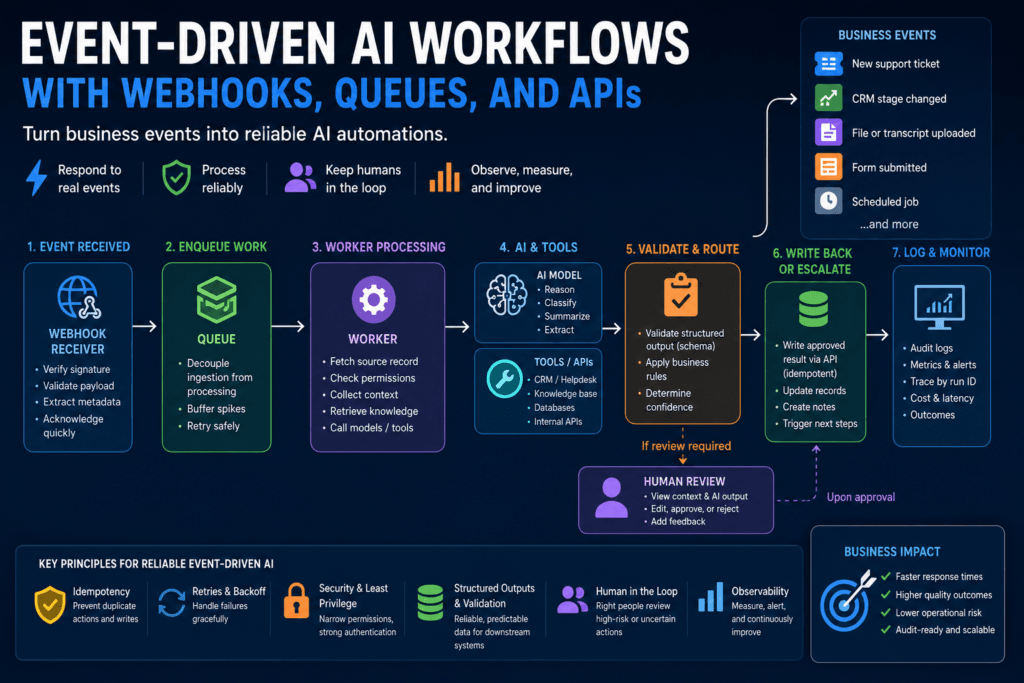
Those are business events. A production AI workflow can listen for those events, validate them, enqueue work, collect context, call models and APIs, validate structured outputs, route uncertain results to humans, write approved outputs back to the right system, and log what happened.
That is very different from a demo that calls a model directly from a button click or webhook.
The core lesson is straightforward: durable AI automation needs durable workflow architecture. A webhook glued directly to a model call can work in a prototype, but it is fragile in production. Model calls can be slow. APIs can rate-limit. Webhooks can retry. Events can arrive more than once. Workers can crash. Model outputs can fail validation. Humans may need to review risky actions before anything is written back.
Reliable event-driven AI workflows are built to handle those realities.
What “event-driven” means in a business AI workflow
An event-driven system reacts to events emitted by other systems. In a business AI context, those systems might include CRMs, helpdesks, finance tools, document repositories, communication platforms, internal apps, or data pipelines.
The event says, “Something happened.” It does not necessarily contain everything the AI workflow needs.
For example, a helpdesk webhook might say a new ticket was created. The workflow may still need to fetch the full ticket, check permissions, retrieve related knowledge articles, inspect customer account metadata, classify the ticket, and decide whether to create an internal note or route the result to review.
This distinction matters. The event is the trigger. The workflow is the process.
A good event-driven AI workflow usually includes:
- an event source
- a webhook receiver or event consumer
- validation and authentication
- an idempotency check
- a queue or job system
- one or more background workers
- context collection
- retrieval or tool calls
- a model call
- structured output validation
- business-rule validation
- human review when needed
- write-back to a business system
- audit logs
- metrics and alerts
Each step has a job. Skipping steps is how prototypes become production problems.
Webhooks, APIs, queues, workers, and event buses explained
These terms are often mixed together, but they are not interchangeable.
| Component | What it does | AI workflow example |
|---|---|---|
| Webhook | Receives an HTTP request from another system when something happens | New support ticket created |
| API | Reads from or writes to a system | Fetch ticket details or add an internal note |
| Queue | Buffers work for later processing | Enqueue a ticket triage job |
| Worker | Processes queued jobs | Classify ticket and draft summary |
| Event bus | Routes events between services | Notify several workflows that a transcript was uploaded |
| Scheduler | Starts work on a timer | Refresh account summaries nightly |
| Dead-letter queue | Stores failed jobs for inspection | Save repeated structured-output validation failures |
| Workflow orchestrator | Coordinates multi-step workflows | Run retrieval, model call, review, and write-back |
A webhook is often the front door. It receives an event from a system such as a helpdesk or CRM. Zendesk’s developer documentation describes webhooks as HTTP requests sent to a specified URL in response to activity such as a user deletion or new ticket creation. That pattern is useful, but it should usually start a workflow rather than do all the work inside the webhook request itself.
An API is how the workflow reads or writes system data. The webhook may include a ticket ID. The API fetches the ticket details. Later, the API may add an internal note, save a draft reply, or update a custom field.
A queue decouples event ingestion from processing. The webhook receiver can quickly accept the event, store minimal metadata, enqueue a job, and return a success response. A worker can process the job later. This protects the workflow from model latency, downstream API slowness, and temporary failures.
A worker is the process that performs the AI task. It loads the source record, checks permissions, collects context, calls models or tools, validates output, routes review, writes back, and logs the run.
A dead-letter queue captures jobs that repeatedly fail. It is not a trash can. It is a debugging surface. AWS SQS documentation describes using dead-letter queues to examine messages that failed processing, analyze application issues, and redrive messages after investigation. Azure Service Bus similarly describes dead-letter queues as holding messages that cannot be delivered or processed until they are inspected and handled.
Why direct webhook-to-model calls are fragile
The tempting prototype is simple:
- Receive webhook.
- Call the model.
- Write result back to CRM or helpdesk.
That can work in a controlled demo. It is often wrong for production.
A webhook request has a limited lifecycle. If the model call takes too long, the sender may time out and retry. If the receiver crashes during the model call, the event may be lost unless it was stored. If the model returns invalid output, the workflow needs a recovery path. If write-back succeeds but the webhook response fails, the source system may retry and trigger duplicate write-back. If a downstream API is rate-limited, the workflow should retry later rather than drop the task.
Direct webhook-to-model designs also make observability harder. If everything happens inside one request handler, teams often fail to log intermediate states clearly. Later, when someone asks why a duplicate CRM note was created, the system cannot easily answer.
The safer pattern is:
- Receive the event.
- Validate the event.
- Check idempotency.
- Enqueue a job.
- Acknowledge receipt quickly.
- Process the job asynchronously.
- Log every step.
This pattern does not eliminate complexity. It puts complexity in the right place.
Synchronous vs asynchronous AI workflows
Not every AI workflow needs a queue. Some synchronous calls are acceptable.
| Pattern | Best for | Risk |
|---|---|---|
| Synchronous model call | Short user-triggered tasks where the user is waiting | Timeouts, poor UX, fragile write-back |
| Webhook plus queue | Event-triggered tasks that can run in the background | Duplicate events if idempotency is missing |
| Scheduled batch job | Periodic summaries, enrichment, cleanup suggestions | Stale data and hidden cost spikes |
| Orchestrated workflow | Multi-step tasks with retries and approvals | More complexity and operational overhead |
A synchronous call may be fine when the user clicks “summarize this note,” the task is short, no external write-back is required, and failure is safe.
Asynchronous processing is usually better when:
- the model call may take too long
- context collection requires multiple API calls
- the workflow involves retrieval or tool use
- downstream APIs may rate-limit
- human review is required
- duplicate events must be controlled
- the result can be delivered later
- write-back should happen only after validation
Many business AI workflows fit the asynchronous pattern. A support ticket triage workflow does not need to finish inside the webhook request. A call transcript summary can be generated in the background. An invoice extraction workflow can route uncertain results to review. A nightly account summary refresh can process records in batches and log failures.
Reference architecture for event-driven AI workflows
A production-grade event-driven AI workflow usually looks like this:
| Step | Purpose | Example |
|---|---|---|
| Event received | Capture business trigger | New support ticket webhook |
| Event validated | Confirm authenticity and shape | Verify signature and required fields |
| Idempotency checked | Avoid duplicate processing | Ignore already-seen event ID |
| Job enqueued | Decouple ingestion from processing | Add ticket_triage job to queue |
| Worker processes | Run AI workflow | Fetch ticket, retrieve context, call model |
| Output validated | Ensure usable result | Check schema and required fields |
| Review routed | Handle risk | Send low-confidence result to human |
| Write-back executed | Save approved result | Add internal note |
| Log emitted | Support audit and monitoring | Store run ID, source IDs, latency, status |
This design has one major advantage: each component can fail independently without losing the whole workflow.
If the model fails, the job can retry. If the model repeatedly fails, the job can go to a dead-letter queue. If output validation fails, the task can route to review. If a downstream API rate-limits, the worker can retry with backoff. If a webhook arrives twice, idempotency can prevent duplicate processing.
The architecture exists because failure is normal. Production workflows should assume failure and recover.
Designing webhook receivers
A webhook receiver should be boring, fast, and strict.
Its job is not to run the entire AI workflow. Its job is to receive the event safely and enqueue work.
A practical webhook receiver should:
- verify the webhook signature if the provider supports signatures
- validate required fields
- reject malformed payloads
- record event metadata
- check whether the event was already seen
- enqueue a job
- acknowledge receipt quickly
- avoid long-running model calls inside the request lifecycle
The receiver should store enough information to debug later: source system, event ID, record ID, event type, timestamp, and received status. It should not blindly trust the payload. It should not include broad secrets in logs. It should not send the entire event payload to a model without first deciding what the model actually needs.
For example, a new-ticket event might include the ticket ID, requester ID, subject, and event type. The worker can later fetch the full ticket through the helpdesk API after checking permissions and applying context limits.
Queue design for AI workflows
Queues buffer work. That is their main value.
A queue lets the webhook receiver accept events quickly while workers process jobs at a controlled pace. This matters because AI workflows often have variable latency. A model call may be fast or slow. Retrieval may require several searches. A downstream API may be temporarily unavailable. A rate limit may require waiting before retrying.
Queues also create a natural retry boundary. If a worker fails, the job can become visible again or be retried depending on the queue system. AWS SQS visibility timeout behavior is a useful example: when a consumer receives a message, the message remains in the queue but becomes temporarily invisible to other consumers; if it is not deleted before the visibility timeout expires, it becomes visible again for another processing attempt.
Important queue design choices include:
- visibility timeout
- retry count
- backoff policy
- dead-letter queue configuration
- job priority
- maximum job age
- concurrency limits
- worker timeout
- payload size
- whether jobs contain full data or only record IDs
For AI workflows, record IDs are often better than large payloads. The worker can fetch fresh data when it starts. That reduces stale context and avoids copying sensitive data through the queue unnecessarily.
Worker design for AI tasks
The worker is where the AI workflow actually runs.
A safe worker should follow a predictable sequence:
- Load the job.
- Fetch the source record.
- Check permissions.
- Collect context.
- Retrieve knowledge or call tools if needed.
- Call the model.
- Validate structured output.
- Apply business rules.
- Route to review or write back.
- Write audit logs.
- Mark the job complete.
This sequence is intentionally explicit. It prevents the model call from swallowing the whole workflow.
The worker should not assume that the record still exists. It may have been deleted, merged, closed, or changed since the event was created. The worker should check current state before write-back. If the ticket has already been solved, maybe no action is needed. If the opportunity stage changed again, the old event may be stale. If the invoice was already approved, the extraction job may be unnecessary.
Workers should also separate model failure from business failure. A timeout, invalid output, permission denial, stale record, and rejected write-back are different statuses. Logging them separately makes debugging possible.
Idempotency: preventing duplicate AI actions
Idempotency prevents duplicate processing or duplicate side effects when the same operation is attempted more than once.
This matters because event-driven systems retry. Webhooks can be delivered more than once. Workers can crash after writing but before marking a job complete. APIs can time out even after the server performed the action. A queue can redeliver a job after a visibility timeout expires.
Without idempotency, a retry can create duplicate CRM notes, duplicate ticket comments, duplicate review tasks, duplicate emails, or duplicate field updates.
| Risk | Example | Control |
|---|---|---|
| Duplicate webhook | Same ticket event delivered twice | Store source event ID |
| Retry after timeout | Worker retries after uncertain write | Use idempotency key on write-back |
| Race condition | Two workers process same record | Lock per record or use job uniqueness |
| Partial failure | Note created but audit log failed | Reconcile by workflow run ID |
| User edit during processing | Ticket changes before write-back | Check record version before update |
A good idempotency key might combine source system, event ID, record ID, workflow type, and action type.
For example:
support_platform:ticket_123:event_456:ticket_triage_internal_note
If the workflow sees the same key again, it can return the existing result or skip the duplicate action.
Stripe’s API documentation gives a clear example of idempotent requests: clients can provide an idempotency key so a retry after a connection error does not accidentally create a second object or repeat an update. The same principle applies to AI write-back operations even when the destination system does not provide native idempotency support. Your workflow may need its own idempotency table.
Retries, backoff, timeouts, and dead-letter queues
Retries are necessary, but careless retries create new problems.
A retry can fix a temporary model timeout, a transient network error, or a rate limit. But retrying immediately and repeatedly can overload downstream systems or create duplicate actions. Retrying a bad payload will not fix it. Retrying a prompt that always produces invalid output may only waste tokens.
Use retries for recoverable failures:
- temporary network failures
- rate limits
- model timeouts
- downstream API timeouts
- temporary service unavailability
Do not blindly retry:
- invalid event payloads
- permission denials
- missing required records
- schema failures caused by bad prompt design
- business-rule violations
- high-risk actions needing review
Backoff spaces out retries. A workflow might retry after 30 seconds, then 2 minutes, then 10 minutes. Rate-limited API calls should respect provider guidance where available.
Dead-letter queues capture jobs that exceed retry limits. Google Pub/Sub documentation describes dead-letter topics as receiving messages that cannot be acknowledged after a configured number of delivery attempts. Azure Service Bus documentation notes that messages remain in its dead-letter queue until explicitly retrieved and completed. The lesson for AI workflows is simple: a dead-letter queue must be monitored. A hidden dead-letter queue is just a silent failure archive.
API calls inside event-driven AI workflows
Event-driven AI workflows often call several APIs.
A support ticket workflow may call a helpdesk API, a CRM API, a knowledge-base search API, an LLM API, and a review-queue API. Each call can fail. Each call may have different authentication, authorization, pagination, rate limits, and error behavior.
API concerns include:
- authentication
- authorization
- OAuth scopes
- pagination
- rate limits
- timeouts
- retries
- partial failures
- stale records
- write permissions
- idempotency
- audit logging
The worker should not give the model direct access to broad credentials. Tool calling can let a model request an action, but the application should own execution. OpenAI’s function calling documentation describes tool calling as a way for models to interface with external systems and access data or actions provided by an application. That framing is important: the application defines and executes the tool.
Good AI tools are narrow:
- get_ticket(ticket_id)
- search_help_articles(query, product)
- add_internal_note(ticket_id, body, idempotency_key)
- create_review_task(record_id, reason, payload)
- get_customer_plan(customer_id)
Risky tools are broad:
- update_any_record(payload)
- call_arbitrary_api(url, body)
- send_customer_message(text)
- execute_system_action(command)
Narrow tools are easier to authorize, validate, log, and test.
Structured outputs and validation in asynchronous workflows
Event-driven AI workflows need structured outputs because downstream systems need fields, not just prose.
A ticket triage workflow may need:
- issue_type
- urgency
- product_area
- summary
- suggested_queue
- confidence
- requires_review
- evidence
- source_ids
A call-summary workflow may need:
- account_id
- meeting_summary
- decision_makers
- objections
- next_steps
- owner
- due_date
- risks
- suggested_crm_updates
- review_required
Structured outputs make validation possible. OpenAI’s structured output documentation distinguishes function calling for connecting models to tools from structured output schemas for controlling the model’s response shape, and notes that structured outputs are designed for schema adherence rather than merely producing valid JSON.
Validation should happen in layers.
First, validate schema. Are required fields present? Are enum values allowed? Is the date format valid? Is the confidence value within range?
Second, validate business rules. Is the suggested queue allowed for this product? Is the customer-facing draft missing required citations? Is the proposed action high risk? Does the user have permission?
Third, decide routing. Some results can become internal notes. Some should go to a human review queue. Some should be rejected and logged.
A valid schema is not the same as a correct answer. It is only the first gate.
Human review inside event-driven AI systems
Human review is not a failure of automation. It is a control.
Event-driven AI workflows should route outputs to humans when:
- confidence is low
- the action is customer-facing
- the action is irreversible
- the workflow affects legal, finance, HR, security, or compliance
- sources conflict
- required context is missing
- retrieved evidence is stale or weak
- the output fails validation
- the customer is high value or at escalation risk
- the workflow is new and evidence is limited
Review queues fit naturally into asynchronous systems. Instead of forcing every event to finish automatically, the worker can create a review task. A reviewer can accept, edit, reject, or escalate. The system can capture reviewer edits and use them to improve prompts, schemas, retrieval, and workflow rules.
The review queue should show the source event, source record, model output, evidence, validation result, and reason for review. Otherwise, reviewers become another bottleneck with too little context.
Security risks in event-driven AI workflows
Event payloads often contain user-generated content. That content is untrusted.
A customer can write instructions inside a support ticket. A vendor can include misleading text in an invoice. A document can contain hidden prompt injection instructions. A Slack message can include text that tries to override system behavior.
OWASP describes prompt injection as occurring when user prompts alter an LLM’s behavior or output in unintended ways, and it specifically notes that external content can cause indirect prompt injection. OWASP also lists excessive agency and insecure output handling as LLM application risks. That is directly relevant to event-driven AI workflows because these systems often combine user-generated content, tool access, and downstream actions.
Practical controls include:
- Separate system instructions from event data.
- Treat event payloads as data, not instructions.
- Keep tools narrow.
- Enforce least privilege.
- Validate outputs before using them.
- Require approval for high-risk actions.
- Log tool calls and write-back decisions.
- Avoid sending unnecessary sensitive data to external models.
- Review provider data-retention and privacy terms.
- Use deterministic checks for critical rules.
Event-driven AI should not increase the blast radius of a malicious support ticket or document.
Observability: what to log and measure
A production AI workflow needs a workflow run ID.
That run ID should connect the event, queued job, worker logs, model call, structured output, review decision, write-back action, and final status. Without it, debugging becomes guesswork.
Log fields should include:
- workflow_run_id
- source_system
- source_event_id
- source_record_id
- event_type
- job_id
- model_used
- prompt_version
- schema_version
- source_ids used for context
- token usage
- latency
- retry count
- validation status
- review status
- write-back status
- error type
- final outcome
Metrics should include:
- event volume
- queue depth
- worker latency
- model latency
- token cost
- retry rate
- dead-letter queue rate
- validation failure rate
- review queue volume
- reviewer acceptance rate
- incorrect write-back rate
- duplicate event rate
- cost per completed workflow
NIST’s AI Risk Management Framework is useful because it treats AI risk management as an operational discipline involving governance, mapping, measurement, and management. Event-driven AI workflows need that operating mindset. They are not just model calls; they are production systems that affect business processes.
Business examples of event-driven AI workflows
A new support ticket webhook triggers ticket classification, similar-ticket retrieval, and an internal triage note. The workflow does not send a customer reply automatically. It helps the agent understand the issue faster.
A ticket reply event triggers a draft response. The model retrieves relevant knowledge-base articles, checks the latest ticket thread, and creates a draft. The agent approves or edits before sending.
A sales call transcript upload triggers a background job. The worker summarizes the call, extracts next steps, identifies risks, and suggests CRM updates. The account owner reviews before saving.
A CRM opportunity stage-change event triggers an AI-generated risk summary for manager review. The workflow fetches CRM context, recent activity, and open support issues before generating the summary.
A customer feedback form submission triggers clustering against similar feedback. The system suggests a product theme and routes it to a product operations queue.
An invoice upload event triggers extraction and exception detection. Low-confidence fields go to a finance review queue. Clean extractions can be staged for approval.
A service desk incident event triggers retrieval of runbook steps and creates an escalation summary. Any tool call that changes system state requires human approval.
A scheduled nightly job refreshes account health summaries. It logs source records, token cost, stale records, and write-back decisions.
A webhook retry creates duplicate events, but an idempotency key prevents duplicate CRM notes.
A downstream API rate limit sends jobs back to the queue with backoff rather than dropping work.
A failed structured-output validation sends the task to review rather than writing bad fields.
A dead-letter queue exposes recurring failures that require prompt, schema, or API changes.
A minimal workflow sketch
The following Python-like pseudocode is illustrative. It has not been executed here. It shows the structure of a webhook-to-queue-to-worker AI workflow.
def receive_webhook(event):
    verify_signature(event)

    event_id = event.id
    record_id = event.record_id

    if idempotency_store.exists(event_id):
        return acknowledge("duplicate_ignored")

    idempotency_store.save(event_id)

    queue.enqueue(
        job_type="ticket_triage",
        event_id=event_id,
        record_id=record_id,
    )

    return acknowledge("accepted")


def worker_process_ticket_triage(job):
    ticket = helpdesk_api.get_ticket(job.record_id)

    if not permissions.can_process(ticket):
        audit_log.write(
            job.event_id,
            status="permission_denied",
        )
        return

    context = collect_context(ticket)

    result = call_model_for_structured_triage(context)

    if not validate_schema(result):
        review_queue.create(
            job.record_id,
            reason="invalid_output",
            result=result,
        )
        audit_log.write(
            job.event_id,
            status="sent_to_review",
        )
        return

    if result.requires_review or result.confidence < 0.80:
        review_queue.create(
            job.record_id,
            reason="review_required",
            result=result,
        )
    else:
        helpdesk_api.add_internal_note(
            job.record_id,
            result.summary,
            idempotency_key=f"{job.event_id}:internal_note",
        )

    audit_log.write(
        job.event_id,
        status="completed",
        model=result.model,
        source_ids=context.source_ids,
)The important part is not the exact syntax. The important part is the separation of responsibilities. The webhook receives and enqueues. The worker processes. Validation controls the output. Review handles risk. Idempotency protects write-back. Audit logs preserve the trace.
Evaluation metrics for event-driven AI workflows
Evaluate the whole workflow, not just the model response.
Useful metrics include:
- classification accuracy
- extraction accuracy
- draft acceptance rate
- reviewer edit rate
- duplicate event rate
- failed job rate
- dead-letter queue rate
- invalid structured-output rate
- incorrect write-back rate
- average and p95 latency
- cost per completed workflow
- retry count by failure type
- review queue backlog
- human approval rate
- rollback or correction count
- user adoption
- business outcome improvement
For support workflows, track routing accuracy, response draft acceptance, handle time, first-response time, escalation detection quality, and reopen rate.
For CRM workflows, track summary acceptance, next-step extraction accuracy, field suggestion accuracy, incorrect update rate, and rep adoption.
For finance workflows, track field-level extraction accuracy, exception detection quality, review burden, and correction rate.
For operations workflows, track runbook retrieval quality, escalation summary quality, approval decisions, and incident handoff speed.
The evaluation should match the workflow’s purpose. A ticket classifier should not be judged only by whether the output reads well. It should be judged by whether the label was correct, the queue suggestion was useful, and the workflow improved support operations.
How to pilot an event-driven AI workflow
Start narrow.
Choose one event source and one workflow. Do not start with “automate support.” Start with “when a new billing ticket arrives, classify it, retrieve related knowledge, and create an internal triage note for review.”
A practical pilot plan:
- Choose one event source.
- Choose one workflow.
- Start with read-only or internal-note output.
- Replay historical events before live launch.
- Test duplicate events.
- Test model failure.
- Test downstream API failure.
- Test rate limits.
- Test invalid structured outputs.
- Launch in shadow mode.
- Require human review.
- Add limited write-back only after evidence.
- Monitor dead-letter queue, latency, cost, and reviewer edits.
- Expand gradually.
Historical replay is especially useful. Take past events, run them through the workflow, and compare AI output to what humans actually did. This gives you a baseline before live users depend on the system.
Shadow mode is also valuable. The workflow runs, but it does not affect production records. Reviewers compare AI suggestions against real outcomes. Only after the system performs well should it move to draft-only or limited write-back.
When not to use event-driven AI
Event-driven AI workflows are not always the right starting point.
Avoid or delay this pattern when:
- there is no clear event source
- no one owns the workflow
- the source of truth is unreliable
- output cannot be validated
- the business process changes weekly
- high-risk actions have no approval path
- system APIs are too unstable
- the team cannot monitor queues and failures
- privacy review has not been completed
- users do not trust or want the workflow
- the workflow creates more review work than it saves
Queues do not fix unclear business logic. Webhooks do not fix bad data. AI does not fix a process nobody owns.
Production-readiness checklist
Before launching event-driven AI workflows, check the basics:
- event source defined
- webhook authentication implemented
- payload validation implemented
- idempotency key designed
- queue or job system selected
- worker ownership assigned
- retry policy defined
- backoff policy defined
- timeout policy defined
- dead-letter queue configured
- source record lookup tested
- permission check implemented
- context limits defined
- structured output schema created
- validation rules written
- human review threshold defined
- write-back permissions limited
- audit log implemented
- monitoring dashboard created
- failure alert owner assigned
- replay strategy tested
- cost and latency tracked
- evaluation dataset created
If this checklist feels like too much, the workflow probably is not ready for production automation. Start with a smaller, read-only workflow and build from there.
Conclusion: durable AI requires durable workflow architecture
Event-driven AI workflows are production software systems. They receive business events, validate inputs, enqueue jobs, process tasks asynchronously, call models and APIs, validate outputs, handle retries, prevent duplicate actions, route risky work to humans, write back safely, and log enough detail to recover and improve.
That is the difference between a demo and an operating system.
A webhook glued to a model may look impressive for one ticket or one CRM update. A reliable workflow has to handle thousands of events, duplicate deliveries, slow model calls, rate limits, stale records, invalid outputs, human review, and audit requirements.
The practical lesson is direct: do not treat event-driven AI as a prompt attached to a webhook. Treat it as an asynchronous workflow with clear boundaries, typed outputs, controlled permissions, human checkpoints, durable logs, and measurable outcomes.
Key Takeaways
- Event-driven AI workflows start from business events, not chat prompts.
- Webhooks should receive and enqueue work, not run long model calls directly.
- Queues decouple event ingestion from AI processing and help absorb latency and failures.
- Workers should fetch records, check permissions, collect context, call models, validate outputs, route review, and write logs.
- Idempotency prevents duplicate notes, comments, emails, updates, and review tasks.
- Dead-letter queues are debugging tools and must be monitored.
- Structured outputs make asynchronous AI workflows easier to validate and route.
- Human review is required for risky, low-confidence, customer-facing, or irreversible actions.
- Durable AI automation requires observability, replayability, and evaluation.
Practical Exercise
Objective:
Design a reliable event-driven AI workflow for one business event.
Task:
Choose one realistic event and map the workflow from event receipt to final outcome.
Starter instructions:
- Pick one event source:
- new support ticket
- ticket reply received
- sales call transcript uploaded
- CRM opportunity stage changed
- invoice uploaded
- customer feedback submitted
- incident created
- scheduled account summary refresh
- Define the webhook or scheduler trigger.
- Define the idempotency key.
- Decide what goes into the queue payload.
- Define what the worker fetches from source systems.
- Define the structured output schema.
- Define validation rules.
- Define when human review is required.
- Define the write-back action.
- Define logging and metrics.
Example result:
Event: New support ticket created.
Trigger: Helpdesk webhook.
Idempotency key: helpdesk:ticket_created:{event_id}:{ticket_id}:triage_v1
Queue payload: event_id, ticket_id, event_type, received_at.
Worker context: ticket subject, latest message, product, customer plan, recent related tickets, top three knowledge-base articles.
Structured output: issue_type, urgency, product_area, summary, suggested_queue, confidence, requires_review, evidence_source_ids.
Validation: issue_type must be an allowed enum; confidence must be between 0 and 1; suggested_queue must be in the approved queue list; evidence_source_ids required for draft responses.
Human review: required for high urgency, low confidence, billing issues, legal complaints, or invalid output.
Write-back: create internal note only, using idempotency key.
Metrics: queue latency, model latency, validation failures, review rate, queue suggestion accuracy, duplicate event rate, and cost per completed workflow.
What success looks like:
You can explain how the workflow handles duplicate events, model failure, invalid output, API rate limits, human review, and audit logging without losing work or creating duplicate records.
Stretch goal:
Add a failure test plan. Include at least five test cases: duplicate webhook, model timeout, downstream API rate limit, invalid structured output, and record changed before write-back.
FAQ
What is an event-driven AI workflow?
An event-driven AI workflow is an AI process triggered by a business event, such as a new ticket, uploaded transcript, submitted form, changed CRM record, or scheduled refresh.
Why not call the AI model directly from a webhook?
Direct webhook-to-model calls are fragile because model calls can be slow, APIs can fail, webhooks can retry, and duplicate events can create duplicate downstream actions.
What role does a queue play in an AI workflow?
A queue buffers work so the webhook receiver can acknowledge events quickly while background workers process AI jobs asynchronously.
What is idempotency?
Idempotency is a design property that prevents duplicate side effects when the same operation is attempted more than once. In AI workflows, it helps prevent duplicate notes, comments, emails, updates, or review tasks.
What is a dead-letter queue?
A dead-letter queue stores jobs or messages that could not be processed successfully after retry attempts. It should be monitored and used for debugging, not ignored.
When should an AI workflow use human review?
Use human review when output is low-confidence, customer-facing, high-risk, irreversible, legally sensitive, financially sensitive, security-sensitive, or fails validation.
Are event-driven AI workflows only for large companies?
No. Smaller teams also benefit from queues, retries, idempotency, and logs when AI workflows connect to CRMs, helpdesks, finance systems, or internal tools.
What should be measured first?
Start with reliability and quality metrics: failed job rate, duplicate event rate, validation failure rate, review rate, acceptance rate, latency, cost per workflow, and incorrect write-back rate.
Sources
- OpenAI Function Calling: https://developers.openai.com/api/docs/guides/function-calling
- OpenAI Structured Outputs: https://developers.openai.com/api/docs/guides/structured-outputs
- Zendesk Creating and Monitoring Webhooks: https://developer.zendesk.com/documentation/webhooks/creating-and-monitoring-webhooks/
- Zendesk API Rate Limits: https://developer.zendesk.com/api-reference/introduction/rate-limits/
- HubSpot Webhooks Journal and Management APIs: https://developers.hubspot.com/docs/api-reference/latest/webhooks-journal/guide
- AWS SQS Visibility Timeout: https://docs.aws.amazon.com/AWSSimpleQueueService/latest/SQSDeveloperGuide/sqs-visibility-timeout.html
- AWS SQS Dead-Letter Queues: https://docs.aws.amazon.com/AWSSimpleQueueService/latest/SQSDeveloperGuide/sqs-dead-letter-queues.html
- Google Cloud Pub/Sub Retry Requests: https://docs.cloud.google.com/pubsub/docs/retry-requests
- Google Cloud Pub/Sub Dead-Letter Topics: https://docs.cloud.google.com/pubsub/docs/dead-letter-topics
- Azure Service Bus Dead-Letter Queues: https://learn.microsoft.com/en-us/azure/service-bus-messaging/service-bus-dead-letter-queues
- Stripe Idempotent Requests: https://docs.stripe.com/api/idempotent_requests
- OWASP Top 10 for Large Language Model Applications: https://owasp.org/www-project-top-10-for-large-language-model-applications/
- OWASP LLM01 Prompt Injection: https://genai.owasp.org/llmrisk/llm01-prompt-injection/
- NIST AI Risk Management Framework: https://www.nist.gov/itl/ai-risk-management-framework
Related articles from Kyle Beyke
- AI Workflow Anatomy: Essential Guide for Business: https://beykeworkflows.com/ai-workflow-anatomy-business-guide/
- Structured Outputs for AI Workflows: Reliable Guide: https://beykeworkflows.com/structured-outputs-for-ai-workflows-guide/
- Powerful Text Classification, Extraction, and Summarization with AI: https://beykeworkflows.com/text-classification-extraction-summarization-ai/
- LLM Integration: 7 Best Python Patterns: https://beykeworkflows.com/llm-integration-python-hugging-face-inference/
- How Modern Agentic AI Systems Are Built for Business: https://beykeworkflows.com/how-modern-agentic-ai-systems-are-built-for-business/