
Lesson
AI for Customer Support Triage and Response Drafting
Learning Objectives
- Design a customer support AI workflow that starts with agent assist instead of unsafe auto-replies.
- Define structured triage outputs for issue type, urgency, escalation risk, routing, and review.
- Use approved knowledge retrieval and similar-ticket search without treating old tickets as policy.
- Build response-drafting rules that preserve accuracy, tone, citations, and human approval.
- Evaluate support AI with operational metrics such as routing quality, draft acceptance, QA findings, reopen rate, and customer satisfaction.
Prerequisites
Helpful background includes basic familiarity with helpdesk workflows, ticket queues, support macros, knowledge bases, CRMs, RAG, structured outputs, and human review. You do not need deep machine learning expertise. This lesson assumes you understand that production AI support is not just a model generating text. It is a workflow that includes ticket triggers, context collection, retrieval, classification, validation, review, write-back, logging, QA, and measurement.
Main Lesson Body
Customer support AI should start with agent assist
Customer support AI is one of the strongest practical AI use cases because support work is high-volume, text-heavy, repetitive, and measurable. Tickets need to be read, classified, summarized, researched, routed, answered, escalated, and reviewed. Those are exactly the kinds of language-heavy workflow steps where AI can help.
But support is also a risky place to automate too aggressively.
A bad AI-generated answer does not just produce a messy internal report. It can confuse a customer, misstate a refund policy, mishandle a security report, expose internal information, promise an account change, or create more work for the support team. That is why the right starting point is usually agent assist, not fully autonomous support.
Agent assist means the AI helps the human support team do the work faster and more consistently. It can classify the ticket, summarize the thread, retrieve relevant help articles, find similar solved tickets, identify missing information, draft a response, suggest a queue, and flag escalation risk. The human agent still reviews customer-facing messages and risky decisions.
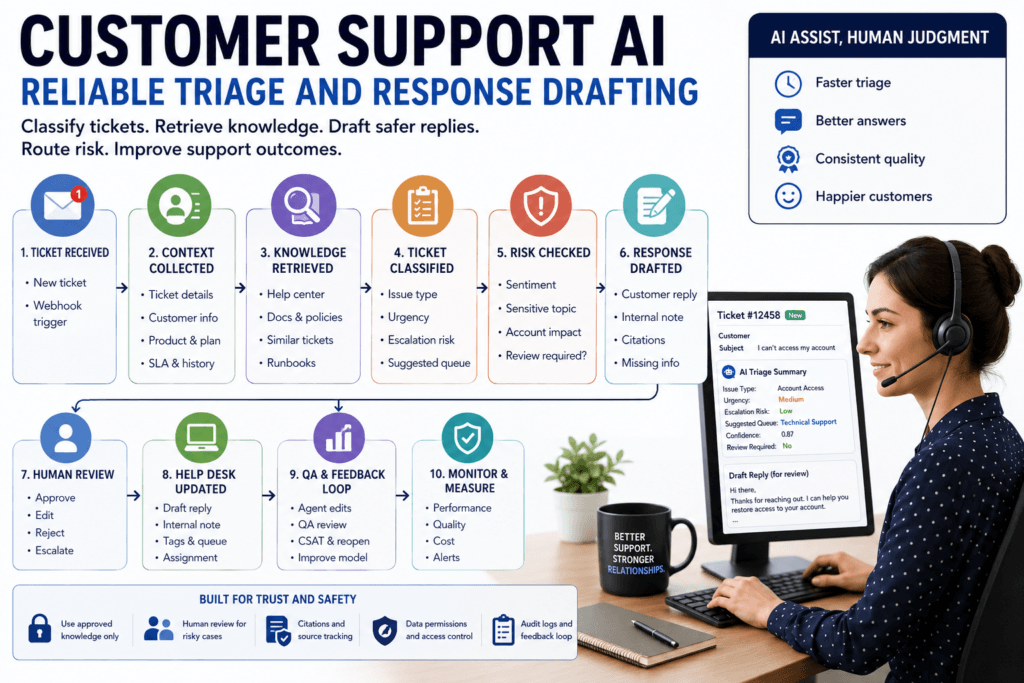
This is the practical thesis of the lesson: customer support AI works best as a controlled workflow. Classify the ticket, retrieve approved knowledge, detect urgency and risk, draft a response with evidence, route uncertain cases to humans, and measure whether support quality improves.
The goal is not to replace support judgment. The goal is to reduce repetitive work while improving consistency, speed, and source-grounded decision-making.
What support triage and response drafting actually mean
Support triage and response drafting are related, but they are not the same task.
Triage is the process of understanding and routing the ticket. A triage workflow may identify issue type, product area, urgency, escalation risk, sentiment, customer impact, suggested queue, missing information, and review requirements.
Response drafting is the process of preparing a customer-facing or internal message. A response-drafting workflow may use the ticket, customer context, product details, approved policies, relevant help articles, and troubleshooting steps to draft a reply for an agent to review.
The distinction matters because the risks are different.
A wrong triage label can misroute the ticket or delay resolution. A wrong response draft can directly mislead a customer. A bad internal note can mislead the next agent. A bad escalation decision can mishandle a sensitive issue.
That is why support AI should be decomposed into smaller steps rather than treated as one “answer this ticket” prompt.
A useful support workflow may include:
- ticket classification
- urgency detection
- sentiment or escalation risk detection
- similar-ticket retrieval
- knowledge-base retrieval
- customer or account context lookup
- internal note generation
- response draft generation
- queue recommendation
- macro suggestion
- review routing
- helpdesk write-back
- QA feedback capture
Each step can be evaluated separately. If routing is weak, improve the classifier or taxonomy. If drafts are unsupported, improve retrieval and prompt rules. If the model misses angry customers, improve escalation detection. If agents edit every draft heavily, measure what they change and why.
Why support AI should not begin with auto-replies
The most common mistake is treating customer support AI as “automatically answer tickets.”
That is usually too broad. Tickets vary by risk, complexity, customer tier, policy sensitivity, and available evidence. A routine password reset question is not the same as a refund exception, security disclosure, legal complaint, billing dispute, or angry enterprise customer.
Support teams should usually start with safer modes:
| Mode | Best for | Risk |
|---|---|---|
| Read-only assistant | Summaries, knowledge lookup, similar-ticket search | Low adoption if not embedded in workflow |
| Draft-only reply | Routine questions with approved knowledge | Agents may trust drafts without review |
| Internal note generation | Escalations, handoffs, long ticket threads | Bad summary may mislead next owner |
| Suggested routing | Queue recommendation and issue labels | Wrong queue if taxonomy or context is weak |
| Human-approved write-back | Notes, tags, draft replies after review | Review burden if thresholds are too conservative |
| Limited auto-reply | Narrow, low-risk, well-tested cases | Customer-facing mistakes if scope expands too quickly |
The safer progression is simple.
Start read-only. Then draft-only. Then human-approved write-back. Only after strong evidence should a team consider limited auto-replies for narrow, low-risk categories.
A limited auto-reply category might be a simple public documentation answer with no account-specific facts, no policy exceptions, no payment implications, no legal or security sensitivity, and strong historical evaluation. Even then, the system needs monitoring, rollback, and sampling for QA.
The core support AI workflow
A practical customer support AI workflow usually follows this path:
| Step | Purpose | Example |
|---|---|---|
| Ticket event received | Start workflow | New ticket webhook |
| Context collected | Gather allowed data | Ticket text, customer plan, product, SLA |
| Knowledge retrieved | Ground the workflow | Help-center article and troubleshooting doc |
| Ticket classified | Create routing data | Billing, medium urgency, refund request |
| Risk checked | Decide review path | Refund exception requires human approval |
| Draft generated | Help agent respond | Customer-facing draft with citations |
| Output validated | Check schema and rules | Required fields and approved source IDs |
| Human reviews | Approve, edit, or reject | Agent edits draft before sending |
| Helpdesk updated | Save approved result | Add internal note or draft reply |
| Feedback logged | Improve workflow | Track edits, wrong sources, QA flags |
This is a workflow, not a single model call.
The ticket event may come from a helpdesk webhook. The context collector may call a CRM or subscription system. The retrieval layer may search the knowledge base and similar tickets. The model may classify the ticket and draft a reply. A validator may check schema fields and business rules. A review queue may hold risky outputs. The helpdesk write-back step may create a private note or a draft reply. The QA loop may compare model output to agent edits and customer outcomes.
This structure makes the system debuggable. If a draft is wrong, the team can ask: Did the ticket classification fail? Did retrieval return stale knowledge? Did the prompt allow unsupported claims? Did the output omit citations? Did the human review threshold fail? Did the helpdesk write-back create the wrong object?
Without that structure, every failure becomes “the AI was wrong,” which is not useful enough for production.
Designing a support triage schema
Support triage should produce structured outputs. Free-form summaries are useful for humans, but downstream systems need fields.
A practical triage schema may include:
| Field | Type | Purpose |
|---|---|---|
| issue_type | enum | Classifies the main problem |
| product_area | enum | Routes to product expertise |
| urgency | enum | Supports SLA and priority |
| escalation_risk | enum | Flags angry, risky, or sensitive tickets |
| sentiment | enum | Captures customer tone |
| summary | string | Creates internal handoff context |
| suggested_queue | enum | Recommends routing |
| missing_information | list | Identifies clarification needs |
| source_ids | list | Tracks retrieved evidence |
| confidence | number | Helps route review |
| requires_review | boolean | Prevents unsafe automation |
The exact fields should match the helpdesk and support process. If the organization has a fixed queue taxonomy, use those queue names as allowed enum values. If product areas are controlled in the ticketing system, use the same values. If the team distinguishes “billing issue” from “refund exception,” encode that distinction.
Structured outputs help because software can validate them. If the model returns a queue that does not exist, reject it. If urgency is missing, route to review. If confidence is low, do not auto-apply the label. If the issue type is “security,” force escalation.
A schema does not guarantee correctness. It only makes the output inspectable and enforceable. Business rules and review policies still matter.
Ticket signals that influence AI outputs
Support tickets contain many signals, but not every signal should be treated equally.
| Ticket signal | AI output | Why it matters |
|---|---|---|
| Product name or area | Product classification | Routes to correct expertise |
| Customer language | Language and localization flag | Supports correct response language |
| Error message | Issue type and similar tickets | Finds known troubleshooting steps |
| Account tier | Priority or review flag | High-value accounts may need faster handling |
| Sentiment or frustration | Escalation risk | Prevents casual replies to angry customers |
| Billing/refund language | Sensitive-topic flag | Routes policy or approval cases to humans |
| Security terms | Security escalation | Avoids unsafe generic replies |
| Missing details | Clarification request | Prevents unsupported troubleshooting |
The system should not blindly send every available field to the model. A ticket thread, account history, internal notes, and CRM timeline may contain sensitive or irrelevant data. More context is not always better. Excessive context can increase cost, latency, and confusion.
The workflow should collect the minimum useful context:
- the current customer message
- relevant ticket history
- product area
- account tier or support plan when allowed
- language
- SLA status
- relevant help articles
- similar solved tickets
- approved policy sources
- internal notes only if the agent is allowed to see them and they are needed
Data minimization is a practical quality control. It also reduces privacy and security risk.
Retrieving the right knowledge before drafting
Response drafting should be grounded in approved knowledge whenever possible.
For support, useful retrieval sources include:
- current help-center articles
- internal troubleshooting guides
- product documentation
- approved macros
- known issue pages
- current policy documents
- support runbooks
- similar solved tickets
- incident updates
- product release notes
But sources are not equal.
A current help-center article may be official customer-facing guidance. A similar ticket may be useful context but not policy. A Slack discussion may reveal an emerging workaround but should not become a customer-facing claim unless approved. An old macro may be deprecated. A prior refund exception may not apply to a new customer.
A strong support AI workflow should separate approved knowledge from examples.
The draft can say, “The current help-center article says…” if the article supports it. It should not say, “We always issue refunds in this case” just because a previous ticket had that outcome.
RAG helps the system retrieve relevant knowledge, but it does not eliminate hallucinations or guarantee correctness. If retrieval returns stale or weak evidence, the draft can still be wrong. The support workflow must check source status, updated dates, product version, approval status, and citation support.
Similar-ticket retrieval without treating old tickets as policy
Similar-ticket retrieval can be extremely useful. It can help agents find previous cases, troubleshooting steps, workarounds, error patterns, and escalation paths.
But previous tickets are not automatically official guidance.
A prior ticket may contain a one-off exception. The agent may have made a mistake. The customer may have been on a special contract. The product may have changed. The workaround may no longer be safe. The ticket may include private customer details that should not appear in a new response.
Use similar tickets as examples, not policy.
A good workflow can retrieve similar tickets and label them clearly:
- “Similar resolved cases”
- “Possible troubleshooting pattern”
- “Prior workaround, not approved policy”
- “Requires agent verification”
- “Do not cite to customer”
The response draft should cite approved articles and policies, not private tickets, unless the system is designed for internal notes only. Similar tickets can inform agent context, but the customer-facing answer should be grounded in approved sources.
Drafting customer responses safely
A customer-facing draft should be helpful, accurate, and constrained.
Useful drafting rules include:
- Use only approved sources for factual claims.
- Do not promise refunds, credits, cancellations, account changes, or timelines unless explicitly supported.
- Do not reveal internal notes, internal queue names, private ticket details, or similar-ticket content.
- Ask for missing information instead of guessing.
- Match the customer’s language when supported.
- Use a calm, professional tone for frustrated customers.
- Avoid blaming the customer.
- Include citations or source references for agent review.
- Flag policy uncertainty.
- Route sensitive cases to human review.
The draft should also distinguish between what is known and what is missing.
For example, a weak draft says:
“We can refund this charge. Please wait 3 to 5 days.”
A safer draft says:
“I found the current refund policy, but this ticket appears to involve a possible exception because the renewal date and account plan are not confirmed. I recommend asking for the invoice number and routing to billing review before promising a refund.”
The second draft may be less flashy, but it is operationally safer.
Human review and escalation rules
Human review should be built into the workflow deliberately, not added only after a failure.
Cases that should usually require review include:
- customer-facing replies
- low-confidence outputs
- billing issues
- refunds or credits
- legal complaints
- security reports
- privacy or data access requests
- angry or frustrated customers
- high-value accounts
- account changes
- subscription changes
- compliance-sensitive topics
- unclear policy
- missing account context
- conflicting sources
- unsupported drafts
Human review is not a sign that the AI failed. In support, it is often the control that makes AI useful enough to deploy.
The review interface should show the ticket, the retrieved sources, the triage fields, the draft response, the reason review was required, and any model uncertainty. The agent should be able to accept, edit, reject, or escalate. Their edits should be logged for evaluation.
A support AI system that cannot learn from agent edits is leaving valuable signal unused.
Tool use for customer and account context
Some support questions require live data. A model should not guess the customer’s plan, entitlement, order status, renewal date, or subscription state.
Tool use can let the application call approved systems:
- retrieve customer plan
- check subscription status
- check order status
- check entitlement
- retrieve SLA tier
- create internal note
- add a draft reply
- suggest routing
- create escalation task
Tool access should be narrow. “Update customer account” is too broad. “Add internal note to ticket after validation” is safer. “Prepare refund recommendation for human approval” is safer than “issue refund.”
The application should own authentication, authorization, rate limits, retries, logging, and write-back. The model can request a tool call, but the system should decide whether the action is allowed.
Customer support AI becomes risky when the model has broad write access. Keep tools narrow, typed, permission-aware, and audited.
Event-driven support workflows
Support AI often begins with events:
- new ticket created
- customer replied
- ticket priority changed
- ticket assigned
- SLA approaching breach
- agent requested draft
- macro suggested
- QA review opened
A new-ticket event can trigger a background workflow. The webhook receiver validates the event, checks idempotency, enqueues a job, and returns quickly. A worker then fetches the ticket, collects context, retrieves knowledge, calls the model, validates output, routes review, and writes logs.
This matters because helpdesk workflows must handle duplicate events, retries, API limits, and partial failures. If a webhook fires twice, the system should not create duplicate internal notes. If the model times out, the job should retry safely. If the helpdesk API rate-limits, the worker should back off rather than drop the task.
Support AI should be reliable software, not a prompt hidden behind a webhook.
A minimal support triage and drafting sketch
The following Python-like pseudocode is illustrative and has not been executed. It shows the shape of a support triage and response-drafting workflow.
def process_support_ticket(ticket_id):
    ticket = helpdesk.get_ticket(ticket_id)
    customer = crm.get_customer(ticket.customer_id)

    if not permissions.can_view_ticket(ticket):
        audit_log.write(ticket_id, status="permission_denied")
        return

    knowledge = knowledge_base.search(
        query=ticket.subject + " " + ticket.latest_message,
        filters={
            "approval_status": "approved",
            "product": ticket.product,
            "is_deprecated": False,
        },
    )

    triage = model.classify_ticket(
        ticket=ticket,
        customer=customer,
        sources=knowledge,
        output_schema="support_triage_schema",
    )

    if not validate_triage(triage):
        review_queue.create(
            ticket_id,
            reason="invalid_triage",
            payload=triage,
        )
        return

    draft = model.draft_response(
        ticket=ticket,
        triage=triage,
        sources=knowledge,
        instructions=(
            "Use only approved sources. "
            "Do not promise refunds or account changes."
        ),
    )

    if triage.escalation_risk == "high" or triage.requires_review:
        review_queue.create(
            ticket_id,
            reason="review_required",
            payload=draft,
        )
    else:
        helpdesk.add_draft_reply(
            ticket_id,
            draft.customer_facing_reply,
        )

    audit_log.write(
        ticket_id=ticket_id,
        source_ids=[source.id for source in knowledge],
        triage=triage,
        status="completed",
)The important pattern is the order. Check permissions before context collection. Retrieve approved sources before drafting. Validate structured output before write-back. Route risky cases to review. Log source IDs and decisions.
Structured outputs for routing and QA
Structured outputs also make QA easier.
If every AI-assisted ticket stores issue type, product area, urgency, escalation risk, source IDs, confidence, review requirement, agent decision, and QA outcome, the team can measure quality.
Without structured fields, support leaders may only see that “AI helped.” That is not enough.
Structured fields answer better questions:
- Which issue types are classified correctly?
- Which queues receive bad recommendations?
- Which product areas produce unsupported drafts?
- Which sources are cited but later rejected?
- Which draft types require heavy edits?
- Which customers are being routed to review?
- Which knowledge articles cause wrong answers?
- Which categories are safe for more automation?
- Which categories should stay human-reviewed?
Support AI should generate data that improves the support operation, not just text that fills a reply box.
Evaluation metrics for support AI
Do not measure customer support AI only by automation rate.
Automation rate can be misleading. A system that sends many bad replies may look efficient until customer satisfaction drops, reopen rates rise, and agents spend more time cleaning up mistakes.
Better metrics include:
| Metric | What it measures | Why it matters |
|---|---|---|
| Classification accuracy | Correct issue and product labels | Better routing and reporting |
| Routing precision and recall | Queue recommendation quality | Fewer misrouted tickets |
| Escalation detection accuracy | Risk flag quality | Prevents mishandled sensitive cases |
| Draft acceptance rate | Agent acceptance of AI drafts | Measures practical usefulness |
| Reviewer edit distance | How much agents change drafts | Shows draft quality and trust |
| Citation support rate | Whether sources support draft claims | Reduces hallucinated policy |
| Reopen rate | Whether answers solved issues | Measures downstream support quality |
| QA score | Review quality of AI-assisted tickets | Tracks customer-facing risk |
| Cost per assisted ticket | Model and retrieval cost | Supports sustainable rollout |
Also track first-response time, average handle time, customer satisfaction, human override rate, support backlog, SLA breach rate, incorrect-answer incidents, and knowledge-gap reports.
The right question is not “How many tickets did AI touch?” The right question is “Did AI-assisted support become faster, more accurate, safer, and easier to operate?”
Support QA and feedback loops
Support AI needs feedback from agents and QA reviewers.
Useful feedback signals include:
- accepted draft
- edited draft
- rejected draft
- wrong issue type
- wrong queue
- wrong source
- stale source
- missing source
- unsupported claim
- tone issue
- escalation missed
- policy warning missed
- internal information leaked
- customer-facing answer unsafe
Agent edits are especially valuable. If agents consistently remove a certain phrase, add a missing caveat, correct a policy detail, or change the tone, the workflow should learn from that pattern.
QA teams should sample AI-assisted tickets separately. They should review whether the AI draft was supported by sources, whether the agent over-trusted it, whether the final reply was correct, and whether the ticket outcome improved.
A good feedback loop improves prompts, retrieval, schemas, escalation rules, source quality, and training data.
Common mistakes and failure modes
The first mistake is auto-sending too early. Draft-first is safer than customer-facing automation.
The second mistake is retrieving stale knowledge. Old macros, deprecated help articles, and old product docs can produce polished but wrong drafts.
The third mistake is using previous tickets as policy. Similar tickets can help agents, but prior outcomes are not necessarily approved guidance.
The fourth mistake is ignoring escalation risk. Angry customers, security issues, billing exceptions, and legal complaints need special handling.
The fifth mistake is exposing internal notes. Internal analysis, agent comments, and private ticket details should not leak into customer-facing replies.
The sixth mistake is weak structured outputs. If the output has no issue type, confidence, source IDs, or review flag, the workflow is hard to validate and measure.
The seventh mistake is broad write access. The AI should not have unrestricted permission to send messages, update accounts, issue credits, or close tickets.
The eighth mistake is measuring only deflection. Deflection without quality can hide customer frustration and reopen volume.
The ninth mistake is ignoring helpdesk integration reliability. Duplicate webhooks, retries, rate limits, and failed write-backs are ordinary production concerns.
The tenth mistake is no QA loop. Support AI must be reviewed like any other customer-facing workflow.
When not to automate support responses
Some support categories should remain human-led unless the organization has strong controls and evidence.
Do not automate replies for:
- angry or frustrated customers
- legal complaints
- security reports
- refund exceptions
- billing disputes
- account cancellations
- data access or deletion requests
- regulated data
- missing account context
- unclear policy
- conflicting knowledge sources
- high-value accounts
- product incidents
- safety-sensitive issues
- unresolved bugs
AI can still assist with summaries, internal notes, source retrieval, and escalation packaging. But assistance is different from autonomous response.
For high-risk topics, the safest AI output may be an internal summary and recommended escalation path, not a customer reply.
Rollout strategy for support AI
Start with one queue.
Choose one product area or one low-risk ticket category. Define the taxonomy and escalation rules. Inventory approved knowledge sources. Create a historical test set. Label expected issue type, queue, urgency, and escalation status. Run the AI in shadow mode. Compare AI outputs to human labels. Generate draft replies without showing customers. Collect agent and QA feedback. Launch draft-only mode. Require human approval before sending. Monitor edits, wrong sources, reopen rate, QA issues, customer satisfaction, and cost.
Only expand after evidence.
A practical pilot might begin with routine troubleshooting tickets for a single product area. It should not begin with refunds, security, legal, or enterprise escalations.
A good pilot proves:
- the AI classifies tickets accurately enough to help
- the retrieval layer finds approved sources
- drafts reduce agent work
- agents trust the workflow
- QA scores remain stable or improve
- risky tickets route to humans
- customer outcomes do not degrade
- costs are sustainable
- failures are visible and recoverable
Production-readiness checklist
Before launching customer support AI, confirm:
- support workflow owner
- target queue
- supported ticket categories
- excluded ticket categories
- classification taxonomy
- urgency definitions
- escalation rules
- approved knowledge sources
- deprecated-source filter
- similar-ticket policy
- customer data permissions
- account lookup permissions
- structured output schema
- draft tone guidelines
- forbidden promises
- review thresholds
- write-back permissions
- idempotency key
- audit log
- QA feedback loop
- evaluation dataset
- rollout plan
- monitoring owner
This checklist is not paperwork. It is how the workflow avoids preventable customer-facing mistakes.
Conclusion: useful support AI improves the workflow, not just the reply
Customer support AI is most valuable when it improves the support workflow, not just when it writes a plausible response.
A reliable system helps agents understand tickets faster, retrieve approved knowledge, classify issues consistently, detect escalation risk, draft safer replies, route work correctly, and learn from QA feedback.
That requires more than a prompt. It requires structured outputs, retrieval, permission checks, review rules, helpdesk integration, event handling, audit logs, and support metrics.
The practical lesson is direct: start with agent assist. Let AI reduce repetitive work while humans approve customer-facing and risky decisions. Expand automation only where the workflow is narrow, evidence is strong, and support quality is measurable.
Key Takeaways
- Customer support AI should usually start as agent assist, not autonomous replies.
- Triage and response drafting are separate tasks with different risks.
- Structured outputs make routing, urgency, escalation, QA, and measurement practical.
- RAG can ground drafts in approved knowledge, but it does not guarantee correctness.
- Similar tickets are useful examples, not official policy.
- Human review is required for risky, low-confidence, customer-facing, or sensitive cases.
- Success should be measured by support quality, not just automation or deflection rate.
- A safe rollout starts with one queue, shadow mode, draft-only launch, QA feedback, and gradual expansion.
Practical Exercise
Objective:
Design a safe customer support AI workflow for one ticket category.
Task:
Choose a support queue and map the workflow from ticket intake to agent-reviewed response draft.
Starter instructions:
- Pick one queue:
- billing
- technical support
- onboarding
- account access
- product questions
- integrations
- service desk
- renewals
- Pick one low-risk ticket category.
- Define the classification taxonomy.
- Define urgency and escalation rules.
- List approved knowledge sources.
- List excluded sources.
- Define allowed customer context.
- Define the triage schema.
- Define the response-draft schema.
- Define human review rules.
- Define write-back behavior.
- Define evaluation metrics.
Example result:
Queue: Technical support.
Ticket category: Routine login troubleshooting.
Approved sources: current login troubleshooting article, account verification checklist, password reset help-center page, known authentication incident page.
Excluded sources: old macros, private engineering incident notes, Slack discussions, unrelated solved tickets.
Allowed context: current ticket message, product area, account status, language, recent authentication incident status.
Triage schema: issue_type, product_area, urgency, escalation_risk, missing_information, suggested_queue, confidence, source_ids, requires_review.
Draft schema: customer_facing_reply, internal_note, cited_sources, clarification_needed, policy_warnings, approval_required.
Human review: required for account takeover language, angry sentiment, security terms, missing verification context, or confidence below 0.85.
Write-back: create draft reply only; no automatic sending.
Evaluation: classification accuracy, draft acceptance rate, edit distance, source support rate, reopen rate, QA score, and cost per assisted ticket.
What success looks like:
The workflow correctly classifies routine tickets, retrieves approved troubleshooting sources, drafts useful replies, routes risky cases to humans, avoids unsupported promises, and shows measurable improvement without hurting QA or customer outcomes.
Stretch goal:
Add three failure tests:
- the ticket contains angry language
- the retrieved article is deprecated
- the customer asks for an account change
Define how the system should respond in each case.
FAQ
What is customer support AI?
Customer support AI is the use of AI workflows to help support teams classify tickets, retrieve knowledge, draft replies, summarize threads, route work, and identify escalation risk.
Should customer support AI send replies automatically?
Usually not at first. Most teams should start with draft-only or agent-assist workflows and require human approval for customer-facing responses.
What is support triage?
Support triage is the process of classifying, prioritizing, routing, and flagging tickets based on issue type, product area, urgency, customer impact, and escalation risk.
How does RAG help support AI?
RAG helps retrieve current help articles, policies, troubleshooting steps, product documentation, and similar cases before the model drafts or summarizes.
Are similar tickets safe to use for drafting?
They can help agents understand patterns, but they should not be treated as official policy. Customer-facing drafts should rely on approved knowledge sources.
What support tickets should always require review?
Billing disputes, refunds, legal complaints, security reports, angry customers, account changes, high-value accounts, low-confidence outputs, and unclear policy cases should usually require review.
What should support AI measure?
Useful metrics include classification accuracy, routing quality, escalation detection, draft acceptance, edit distance, citation support, reopen rate, QA score, customer satisfaction, and cost per assisted ticket.
What is the safest first pilot?
Choose one low-risk queue, run historical replay, test in shadow mode, launch draft-only with human approval, and expand only after QA and customer outcomes remain strong.
Sources
- OpenAI Structured Outputs: https://developers.openai.com/api/docs/guides/structured-outputs
- OpenAI Function Calling: https://developers.openai.com/api/docs/guides/function-calling
- OpenAI File Search: https://developers.openai.com/api/docs/guides/tools-file-search
- OpenAI Retrieval: https://developers.openai.com/api/docs/guides/retrieval
- Zendesk Webhooks: https://developer.zendesk.com/api-reference/webhooks/introduction/
- Zendesk Rate Limits: https://developer.zendesk.com/api-reference/introduction/rate-limits/
- Zendesk Ticket Comments API: https://developer.zendesk.com/api-reference/ticketing/tickets/ticket_comments/
- Intercom Rate Limiting: https://developers.intercom.com/docs/references/rest-api/errors/rate-limiting
- Intercom Retrieve a Conversation: https://developers.intercom.com/docs/references/preview/rest-api/api.intercom.io/conversations/retrieveconversation
- NIST AI Risk Management Framework: https://www.nist.gov/itl/ai-risk-management-framework
- NIST AI RMF 1.0 Publication: https://www.nist.gov/publications/artificial-intelligence-risk-management-framework-ai-rmf-10
- OWASP LLM01 Prompt Injection: https://genai.owasp.org/llmrisk/llm01-prompt-injection/
- OWASP Top 10 for Large Language Model Applications: https://owasp.org/www-project-top-10-for-large-language-model-applications/
Related articles from Kyle Beyke
- AI Use Cases: 7 Smart Rules for Business: https://beykeworkflows.com/ai-use-cases-rules-business/
- AI Workflow Anatomy: Essential Guide for Business: https://beykeworkflows.com/ai-workflow-anatomy-business-guide/
- Structured Outputs for AI Workflows: Reliable Guide: https://beykeworkflows.com/structured-outputs-for-ai-workflows-guide/
- Production Prompting: Essential Business AI Guide: https://beykeworkflows.com/production-prompting-business-ai-guide/
- LLM Integration: 7 Best Python Patterns: https://beykeworkflows.com/llm-integration-python-hugging-face-inference/