
Lesson
AI for Sales Notes, Follow-Ups, and CRM Enrichment
Learning Objectives
- Design a sales AI workflow that starts with rep assist instead of unsafe CRM automation.
- Extract structured sales notes, next steps, stakeholders, objections, risks, and CRM field suggestions from sales conversations.
- Draft follow-up messages from evidence without inventing commitments, pricing, timelines, or customer intent.
- Define safe CRM enrichment rules for review, field mapping, write-back, audit logs, and RevOps QA.
- Evaluate sales AI using CRM quality, rep adoption, edit distance, field accuracy, manager trust, and follow-up outcomes.
Prerequisites
Helpful background includes basic familiarity with CRMs, sales calls, meeting transcripts, opportunity records, sales stages, follow-up emails, RevOps workflows, structured outputs, and AI workflow design. You do not need deep machine learning expertise. This lesson assumes you understand that production sales AI is not just a model summarizing a transcript. It is a workflow that includes data collection, CRM context, extraction, drafting, validation, rep review, write-back controls, logging, and evaluation.
Main Lesson Body
Sales AI should start with rep assist
Sales AI can remove a lot of administrative drag from revenue teams. Sales reps spend time writing call notes, updating opportunities, creating tasks, drafting follow-ups, summarizing account history, and trying to keep the CRM current. Managers and RevOps teams spend time chasing missing next steps, incomplete fields, inconsistent notes, and unreliable pipeline data.
AI can help with all of that.
But sales AI also creates real risk when it is allowed to write into the CRM or contact customers without review. A model can misread a transcript, confuse speakers, invent a next step, overstate buyer intent, suggest the wrong opportunity stage, add a false competitor mention, or draft a follow-up that promises pricing or roadmap commitments the rep never made.
That is why the right starting point is usually rep assist, not autonomous CRM updates.
Rep assist means the system helps the salesperson do the work faster and more consistently. It can summarize the meeting, extract next steps, identify stakeholders, detect objections, suggest tasks, draft a follow-up, and propose CRM field updates. The rep still reviews the output before anything important is saved or sent.
The core lesson is simple: sales AI works best as a controlled workflow. Summarize what happened, extract evidence-backed sales signals, draft follow-ups from the conversation and approved context, suggest CRM updates for review, and measure whether CRM quality and sales execution actually improve.
The goal is not to replace the rep. The goal is to reduce administrative work without damaging CRM trust.
What sales notes, follow-ups, and CRM enrichment actually mean
Sales notes, follow-ups, and CRM enrichment are related, but they are not the same task.
Sales notes summarize what happened in a conversation. Good notes capture the customer’s stated goals, pain points, objections, stakeholders, decision process, next steps, owners, and due dates. They should distinguish what was said from what the model inferred.
Follow-up drafting turns the conversation into a message the rep can review and send. A useful follow-up should recap the discussion, confirm agreed next steps, answer promised questions, attach or mention approved materials, and avoid unsupported commitments.
CRM enrichment means suggesting updates to CRM records. The system may propose changes to fields such as pain points, competitors, next step, decision criteria, buying committee, use case, renewal risk, account summary, or meeting outcome. Some of these fields are low risk. Others affect forecasting, manager review, compensation, and board-level pipeline reporting.
That difference matters.
A draft note can be useful even if the rep edits it. A suggested next-step task can improve follow-through. But automatically changing forecast category, opportunity amount, close date, probability, or stage from a model interpretation can corrupt CRM data quickly.
Sales AI should separate note generation, follow-up drafting, and CRM enrichment into different outputs with different review rules.
Why sales AI should not begin with automatic CRM updates
The most common mistake is treating sales AI as “auto-update the CRM after every call.”
That sounds efficient, but it is dangerous if the workflow cannot prove where each update came from.
A transcript may have poor speaker attribution. A prospect may mention a future plan without committing to it. A rep may discuss a possible discount without approval. A customer may ask about a roadmap item without receiving a promise. A model may infer urgency from tone that does not actually indicate buying intent.
If the system writes those interpretations directly into the CRM, the pipeline becomes less trustworthy.
A safer progression looks like this:
| Mode | Best for | Risk |
|---|---|---|
| Read-only assistant | Account summaries, messaging lookup, similar-deal search | Low adoption if not embedded in sales workflow |
| Draft-only CRM note | Call summaries and meeting recaps | Reps may trust inaccurate notes without review |
| Follow-up draft | Routine recap emails and next-step messages | May invent commitments or overstate intent |
| Suggested CRM enrichment | Field suggestions for pain points, competitors, next steps | Bad data if written without review |
| Human-approved write-back | Notes, tasks, and selected field updates after review | Review burden if thresholds are too conservative |
| Limited auto-update | Narrow, low-risk, well-tested fields | CRM trust damage if scope expands too quickly |
Start with draft notes and follow-up suggestions. Then add human-approved CRM write-back for notes, tasks, and selected low-risk fields. Only consider limited auto-update after the team has evidence that the workflow is accurate, accepted by reps, and safe for the specific fields involved.
The core sales AI workflow
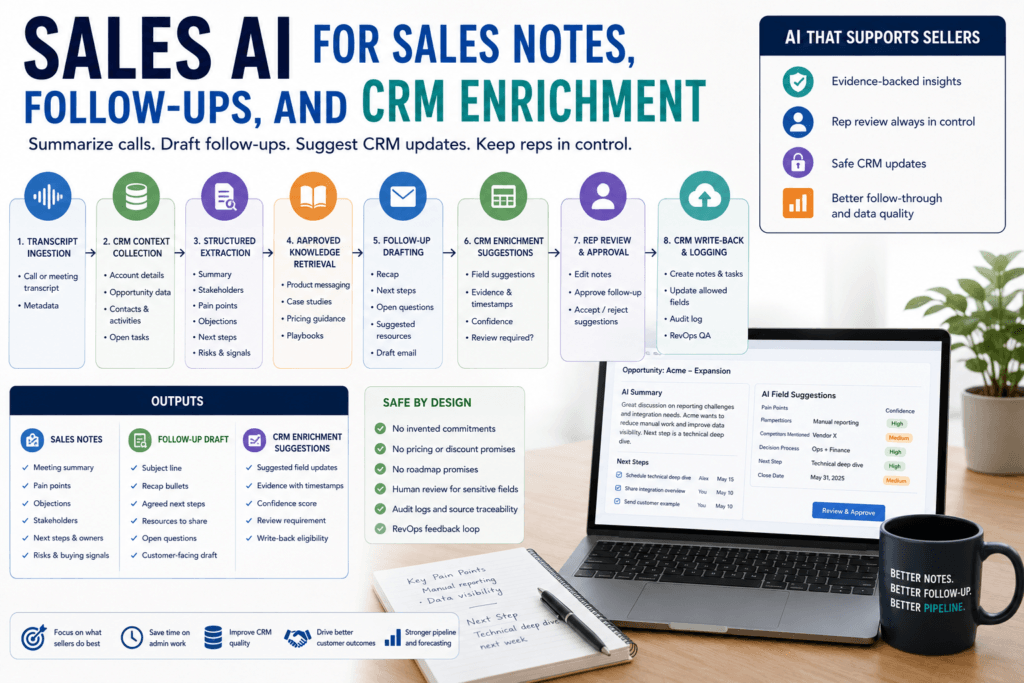
A practical sales AI workflow usually begins when a meeting ends, a transcript becomes available, or a rep requests help from inside the CRM.
The system should not immediately write to the CRM. It should move through a controlled sequence.
| Step | Purpose | Example |
|---|---|---|
| Meeting event received | Start workflow | Transcript uploaded |
| Context collected | Gather allowed CRM data | Account, opportunity, contacts, open tasks |
| Knowledge retrieved | Ground the workflow | Approved messaging and case study |
| Sales signals extracted | Create structured data | Pain points, objections, next steps |
| Risk checked | Decide review path | Pricing discussion requires review |
| Follow-up drafted | Help rep respond | Email draft with recap and next steps |
| Output validated | Check schema and field rules | Allowed CRM fields and evidence required |
| Rep reviews | Approve, edit, or reject | Rep edits follow-up and CRM note |
| CRM updated | Save approved result | Add note, task, or selected field update |
| Feedback logged | Improve workflow | Track edits, rejected fields, manager QA |
This sequence is important because each step can fail.
The transcript may be incomplete. The CRM account may be wrong. The customer may have multiple active opportunities. The retrieved messaging may be stale. The model may infer too much. The CRM field mapping may be invalid. The write-back may hit an API rate limit. A duplicate transcript event may create duplicate notes unless idempotency is in place.
A production workflow should make those failures visible and recoverable.
Common sales inputs and why context must be controlled
Sales workflows can pull from many data sources:
- call transcript
- meeting notes
- calendar metadata
- email thread
- CRM account record
- contact record
- opportunity record
- current sales stage
- deal amount
- close date
- account tier
- customer industry
- previous activities
- open tasks
- approved messaging
- case studies
- product documentation
- pricing or packaging guidance
- prior opportunity notes
More context is not automatically better.
A long transcript plus the full account history plus every prior email thread plus all CRM notes can increase cost, latency, and confusion. It can also expose sensitive or irrelevant information to the model. A good system collects the minimum useful context for the task.
For a call summary, the transcript and meeting metadata may be enough. For a follow-up draft, the system may need the transcript, agreed next steps, and approved messaging. For CRM enrichment, the system may need the current opportunity fields so it can suggest changes rather than duplicate existing data. For pricing-sensitive follow-ups, the system may need to retrieve approved pricing guidance or route the draft to review.
The workflow should define what each task is allowed to see.
Designing a sales note schema
Sales notes should be structured enough to be useful in CRM, manager review, and follow-up workflows.
A practical sales note schema might include:
| Field | Type | Purpose |
|---|---|---|
| meeting_summary | string | Creates a concise recap |
| participants | list | Identifies who attended |
| customer_goals | list | Captures stated goals |
| pain_points | list | Records stated problems |
| objections | list | Captures concerns or blockers |
| competitors_mentioned | list | Flags competitive context |
| buying_signals | list | Captures evidence-backed intent |
| risks | list | Identifies deal or account risk |
| next_steps | list | Captures agreed actions |
| owners | list | Assigns responsibility |
| due_dates | list | Makes tasks actionable |
| missing_information | list | Shows what was not confirmed |
| source_timestamps | list | Supports traceability |
| requires_review | boolean | Prevents unsafe write-back |
The key word is “evidence-backed.”
If the customer says, “We need to reduce manual reporting before Q3,” that can become a stated goal or pain point. If the model merely thinks the customer is budget-sensitive because they asked about pricing, that should be marked as an inference or review item, not a fact.
A good note schema should also capture missing information. If the decision-maker was not identified, the note should say that. If no next step was agreed, the system should not invent one. If the customer mentioned a timeline but no date, the due date should remain blank.
Missing information is not a failure. It is useful sales intelligence.
Extracting next steps, stakeholders, objections, and risks
Sales AI is most valuable when it captures the operational details reps often forget to enter.
Next steps should include the action, owner, due date, and source evidence. “Follow up” is too vague. “Rep will send integration documentation by Friday” is useful.
Stakeholders should include the person, role, organization, and confidence. If speaker attribution is weak, the system should avoid assigning stakeholder roles with certainty.
Objections should be grounded in what was said. “Customer is worried about implementation time” is valid if the customer said implementation time is a concern. “Customer is not ready to buy” may be an unsupported inference unless the conversation clearly supports it.
Risk signals should be separated from facts. A stalled next step, missing economic buyer, repeated pricing concern, security review, procurement delay, or competitor mention may indicate risk. But the system should show the evidence behind the signal.
| Sales signal | AI output | Why it matters |
|---|---|---|
| Mentioned pain point | Pain-point field suggestion | Improves discovery documentation |
| Named stakeholder | Contact role or buying committee note | Helps map decision process |
| Agreed action item | Next step and task suggestion | Improves follow-through |
| Due date mentioned | Task due date | Keeps handoffs concrete |
| Competitor mentioned | Competitive risk flag | Helps rep prepare positioning |
| Budget uncertainty | Opportunity risk | Helps manager coach deal strategy |
| Pricing or discount discussion | Review flag | Prevents unsupported commitments |
| Roadmap request | Product or roadmap risk flag | Avoids overpromising |
| Legal or procurement topic | Specialist review flag | Routes sensitive work appropriately |
This structure helps the rep and manager understand what happened without turning model interpretation into CRM truth.
Retrieving approved messaging before drafting follow-ups
Follow-up drafts should not be generated from the transcript alone when the message needs product positioning, case studies, pricing guidance, implementation details, security language, or competitive messaging.
The system should retrieve approved sales content where relevant:
- product messaging
- positioning statements
- case studies
- sales playbooks
- competitive battlecards
- discovery-question frameworks
- pricing or packaging guidance where allowed
- implementation overview language
- security or compliance resources
- customer-facing product documentation
Retrieval matters because sales content changes. Pricing changes. Product capabilities change. Case studies go stale. Security language may need legal or compliance approval. A model should not rely on its general memory or a previous call transcript to create customer-facing commitments.
But retrieval is not a guarantee. Retrieved content may be outdated or not applicable. The workflow should filter for approval status, audience, product, region, and effective date where possible.
A good follow-up draft should be clear about what comes from the conversation and what comes from approved internal content.
Using similar deals without treating them as policy
Similar-deal retrieval can help reps and managers. It can surface patterns from past opportunities with similar objections, industries, products, deal sizes, or competitors.
But previous deals are examples, not policy.
A prior discount may have been a one-time exception. A competitor response may be outdated. A legal workaround may not be approved. A procurement timeline from one account may not apply to another. A lost deal may have incomplete notes.
Use similar deals for internal context and coaching, not as automatic customer-facing truth.
A useful workflow might show:
- similar opportunity
- similarity reason
- objection pattern
- prior response
- outcome
- caveat
- owner
- whether the source can be used externally
A follow-up draft should not cite or copy from prior private deals unless the content is approved for reuse. For customer-facing messages, use approved messaging and facts from the current conversation.
Drafting customer follow-ups safely
A good sales follow-up draft should help the rep move faster without creating risk.
It should include:
- a concise thank-you
- recap of the customer’s stated goals
- agreed next steps
- owners and dates
- promised resources
- open questions
- relevant approved messaging
- clear call to action
- tone appropriate to the relationship
It should not include:
- invented commitments
- unsupported pricing
- unapproved discounts
- fake timelines
- legal terms
- roadmap promises
- exaggerated urgency
- confidential internal strategy
- claims not supported by the conversation or approved content
For example, a weak AI follow-up says:
“Great speaking today. We are excited to offer a 20% discount and can deliver the roadmap feature by July.”
A safer rep-assist draft says:
“Thanks for the conversation today. You mentioned that manual reporting and onboarding time are the two biggest areas you want to improve this quarter. As a next step, I’ll send the integration overview and a customer example relevant to your team’s use case. We also discussed pricing at a high level, but I’ll confirm the appropriate packaging details before sharing specifics.”
The safer version captures what was said, avoids unsupported commitments, and preserves rep control.
CRM enrichment should be evidence-backed
CRM enrichment is where sales AI can either improve data quality or damage it.
The system may suggest updates to:
- pain points
- use case
- next step
- competitor
- stakeholders
- decision criteria
- implementation timeline
- close plan
- account summary
- opportunity risk
- customer goals
- objection notes
- open tasks
But every suggested update should include evidence.
A CRM enrichment schema can make this explicit:
| Field | Type | Purpose |
|---|---|---|
| crm_field | enum | Identifies the target CRM field |
| proposed_value | string | Suggests a value |
| evidence | string | Explains the transcript support |
| source_timestamp | string | Points to where it was said |
| confidence | number | Supports review routing |
| write_back_allowed | boolean | Blocks unsafe automatic writes |
| review_reason | string | Explains why review is needed |
A field suggestion without evidence should not be written automatically.
For example, “Competitor mentioned: Vendor X” is safer if the transcript shows the customer mentioned Vendor X at a specific timestamp. “Budget confirmed” is not safe unless the customer clearly stated budget approval. “Close date should move to June 30” is not safe unless the conversation supports it and the rep approves it.
Forecast-impacting fields deserve stricter controls than note fields.
Human review and CRM write-back rules
Sales AI should use different review rules for different output types.
Low-risk outputs may include draft notes, task suggestions, and internal summaries. Medium-risk outputs may include CRM field suggestions for pain points, competitors, use case, and next steps. High-risk outputs include opportunity stage, close date, amount, forecast category, probability, pricing, discount terms, legal terms, procurement status, and roadmap commitments.
Human review should be required when:
- the message is customer-facing
- the output affects forecast or pipeline reporting
- the transcript quality is poor
- speaker attribution is unclear
- pricing or discount was discussed
- legal, security, procurement, or contract terms were discussed
- the account is strategic or enterprise
- evidence is missing
- confidence is low
- the model suggests a stage or close date change
- the output includes a commitment to the customer
- the rep or manager previously rejected similar suggestions
Review is not bureaucracy. It is how the system protects CRM trust.
Tool use for CRM and account context
Some sales workflows need live CRM data. A model should not guess the opportunity stage, current close date, account owner, open tasks, or existing contacts.
Tool use lets the application call approved systems:
- fetch account details
- fetch opportunity fields
- retrieve recent activities
- retrieve open tasks
- create a draft note
- create a draft follow-up task
- suggest field updates
- create a manager review item
The model can request information, but the application should own the actual CRM API call, authentication, authorization, validation, and logging.
Tool design should be narrow.
Safer tools include:
- get_opportunity_context(opportunity_id)
- create_draft_crm_note(opportunity_id, body)
- create_task_for_rep(opportunity_id, task)
- suggest_field_updates(opportunity_id, suggestions)
- create_manager_review_item(opportunity_id, reason)
Risky tools include:
- update_any_crm_record(payload)
- send_follow_up_email(text)
- change_forecast_fields(data)
- apply_discount(account_id, discount)
- execute_arbitrary_crm_action(command)
Narrow tools are easier to validate and audit. Broad tools make it harder to enforce least privilege.
Event-driven sales workflows
Sales AI often runs after an event:
- meeting ended
- transcript available
- call recording processed
- CRM opportunity updated
- rep requested summary
- manager requested deal review
- stage changed
- task became overdue
A meeting-ended event might trigger a transcript-processing job. The system validates the event, checks idempotency, enqueues work, and processes the transcript in the background. The worker fetches CRM context, retrieves approved content, extracts notes, drafts follow-up content, validates outputs, routes review, and writes logs.
This event-driven pattern matters because transcript and CRM workflows can fail in ordinary ways.
The transcript may arrive twice. The meeting platform may retry a webhook. The CRM API may rate-limit. A worker may crash after creating a draft note. A rep may update the opportunity while the AI job is still processing. The system needs idempotency keys, retries, record version checks, and audit logs.
A duplicate transcript event should not create duplicate CRM notes. A failed write-back should not silently lose the output. A stale opportunity record should not receive an outdated field update.
A minimal sales AI workflow sketch
The following Python-like pseudocode is illustrative and has not been executed. It shows the structure of a sales note, follow-up, and CRM enrichment workflow.
def process_sales_meeting(meeting_id):
    transcript = meeting_platform.get_transcript(meeting_id)
    crm_context = crm.get_opportunity_context(transcript.opportunity_id)

    if not permissions.can_process_account(crm_context.account_id):
        audit_log.write(meeting_id, status="permission_denied")
        return

    approved_context = knowledge_base.search(
        query=transcript.summary_text,
        filters={
            "approval_status": "approved",
            "audience": "sales",
            "is_deprecated": False,
        },
    )

    sales_notes = model.extract_sales_notes(
        transcript=transcript,
        crm_context=crm_context,
        output_schema="sales_notes_schema",
    )

    if not validate_sales_notes(sales_notes):
        review_queue.create(
            meeting_id,
            reason="invalid_notes",
            payload=sales_notes,
        )
        return

    follow_up = model.draft_follow_up(
        transcript=transcript,
        notes=sales_notes,
        approved_context=approved_context,
        instructions=(
            "Do not invent commitments, pricing, discounts, timelines, "
            "or roadmap promises."
        ),
    )

    crm_suggestions = map_notes_to_crm_fields(sales_notes)

    if sales_notes.requires_review or contains_sensitive_commitment(follow_up):
        review_queue.create(
            meeting_id,
            reason="rep_review_required",
            payload={
                "notes": sales_notes,
                "follow_up": follow_up,
                "crm_suggestions": crm_suggestions,
            },
        )
    else:
        crm.create_draft_note(
            opportunity_id=crm_context.opportunity_id,
            body=sales_notes.summary,
            idempotency_key=f"{meeting_id}:draft_note",
        )

    audit_log.write(
        meeting_id=meeting_id,
        source_transcript_id=transcript.id,
        suggested_fields=list(crm_suggestions.keys()),
        status="completed",
)The important pattern is the order. Fetch context through approved tools. Check permissions. Retrieve approved sales content. Extract structured notes. Validate. Draft carefully. Route risky outputs to review. Use idempotency for CRM write-back. Log source IDs, transcript IDs, and suggested fields.
Structured outputs for RevOps and CRM QA
Sales AI should create structured outputs that RevOps can inspect.
If the system only produces a paragraph, it is hard to measure. If it produces fields, the team can compare output to rep edits, manager corrections, CRM changes, and downstream outcomes.
Useful structured outputs include:
- meeting summary
- participants
- stakeholders
- customer goals
- pain points
- objections
- competitors
- risks
- next steps
- owners
- due dates
- proposed CRM field updates
- source timestamps
- confidence
- review requirement
- write-back eligibility
Structured fields allow RevOps to ask better questions:
- Which fields are accepted most often?
- Which fields are rejected?
- Which reps edit the most?
- Which meeting types produce reliable notes?
- Which call sources have poor transcripts?
- Which stage suggestions are unsafe?
- Which fields should never be auto-updated?
- Which CRM fields are now more complete?
- Which outputs improve follow-through?
Sales AI should improve CRM operations, not just generate text.
Evaluation metrics for sales AI
Do not evaluate sales AI only by time saved.
Time saved matters, but it is not enough. A tool that saves five minutes per call while degrading CRM quality is not a success.
Better metrics include:
| Metric | What it measures | Why it matters |
|---|---|---|
| Note acceptance rate | Rep acceptance of generated notes | Measures practical usefulness |
| Rep edit distance | How much reps change notes or drafts | Shows quality and trust |
| Next-step extraction accuracy | Correct actions, owners, and dates | Improves follow-through |
| Stakeholder extraction accuracy | Correct people and roles | Improves account mapping |
| Field suggestion acceptance rate | CRM enrichment usefulness | Improves data quality |
| Incorrect field update rate | Bad CRM suggestions or writes | Protects CRM trust |
| Follow-up send rate | Whether drafts help reps act | Measures adoption |
| Manager correction rate | Manager QA findings | Tracks revenue quality |
| Cost per processed meeting | Model and retrieval cost | Supports sustainable rollout |
Also track CRM completeness, overdue-task reduction, follow-up turnaround time, manager trust score, forecast-impacting correction rate, duplicate note rate, and rep adoption.
A mature workflow should measure both efficiency and data quality.
Feedback loops from reps, managers, and RevOps
Sales AI needs feedback from multiple roles.
Reps can identify whether notes are useful, follow-ups sound natural, next steps are accurate, and field suggestions match the conversation.
Managers can identify whether opportunity summaries, risks, stakeholder maps, and next-step quality are useful for coaching and pipeline review.
RevOps can identify whether field mapping, CRM hygiene, duplicate records, API behavior, and governance rules are working.
Useful feedback categories include:
- accepted note
- edited note
- rejected note
- wrong stakeholder
- wrong next step
- missing due date
- unsupported inference
- stale messaging
- pricing issue
- wrong CRM field
- duplicate note
- poor transcript quality
- speaker attribution problem
- manager correction required
These feedback signals should improve prompts, schemas, retrieval rules, field mapping, review thresholds, and source content.
Common mistakes and failure modes
The first mistake is inventing next steps. If no next step was agreed, the system should say so.
The second mistake is treating inference as fact. “The buyer seemed interested” is not the same as “The buyer committed to a pilot.”
The third mistake is overwriting CRM fields without review. Forecast-impacting fields need stricter controls.
The fourth mistake is using stale messaging. Sales content changes, and old decks can produce bad follow-ups.
The fifth mistake is ignoring transcript quality. Poor audio, weak speaker attribution, or partial transcripts should trigger review.
The sixth mistake is allowing pricing or discount promises. Those require explicit approval and often legal or finance constraints.
The seventh mistake is treating similar deals as policy. Similar opportunities are examples, not rules.
The eighth mistake is broad CRM write access. The system should not be able to update arbitrary fields without validation.
The ninth mistake is ignoring duplicate events. Transcript retries can create duplicate notes unless idempotency is implemented.
The tenth mistake is no RevOps QA loop. Without review, bad field suggestions can quietly damage CRM trust.
When not to automate CRM writes or follow-ups
Do not automate CRM write-back or customer follow-ups when the workflow involves:
- strategic accounts
- pricing or discount discussions
- legal terms
- procurement commitments
- security reviews
- roadmap promises
- unclear speaker attribution
- low-quality transcripts
- missing account context
- active negotiation
- forecast-impacting fields
- insufficient evaluation data
- no rep review path
- no audit log
- no rollback process
AI can still assist in these cases. It can summarize the meeting, prepare a manager review note, identify missing information, or draft a follow-up for rep review. But assistance is different from autonomous execution.
A practical rollout strategy
Start with one sales team and one meeting type.
A good first pilot might focus on discovery calls for a single sales motion. Discovery calls often contain pain points, goals, stakeholders, next steps, and objections. They are useful enough to matter, but safer than late-stage negotiation, procurement, legal review, or pricing-heavy calls.
A practical rollout plan:
- Choose one sales team.
- Choose one meeting type.
- Choose low-risk CRM fields.
- Define note, follow-up, and enrichment schemas.
- Inventory approved messaging and sales playbook sources.
- Create 50 to 100 historical transcript examples.
- Label expected next steps, stakeholders, objections, and field suggestions.
- Run the AI in shadow mode.
- Compare extracted fields to rep or manager labels.
- Generate follow-up drafts without sending.
- Collect rep, manager, and RevOps feedback.
- Launch draft-only mode.
- Require rep approval before CRM write-back or email send.
- Monitor edits, rejected field suggestions, duplicate notes, CRM quality, and manager trust.
- Expand only after evidence.
The pilot should prove that reps actually use the output, managers trust the summaries, RevOps sees cleaner data, and customer-facing follow-ups remain accurate.
Production-readiness checklist
Before launching sales AI, confirm:
- sales workflow owner
- target team
- target meeting type
- supported CRM objects
- excluded CRM fields
- sales note schema
- follow-up draft schema
- CRM enrichment schema
- approved messaging sources
- deprecated-source filter
- similar-deal policy
- transcript quality threshold
- speaker attribution threshold
- customer data permissions
- account lookup permissions
- field-mapping rules
- forbidden commitments
- review thresholds
- write-back permissions
- idempotency key
- audit log
- RevOps QA feedback loop
- evaluation dataset
- rollout plan
- monitoring owner
This checklist protects the CRM from plausible but unsupported automation.
Conclusion: useful sales AI improves follow-through and CRM quality
Sales AI is most useful when it improves follow-through, note quality, and CRM hygiene without weakening trust.
A good system helps reps capture what happened, extract next steps, identify risks, draft follow-ups, and suggest CRM updates. It distinguishes facts from inferences. It uses approved messaging. It requires review for customer-facing and forecast-impacting outputs. It logs evidence. It learns from rep, manager, and RevOps feedback.
That is very different from blindly auto-updating the CRM.
The practical lesson is direct: start with rep assist. Let AI draft, summarize, extract, and suggest. Let humans approve the outputs that affect customers, forecasts, and revenue records. Expand automation only after evidence shows the workflow improves both sales execution and CRM data quality.
Key Takeaways
- Sales AI should usually start as rep assist, not autonomous CRM updates.
- Sales notes, follow-up drafts, and CRM enrichment should be separate outputs with different review rules.
- The system should capture what was actually said and distinguish facts from inferences.
- Follow-up drafts should avoid invented commitments, unsupported pricing, fake timelines, legal terms, and roadmap promises.
- CRM enrichment should include field name, proposed value, evidence, source timestamp, confidence, and review requirement.
- Forecast-impacting fields need stricter controls than draft notes or task suggestions.
- Similar deals can inform internal coaching, but they are not policy.
- Success should be measured by CRM quality, rep adoption, manager trust, field accuracy, and follow-up outcomes.
Practical Exercise
Objective:
Design a safe sales AI workflow for one meeting type.
Task:
Choose a sales team and build a rep-assist workflow for notes, follow-ups, and CRM enrichment.
Starter instructions:
- Pick one sales team:
- inbound sales
- enterprise sales
- customer success expansion
- renewals
- sales development
- account management
- partner sales
- Pick one meeting type:
- discovery call
- demo
- pricing discussion
- renewal conversation
- implementation handoff
- procurement call
- executive business review
- Define the CRM objects involved.
- Define fields that are allowed for suggestions.
- Define fields that are excluded from automatic write-back.
- Define the sales note schema.
- Define the follow-up draft schema.
- Define the CRM enrichment schema.
- Define review rules.
- Define evaluation metrics.
Example result:
Team: Mid-market sales.
Meeting type: Discovery call.
Allowed CRM suggestions: pain points, use case, competitors mentioned, next step, task due date, stakeholder notes.
Excluded from automatic write-back: opportunity stage, amount, close date, probability, forecast category, discount terms.
Sales note schema: meeting summary, participants, customer goals, pain points, objections, competitors mentioned, next steps, owners, due dates, missing information, source timestamps, requires review.
Follow-up draft schema: subject line, recap bullets, agreed next steps, requested resources, open questions, customer-facing draft, approval required.
CRM enrichment schema: crm_field, proposed_value, evidence, source_timestamp, confidence, write_back_allowed, review_reason.
Review rules: rep approval required for all follow-ups and CRM writes; manager review required for pricing, legal, procurement, security, roadmap, or strategic-account signals.
Evaluation: note acceptance rate, rep edit distance, next-step extraction accuracy, stakeholder extraction accuracy, field suggestion acceptance rate, incorrect field update rate, follow-up send rate, manager correction rate, and cost per processed meeting.
What success looks like:
The workflow produces accurate draft notes, useful follow-ups, and evidence-backed CRM suggestions that reps approve, managers trust, and RevOps can audit.
Stretch goal:
Add three failure tests:
- the transcript has poor speaker attribution
- the customer asks about a discount
- the model suggests changing close date
Define how the workflow should respond in each case.
FAQ
What is sales AI?
Sales AI is the use of AI workflows to help sales teams summarize calls, extract next steps, draft follow-ups, suggest CRM updates, identify risks, and improve sales execution.
Should sales AI update the CRM automatically?
Usually not at first. Sales AI should begin with draft notes, suggested tasks, follow-up drafts, and CRM field suggestions that reps review before write-back.
What is CRM enrichment?
CRM enrichment is the process of improving CRM records with useful information such as pain points, stakeholders, next steps, competitors, risks, and account context.
What sales fields should require review?
Forecast category, opportunity stage, close date, deal amount, probability, pricing, discounts, legal terms, procurement status, and roadmap commitments should usually require review.
Can AI draft sales follow-up emails?
Yes, but drafts should be reviewed by the rep. The workflow should avoid invented commitments, unsupported pricing, fake timelines, roadmap promises, and legal language.
How should sales AI handle similar deals?
Similar deals can provide internal context, but they should not be treated as policy. Customer-facing drafts should rely on the current conversation and approved messaging.
What should sales AI measure?
Useful metrics include note acceptance, rep edit distance, next-step accuracy, field suggestion acceptance, incorrect update rate, follow-up send rate, manager corrections, CRM completeness, and cost per meeting.
What is the safest first pilot?
Start with one sales team, one meeting type, draft-only outputs, low-risk CRM field suggestions, rep approval, historical replay, and RevOps QA before expanding write-back.
Sources
- OpenAI Structured Outputs: https://developers.openai.com/api/docs/guides/structured-outputs
- OpenAI Function Calling: https://developers.openai.com/api/docs/guides/function-calling
- OpenAI File Search: https://developers.openai.com/api/docs/guides/tools-file-search
- OpenAI Retrieval: https://developers.openai.com/api/docs/guides/retrieval
- Salesforce REST API sObject Rows: https://developer.salesforce.com/docs/atlas.en-us.api_rest.meta/api_rest/resources_sobject_retrieve.htm
- Salesforce REST API Update Records: https://developer.salesforce.com/docs/atlas.en-us.api_rest.meta/api_rest/resources_sobject_retrieve_patch.htm
- Salesforce REST API Request Limits and Allocations: https://developer.salesforce.com/docs/atlas.en-us.salesforce_app_limits_cheatsheet.meta/salesforce_app_limits_cheatsheet/salesforce_app_limits_platform_api.htm
- Salesforce Task Object Reference: https://developer.salesforce.com/docs/atlas.en-us.object_reference.meta/object_reference/sforce_api_objects_task.htm
- Salesforce Opportunity Object Reference: https://developer.salesforce.com/docs/atlas.en-us.object_reference.meta/object_reference/sforce_api_objects_opportunity.htm
- HubSpot CRM Object APIs: https://developers.hubspot.com/docs/guides/crm/using-object-apis
- HubSpot API Usage Guidelines and Limits: https://developers.hubspot.com/docs/api/usage-details
- NIST AI Risk Management Framework: https://www.nist.gov/itl/ai-risk-management-framework
- OWASP LLM01 Prompt Injection: https://genai.owasp.org/llmrisk/llm01-prompt-injection/
- OWASP Top 10 for Large Language Model Applications: https://owasp.org/www-project-top-10-for-large-language-model-applications/
Related articles from Kyle Beyke
- AI Use Cases: 7 Smart Rules for Business: https://beykeworkflows.com/ai-use-cases-rules-business/
- AI Workflow Anatomy: Essential Guide for Business: https://beykeworkflows.com/ai-workflow-anatomy-business-guide/
- Structured Outputs for AI Workflows: Reliable Guide: https://beykeworkflows.com/structured-outputs-for-ai-workflows-guide/
- Powerful Text Classification, Extraction, and Summarization with AI: https://beykeworkflows.com/text-classification-extraction-summarization-ai/
- LLM Integration: 7 Best Python Patterns: https://beykeworkflows.com/llm-integration-python-hugging-face-inference/