
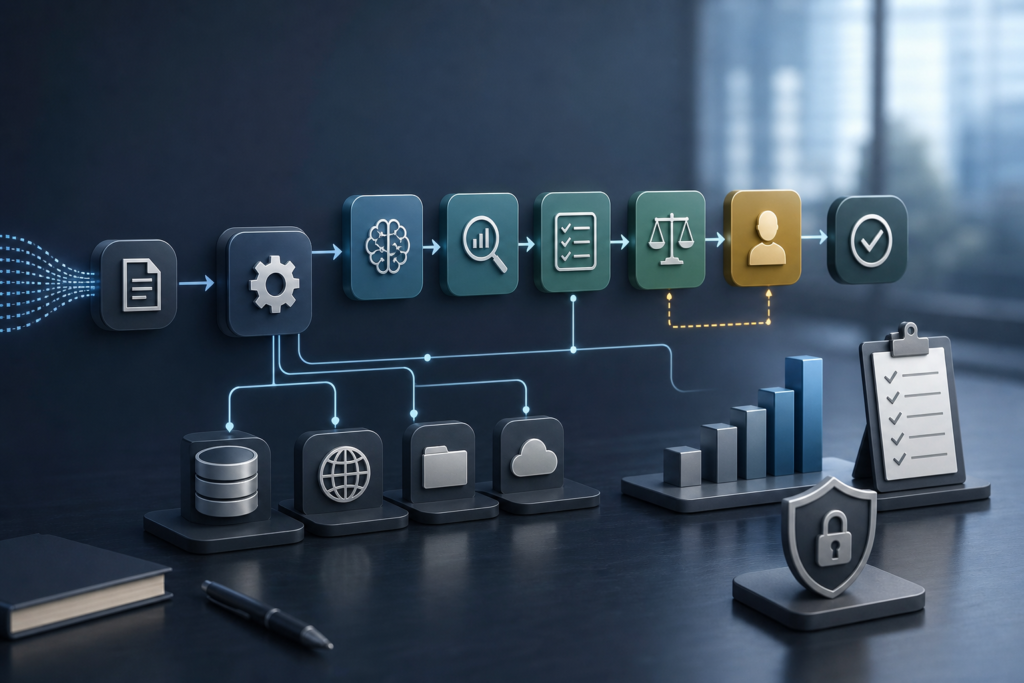
Lesson
Practical Multi-Step AI Workflows Without Agent Sprawl
Learning Objectives
After this lesson, you should be able to:
- Explain the difference between a multi-step AI workflow, a bounded agentic step, and a fully autonomous agent.
- Break a business process into triggers, inputs, state, AI tasks, validation, approvals, actions, and logs.
- Decide which steps should be deterministic and which may benefit from LLM reasoning or agentic behavior.
- Identify production requirements such as retries, idempotency, state persistence, tool contracts, permissions, and human review.
- Apply a practical checklist to avoid overusing agents in predictable business processes.
Prerequisites
Helpful background: basic familiarity with LLMs, prompts, APIs, webhooks, structured outputs, function calling, retrieval, and business systems such as CRM, helpdesk, ERP, or ticketing platforms.
No advanced machine learning math is required.
Main Lesson Body
The Practical Problem
Multi-step AI workflows are orchestrated sequences of AI and non-AI steps that move work from trigger to outcome using defined state, validation, tool calls, approvals, and logs. They are not the same as fully autonomous agents. The practical default is to start with a deterministic workflow backbone, then add LLM calls or bounded agents only where flexible reasoning improves the result enough to justify extra risk, cost, and complexity.
That distinction matters because many business processes look more “agentic” than they really are. A support ticket comes in. The system gathers account context. It classifies the issue. It retrieves knowledge. It drafts a reply. A human reviews the draft. The approved update is written back to the helpdesk. That is a multi-step process, but most of it can be designed as an explicit workflow.
The common mistake is giving the model control over the whole loop because the process has several steps. Multi-step does not mean autonomous. It means the system needs memory, routing, validation, failure handling, and accountability across steps.
If you want the earlier decision framework, read AI Agents vs Workflows: A Practical, Reliable Decision Guide. This lesson assumes you already understand that distinction and now need to design the workflow itself.
Activate Prior Knowledge: Think Like an Operations Manager
Pick a familiar business process:
- Support escalation
- Invoice exception review
- Sales follow-up
- Employee onboarding
- Document intake
- Vendor risk review
Most of these processes already have a pattern:
- Receive an event.
- Gather context.
- Classify or extract key information.
- Decide the next route.
- Draft, calculate, enrich, or recommend.
- Validate against rules.
- Ask a human to approve if risk is high.
- Write the result back to a system.
- Log the outcome.
AI does not remove this structure. It adds useful judgment inside selected steps. The workflow still needs to know what happened, what state changed, who approved it, what tool was called, what failed, and what should happen next.
A good mental model is: the workflow is the operating system, and the model is one type of worker inside it.
The operating system decides how work moves. The model helps with tasks that benefit from language understanding, classification, extraction, summarization, drafting, reasoning, or tool selection.
Direct Definitions
What Is a Multi-Step AI Workflow?
A multi-step AI workflow is a controlled process that combines AI and non-AI steps to complete a business outcome. Each step has an input, output, owner, state transition, and failure behavior.
Example:
New ticket received → fetch customer context → classify issue → retrieve approved knowledge → draft response → validate output → route to reviewer → write approved draft to helpdesk → log result.
The model may help classify, retrieve, draft, or reason. The workflow controls when those steps happen and what happens if they fail.
What Is a Deterministic Workflow?
A deterministic workflow follows predefined paths. It may contain AI calls, but the model does not freely decide the full process. The system uses rules, schemas, state machines, queues, or workflow engines to control execution.
Deterministic does not mean “no AI.” It means the orchestration is explicit.
What Is an Agentic Step?
An agentic step gives an AI system limited freedom to decide the next action within a bounded scope. For example, an exception planner might inspect an unusual support case, choose which approved knowledge sources to query, and recommend a next action.
The key word is limited. A bounded agentic step has permissions, timeouts, budgets, allowed tools, output schemas, and review gates.
What Is Workflow State?
Workflow state is the current record of where the process stands. It may include:
- Workflow ID
- Current step
- Input data
- Retrieved context
- Model outputs
- Validation results
- Approval status
- Tool calls
- Errors
- Retry count
- Final outcome
Without state, a multi-step workflow becomes a chain of disconnected prompts. That makes failures hard to debug and approvals hard to audit.
What Is Bounded Autonomy?
Bounded autonomy means the AI can make limited decisions inside a defined box. The box includes allowed tools, allowed data, allowed actions, approval rules, logging, and stop conditions.
A bounded agent can propose. It should not automatically perform high-impact actions unless the team has strong evidence, monitoring, rollback paths, and governance in place.
The Better Architecture: Deterministic Backbone, AI Task Nodes
The safest starting architecture for most predictable business processes is:
Trigger → deterministic orchestration → bounded AI task → validation → branch → approval if needed → write-back → logging.
This architecture keeps the workflow inspectable. It also prevents the model from becoming the invisible controller of every decision.
A model call should usually be treated as a task node, not as the whole system. For example:
- Classification node: converts messy input into a structured category.
- Extraction node: pulls invoice fields into a schema.
- Drafting node: produces a response draft for review.
- Summarization node: compresses a long record for a human.
- Reasoning node: recommends an exception path with evidence.
- Tool-use node: asks the application to call a defined API.
Function calling and structured outputs can help because they let the application define tool contracts and output schemas instead of accepting unstructured text as downstream instructions. For a deeper treatment of tool-use boundaries, see AI Function Calling: Practical Tool-Use Lesson.
Multi-Step AI Workflows vs Agents
| Concept | What It Does | What It Does Not Do | Business Implication |
|---|---|---|---|
| Single prompt | Produces one answer from one request | Preserve durable state, manage retries, or coordinate systems | Useful for drafts and exploration, weak for production processes |
| Deterministic multi-step workflow | Moves work through defined steps, state, validation, and approvals | Freely choose any next action unless designed to branch | Best default for repeatable operations |
| Bounded agentic step | Handles ambiguity inside a controlled part of the workflow | Own the whole business process by default | Useful for exceptions, research, and unclear next-action selection |
| Fully agentic workflow | Lets an agent plan and act across many steps and tools | Guarantee predictability without strong controls | Higher governance burden, best for open-ended tasks with justified autonomy |
The question is not “Can an agent do this?” The better question is “Which parts of this process need flexible reasoning, and which parts need repeatable control?”
Why Overusing Agents Creates Operational Debt
Agent sprawl happens when teams create agents for every step without asking whether autonomy is needed. That can create several problems.
First, cost becomes harder to forecast. Agentic loops may call models and tools multiple times. If the workflow has no budget or stop condition, the cost per completed outcome can drift.
Second, latency becomes harder to manage. Deterministic steps can be timed and budgeted. Agentic planning may branch unpredictably, especially when tools fail or context is incomplete.
Third, auditability gets weaker. If the model chooses next steps without structured state and logs, it becomes harder to answer: Why did this action happen? What evidence was used? Who approved it? Which tool was called? What changed in the system?
Fourth, permissions become riskier. An agent that can read, write, message, refund, delete, or escalate needs stronger guardrails than a drafting assistant. For permission design, see AI Agent Guardrails for Safe Workflow Permissions.
Where Agents Are Actually Useful
Agents are not the enemy. They are useful when a deterministic path is too rigid for the value case.
An agentic step may be justified when:
- The next action is unclear.
- The input is ambiguous or incomplete.
- The system must choose among several information sources.
- The work requires short planning across tools.
- Exceptions are frequent and expensive.
- The output is a recommendation, not an irreversible action.
- The agent’s permissions can be tightly scoped.
Example: In invoice exception handling, deterministic logic can handle normal invoices. A bounded agentic step may help investigate why a purchase order, receipt, and invoice do not match. The agent might gather evidence, summarize the mismatch, and recommend a route. It should not approve payment on its own unless the organization has specifically designed and tested that control.
State, Retries, and Idempotency
Production multi-step AI workflows need to survive ordinary failure. APIs time out. Models return invalid outputs. Reviewers take days to respond. Webhooks fire twice. A downstream system accepts a write but the caller never receives the response.
This is why state management matters.
A workflow state record should answer:
- What is the workflow trying to complete?
- Which step is currently active?
- What inputs and evidence were used?
- Which model, prompt version, schema, and tool version were used?
- Which actions have already been completed?
- Which failures occurred?
- What can be retried safely?
- What requires human review?
Retries need special care. Retrying a read operation is usually safer than retrying a write operation. Retrying “fetch customer record” is different from retrying “issue refund.” Idempotency helps prevent duplicate side effects. If the same workflow step runs twice, the system should avoid sending two emails, creating two credits, or duplicating CRM updates.
Workflow engines and durable execution systems exist because long-running business processes need state, replay, retries, waiting, and recovery. Cloud workflow tools such as AWS Step Functions and Google Cloud Workflows document state handling and retry behavior. Durable systems such as Temporal and Azure Durable Functions also emphasize stateful, replayable execution and deterministic orchestration constraints.
The lesson for AI teams is simple: do not let the prompt become your workflow engine.
Human Review Is a Workflow Step, Not a Decoration
Human-in-the-loop review is often added too late. A team builds a demo, adds an “approve” button at the end, and calls it governed.
A real review gate needs more structure:
- What exactly is the human approving?
- What evidence is shown?
- Which fields can be edited?
- Which actions are blocked until approval?
- What happens if the reviewer rejects the recommendation?
- How is the decision logged?
- How does the workflow resume afterward?
Human review is especially important before customer messages, financial actions, policy decisions, security changes, data deletion, or updates to systems of record.
A good approval step should show the model output, source evidence, validation warnings, business rules, and a clear approve, reject, or edit path. The workflow should store the reviewer, timestamp, decision, and final output.
Evaluation Before Scaling
A workflow that works once in a demo is not production-ready. It needs evaluation against realistic examples.
Evaluate:
- Happy paths
- Ambiguous inputs
- Missing data
- Conflicting policies
- Unsafe instructions
- Tool failures
- Duplicate events
- Invalid model output
- Low confidence classifications
- Reviewer disagreement
- Cost and latency outliers
Before expanding autonomy, measure business outcomes such as cycle time, handling time, rework rate, escalation rate, cost per completed workflow, and error rate. Also measure technical behavior such as schema validity, retry rate, tool failure rate, review acceptance rate, and model-output defect rate.
For a fuller treatment of this discipline, read AI Evals Are the Critical Layer Between Demo and Production.
A Practical Design Pattern
Use this pattern when designing multi-step AI workflows:
- Map the process without AI first.
- Identify the trigger, systems, users, approvals, and final outcome.
- Mark deterministic steps that should follow rules.
- Mark AI-assisted steps where language judgment helps.
- Define schemas for model outputs.
- Define tool contracts for external actions.
- Store workflow state after each important step.
- Add validation before branching or write-back.
- Add human approval before high-impact actions.
- Add bounded agentic behavior only for ambiguous exception points.
- Log every input, output, tool call, approval, error, and final result.
- Evaluate on real examples before increasing autonomy.
This is the practical antidote to agent sprawl: decompose the process before choosing the autonomy level.
Worked Example
Customer Support Escalation Workflow
Scenario: A B2B software company receives customer support tickets. Some are routine how-to questions. Some involve billing, security, service outages, or contractual commitments. The company wants faster handling without allowing AI to send risky responses or make account changes without review.
Step 1: Trigger
A new ticket webhook arrives from the helpdesk.
Deterministic workflow action:
- Create a workflow ID.
- Store ticket ID, customer ID, timestamp, source channel, and raw message.
- Enqueue the workflow for processing.
Why deterministic: The system should always create a traceable record before AI touches the process.
Step 2: Context Gathering
The workflow fetches:
- Customer plan
- Account status
- Recent incidents
- Product area
- Relevant helpdesk history
- Approved knowledge base articles
This may include API calls to the helpdesk, CRM, status page, and knowledge base.
Why deterministic: The system should control which sources are trusted.
Step 3: Classification
An LLM classifies the ticket into a structured schema:
- issue_type
- product_area
- urgency
- customer_impact
- escalation_risk
- confidence
- evidence_summary
Why AI-assisted: Customer language is messy. Classification benefits from language understanding.
Why bounded: The output must match an allowed schema. Unknown categories should route to review rather than inventing labels.
Step 4: Validation
The workflow validates:
- Required fields are present.
- Category values are allowed.
- Confidence is above threshold.
- Security, legal, billing, and outage categories route to review.
- Retrieved source IDs are approved.
Why deterministic: Business rules should not be left to model preference.
Step 5: Drafting
For low-risk tickets, the LLM drafts an internal response suggestion using approved sources.
The draft includes:
- Customer-facing answer
- Source references
- Assumptions
- Suggested next step
- Confidence note
Why AI-assisted: Drafting saves time.
Why not autonomous: The response is saved as a draft or internal note, not automatically sent.
Step 6: Bounded Agentic Exception Step
If the ticket has low confidence, conflicting evidence, or high escalation risk, the workflow calls an exception planner.
Allowed actions:
- Request additional approved context.
- Recommend a clarifying question.
- Suggest escalation to a named queue.
- Summarize unresolved uncertainty.
Denied actions:
- Send customer replies.
- Issue credits or refunds.
- Change account settings.
- Promise contract terms.
- Close the ticket.
Why agentic: The next best information-gathering step may be unclear.
Why bounded: The agent proposes a route, but the deterministic workflow and human reviewer control action.
Step 7: Human Review
A support lead reviews high-risk drafts and exception recommendations.
The review screen shows:
- Ticket text
- Retrieved evidence
- Model classification
- Draft response
- Validation warnings
- Exception planner recommendation
- Approve, edit, reject, or escalate controls
Why human-reviewed: Customer impact and policy risk remain with the business.
Step 8: Write-Back
The workflow writes the approved draft or internal note to the helpdesk.
For rejected outputs, the workflow logs the reason and routes the ticket to manual handling.
Why deterministic: Writes to systems of record should be controlled, idempotent, and logged.
Step 9: Measurement
The team tracks:
- Time to first draft
- Review acceptance rate
- Escalation accuracy
- Rework rate
- Customer satisfaction impact
- Cost per ticket processed
- Tool failure rate
- Invalid output rate
This workflow uses AI where it helps, but it does not turn the whole support process into an agent.
Implementation Checklist
| Step | What to Do | How to Verify It |
|---|---|---|
| Map the workflow | Draw the full process from trigger to outcome. Include systems, owners, and handoffs. | Stakeholders can explain the same flow without disagreement. |
| Define workflow state | Specify what must be stored after each step. | A failed workflow can resume or be diagnosed from the stored record. |
| Separate deterministic and AI-assisted steps | Label each step as rule-based, AI-assisted, human-reviewed, or agentic. | Every AI step has a reason tied to ambiguity or language judgment. |
| Define schemas | Use structured outputs for classification, extraction, routing, or drafts. | Invalid fields, missing values, and unexpected categories are rejected or routed. |
| Define tool contracts | Specify tool names, inputs, outputs, permissions, timeouts, and errors. | Contract tests cover valid inputs, invalid inputs, timeouts, and safe fallbacks. |
| Scope agentic behavior | Add an agentic step only where next-action selection is ambiguous. | The agent has allowed tools, denied actions, budgets, and stop conditions. |
| Add human approvals | Place review before high-impact write-back or external action. | The review record stores reviewer, timestamp, evidence, decision, and final output. |
| Design retries and idempotency | Decide which steps can retry and how duplicate side effects are prevented. | Duplicate webhooks or retry events do not create duplicate emails, credits, or updates. |
| Log execution | Capture inputs, outputs, model versions, prompts, tool calls, validation results, approvals, errors, latency, and cost. | A support or engineering owner can reconstruct what happened. |
| Evaluate before rollout | Test happy paths, edge cases, policy conflicts, unsafe inputs, and tool failures. | Release criteria are tied to measured quality, safety, latency, and cost. |
| Start with limited autonomy | Begin draft-only or recommendation-only. | Auto-actions are added only after evidence supports them. |
Common Mistakes and Failure Modes
Treating Multi-Step Work as Proof That an Agent Is Needed
A workflow can have many steps and still be deterministic. The number of steps does not determine the need for an agent. Ambiguity, tool choice, planning need, and exception frequency do.
Letting the Model Decide the Whole Process
If the model decides every next step, the workflow becomes harder to test, govern, and debug. Keep the backbone explicit unless open-ended autonomy is the actual value case.
Skipping State Design
Without state, the system cannot recover cleanly, explain outcomes, or support delayed review. Store state at meaningful boundaries.
Accepting Unstructured Outputs Downstream
Free text is useful for humans. Downstream automation needs schemas, validation, allowed values, and error paths.
Retrying Unsafe Actions
A retry can turn one failure into two customer messages, two refunds, or two CRM updates. Use idempotency keys and separate read retries from write retries.
Adding Human Review Without Evidence
Reviewers need context. An approval screen without sources, warnings, diffs, and policy notes creates false confidence.
Granting Broad Tool Permissions
Agents should not receive write permissions because it is convenient. Apply least privilege. Start with read-only and recommendation-only where possible.
Measuring Activity Instead of Outcomes
Counting model calls or drafts created is not enough. Measure cycle time, acceptance rate, rework, error rate, escalation quality, cost, and customer impact.
Knowledge Check
- What is the safest default architecture for a predictable multi-step business process?
- What is the difference between a model generating an output for one step and a model deciding the next step?
- Which parts of a support escalation workflow should usually be deterministic?
- When would a bounded agentic step be justified in an invoice exception workflow?
- What should be logged to make a multi-step AI workflow diagnosable?
- Why are retries more dangerous for write actions than read actions?
Practical Exercise
Objective
Design a one-page multi-step AI workflow for a real business process without overusing agents.
Task
Choose one process from your organization or a realistic example:
- Support triage
- Invoice exception handling
- CRM enrichment
- Employee onboarding
- Contract intake
- Vendor review
- Sales follow-up
Map the workflow from trigger to outcome.
Label each step as:
- Deterministic
- AI-assisted
- Human-reviewed
- Bounded agentic
- Manual
Starter Instructions
- Write the business outcome in one sentence.
- List the trigger and final write-back.
- Draw 6 to 10 workflow steps.
- For each step, define input, output, owner, and failure behavior.
- Mark where an LLM call belongs.
- Define one structured output schema in plain English.
- Identify any agentic step and explain why it is needed.
- Add at least one approval gate.
- Add retry and idempotency notes for write actions.
- List 5 metrics you would track before expanding autonomy.
What Success Looks Like
A successful exercise result includes:
- A clear workflow diagram or ordered step list.
- Explicit state fields stored across the process.
- No more than one bounded agentic step unless there is a strong reason.
- At least one validation step before branching or write-back.
- Human approval before any high-impact action.
- A failure path for invalid model output, tool failure, and reviewer rejection.
- Metrics tied to business outcome, quality, cost, and reliability.
Reflection Questions
- Which steps did you initially want to make agentic, and why?
- Which of those steps became simpler after you made the workflow explicit?
- What business risk increases if the agent receives write permissions?
- What state would you need to debug a failed workflow one week later?
- What evidence would you need before allowing limited auto-actions?
Optional Stretch Goal
Create a minimal prototype using your preferred workflow tool, queue, or state machine. Do not start with full autonomy. Start with one AI-assisted classification or drafting step, schema validation, a review gate, and execution logs.
Key Takeaways
- Multi-step AI workflows do not automatically require fully autonomous agents.
- The reliable default is a deterministic workflow backbone with bounded AI task nodes.
- Agents are most useful for ambiguous exception points, not routine process control.
- Workflow state, validation, retries, idempotency, approvals, and logs are production requirements.
- Human review should be designed as a real workflow step with evidence and decision records.
- Tool permissions should be scoped before connecting AI to business systems.
- Evaluation should include messy cases, policy conflicts, tool failures, cost, latency, and reviewer outcomes.
- The best AI workflow design starts with the business process, not the agent framework.
FAQ
What is a multi-step AI workflow?
A multi-step AI workflow is an orchestrated process that uses AI and non-AI steps to move work from trigger to outcome. It includes defined inputs, outputs, state, validation, approvals, tool calls, failure handling, and logs.
Do multi-step AI workflows require agents?
No. Many multi-step AI workflows work better with deterministic orchestration plus narrow LLM calls. Use agents only where the system needs bounded flexibility, such as exception handling, research, planning, or unclear next-action selection.
What is the difference between AI workflow orchestration and agent orchestration?
AI workflow orchestration controls the process through explicit steps, state, rules, and branches. Agent orchestration coordinates one or more AI systems that may plan, select tools, and decide next actions. A production system can use both, but the distinction affects reliability, cost, auditability, and permissions.
How should workflow state be preserved?
Preserve state in a durable store tied to a workflow ID. Store the current step, inputs, model outputs, tool calls, validation results, approvals, errors, retry counts, and final outcome. This makes the workflow recoverable and auditable.
When should a business use a workflow engine?
Consider a workflow engine, state machine, queue-based design, or durable execution platform when the process is long-running, crosses systems, needs retries, waits for human approval, must preserve state, or requires clear observability across steps.
How do you prevent agent sprawl?
Start by mapping the process. Make predictable steps deterministic. Add AI task nodes where language judgment helps. Add no more agentic behavior than the workflow needs. Require explicit permissions, budgets, stop conditions, validation, approvals, and logs for every agentic step.
Sources
- OpenAI Function Calling in the OpenAI API: https://help.openai.com/en/articles/8555517-function-calling-in-the-openai-api
- OpenAI Structured Outputs Guide: https://platform.openai.com/docs/guides/structured-outputs
- Anthropic Tool Use with Claude: https://platform.claude.com/docs/en/agents-and-tools/tool-use/overview
- AWS Step Functions Documentation Overview: https://aws.amazon.com/documentation-overview/step-functions/
- AWS Step Functions Error Handling: https://docs.aws.amazon.com/step-functions/latest/dg/concepts-error-handling.html
- Temporal Platform Documentation: https://docs.temporal.io/
- LangGraph Persistence Documentation: https://langchain-5e9cc07a.mintlify.app/oss/python/langgraph/persistence
- Microsoft Azure Durable Functions Orchestrator Code Constraints: https://learn.microsoft.com/en-us/azure/azure-functions/durable/durable-functions-code-constraints
- Google Cloud Workflows Retry Steps: https://docs.cloud.google.com/workflows/docs/reference/syntax/retrying
- OWASP Top 10 for Large Language Model Applications: https://owasp.org/www-project-top-10-for-large-language-model-applications
- NIST AI Risk Management Framework: https://www.nist.gov/itl/ai-risk-management-framework
- Object Management Group BPMN: https://www.omg.org/bpmn/
Related articles from Kyle Beyke
- AI Agents vs Workflows: A Practical, Reliable Decision Guide: https://beykeworkflows.com/ai-agents-vs-workflows-deterministic/
- AI Function Calling: Practical Tool-Use Lesson: https://beykeworkflows.com/ai-function-calling-tool-use-business-systems/
- AI Evals Are the Critical Layer Between Demo and Production: https://beykeworkflows.com/ai-evals-management-layer-demos-production/
- Event-Driven AI Workflows: 7 Reliable Patterns: https://beykeworkflows.com/event-driven-ai-workflows-webhooks-queues-apis/
- AI Agent Guardrails for Safe Workflow Permissions: https://beykeworkflows.com/ai-agent-guardrails-permissions-safe-business-workflows/