
Lesson
Retrieval-Augmented Generation (RAG) Fundamentals
Learning Objectives
- Explain what retrieval-augmented generation is and why it matters in business AI systems.
- Distinguish RAG from embeddings, vector databases, semantic search, fine-tuning, tool use, and model memory.
- Describe the core RAG workflow from source documents to retrieval, context assembly, generation, and evaluation.
- Identify where RAG helps business workflows and where it can fail.
- Design a practical RAG implementation checklist for internal knowledge, support, policy, sales, or document workflows.
Prerequisites
Helpful background includes basic familiarity with LLMs, prompts, context windows, embeddings, semantic search, vector databases, and business workflow design. You do not need advanced machine learning knowledge. The most useful prerequisite is understanding that a model’s answer is only as reliable as the information, instructions, retrieval process, and review controls around it.
Retrieval-augmented generation gives models useful context before they answer
Retrieval-augmented generation is one of the most practical patterns in business AI because it addresses a simple production problem: the model often does not have the exact business knowledge it needs.
A general-purpose language model may be fluent, but fluency is not the same as access to your current support articles, internal policies, implementation notes, contracts, product documentation, customer records, pricing rules, runbooks, or compliance procedures. A model can generate a confident answer from patterns it learned during training, but that does not mean it knows your latest refund policy, the current escalation process, or the approved language your support team must use.
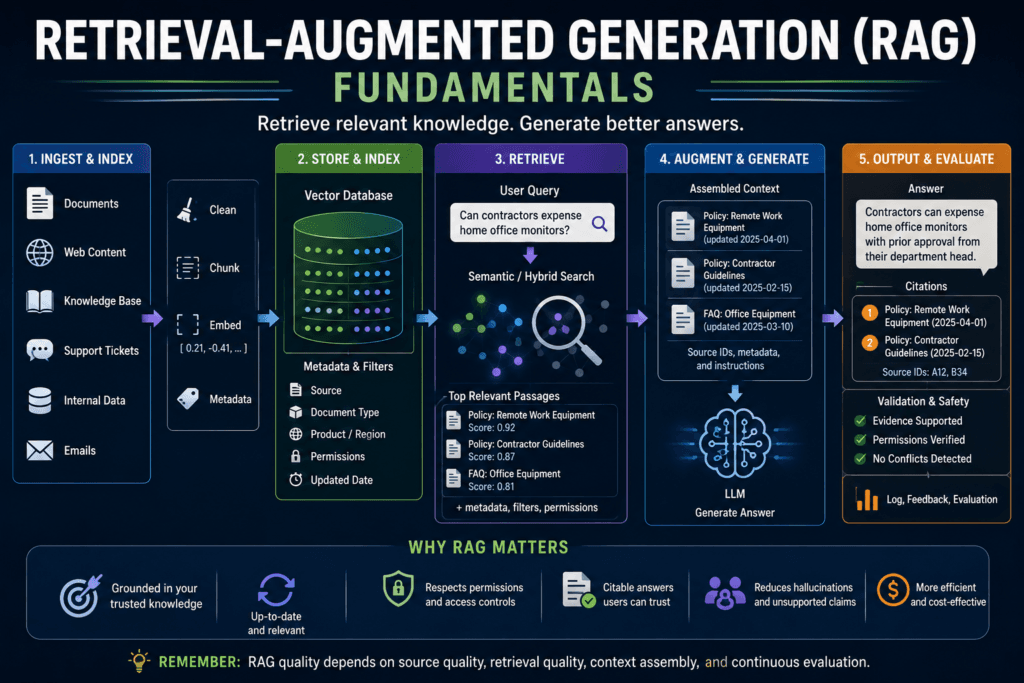
Retrieval-augmented generation, usually shortened to RAG, adds a retrieval step before generation. Instead of asking the model to answer from memory alone, the system first searches approved sources, retrieves relevant passages, places those passages into the model’s context, and asks the model to answer using that evidence.
In plain English, RAG means:
Find relevant information first. Then ask the model to answer with that information in view.
That pattern is powerful. It can make internal knowledge assistants, support copilots, policy Q&A tools, technical documentation assistants, document review systems, sales enablement tools, and customer-facing help systems more useful. It can also reduce some unsupported answers by grounding the model in external source material.
But retrieval-augmented generation is not a magic hallucination cure.
If the retrieval layer finds the wrong document, the model may answer from the wrong evidence. If the document is stale, the answer may be stale. If chunks are poorly split, the model may see a rule without its exception. If metadata is weak, the system may retrieve content for the wrong product, country, version, or customer type. If permissions are weak, the system may expose information the user should not see. If the context is overloaded with irrelevant passages, the model may miss the important one.
RAG makes business AI more useful when it is designed as a system. It fails when teams treat it as “add a vector database to a chatbot.”
What retrieval-augmented generation actually is
Retrieval-augmented generation is an architecture that combines two capabilities:
- Retrieval: finding relevant information from an external source.
- Generation: using a language model to produce an answer, summary, explanation, draft, or structured output.
The original RAG research described models that combine parametric memory, meaning knowledge stored in model parameters, with non-parametric memory, meaning an external retrievable knowledge source. In business applications, the same broad idea appears as a practical workflow: retrieve relevant company knowledge, then generate an answer using that retrieved context.
A basic RAG workflow looks like this:
- A user asks a question.
- The system searches approved knowledge sources.
- The system retrieves relevant passages.
- The system assembles those passages into a compact context.
- The model receives the user question plus the retrieved context.
- The model generates an answer.
- The system may include citations, source IDs, confidence signals, validation, or review routing.
- Logs and evaluation data are stored for improvement.
This is different from asking a model an open-ended question. The system is not saying, “What do you know?” It is saying, “Here is the relevant source material. Answer based on this.”
That is why retrieval-augmented generation is so important for business AI. Most companies do not need a model to invent answers. They need it to use the right internal knowledge at the right time.
Why business AI systems need retrieval
Business knowledge changes constantly.
Policies are updated. Products change. Support procedures evolve. Sales messaging is revised. Contracts are amended. Compliance guidance changes. Known issues appear and disappear. Customer records are updated. Internal runbooks improve after incidents.
A model’s training data is not enough for this environment. Even a strong model may not know proprietary information, current internal rules, or source-specific details. Context windows are also limited. You cannot reliably put every document a company owns into every prompt, and even very large context windows do not remove the need to select the right information.
Retrieval-augmented generation exists because business systems need just-in-time knowledge.
RAG is useful when the answer should depend on external sources such as:
- internal policies;
- help-center articles;
- technical documentation;
- product manuals;
- sales playbooks;
- support macros;
- implementation runbooks;
- legal playbooks;
- contract clauses;
- approved customer-facing language;
- knowledge base articles;
- account-specific notes;
- incident reports;
- audit evidence.
Without retrieval, a model may answer from general patterns. With retrieval, the system can provide relevant source material before the model writes.
That does not guarantee correctness, but it gives the system a better chance of producing a grounded answer.
The basic RAG architecture
A practical retrieval-augmented generation system has two major phases: indexing and answering.
Phase 1: Indexing the knowledge
Before the system can retrieve useful context, it needs searchable knowledge.
The indexing workflow usually includes:
- source inventory;
- document ingestion;
- cleaning;
- chunking;
- metadata extraction;
- embedding or indexing;
- vector, keyword, or hybrid storage;
- permission mapping;
- update and deletion workflows.
Source inventory means deciding what content is approved for retrieval. This may include help articles, policies, product docs, runbooks, or CRM notes. Not every document should be indexed. Drafts, stale content, unapproved guidance, confidential records, and low-quality notes can make the system worse.
Cleaning removes boilerplate, navigation text, duplicate content, broken formatting, signatures, irrelevant menus, and outdated fragments.
Chunking splits documents into useful retrieval units. A chunk might be a policy section, help article section, FAQ answer, contract clause, or runbook step. Chunking matters because retrieval happens at the chunk level. Bad chunks create bad answers.
Metadata gives the system control. Useful metadata includes source, title, document type, product, region, language, version, updated date, owner, approval status, confidentiality level, and permission group.
Indexing makes the content searchable. Some systems use keyword search. Some use vector search. Many production systems use hybrid search.
Phase 2: Answering with retrieved context
When a user asks a question, the system enters the answering phase.
A typical answering workflow includes:
- receive the user question;
- identify user permissions;
- interpret the query;
- retrieve candidate passages;
- filter by metadata;
- optionally rerank results;
- assemble a compact context;
- generate an answer;
- require citations or source IDs when useful;
- refuse or escalate when evidence is missing;
- log query, retrieved sources, answer, latency, and feedback.
This second phase is what most users see. But the first phase determines whether the second phase works.
A RAG assistant with poor source quality is not reliable. A RAG assistant with weak permissions is risky. A RAG assistant with stale documents is misleading. A RAG assistant with no evaluation is unobservable.
The architecture matters because every layer can fail.
RAG versus embeddings, vector databases, semantic search, fine-tuning, and tools
RAG is often confused with adjacent concepts. That confusion leads to bad design decisions.
| Pattern | What it does | What it does not do |
|---|---|---|
| Embeddings | Convert content into vectors | Generate answers |
| Vector search | Finds similar vectors | Prove correctness |
| Vector database | Stores and searches vectors | Govern knowledge by itself |
| Semantic search | Finds meaning-based matches | Guarantee the answer is true |
| RAG | Retrieves context before generation | Eliminate hallucinations automatically |
| Fine-tuning | Changes model behavior or task fit | Automatically add fresh business knowledge |
| Tool use | Calls systems or APIs | Replace retrieval quality |
Embeddings are representations. They make similarity search possible.
Vector databases store and search embeddings.
Semantic search is a retrieval experience that finds related content by meaning.
Fine-tuning adjusts model behavior or task performance. It is not usually the best way to inject constantly changing business knowledge.
Tool use lets a model interact with APIs or systems. It may retrieve records, perform calculations, open tickets, or call business software. Tool use and RAG can work together, but they are not the same thing.
Retrieval-augmented generation is the full pattern where retrieved information is used to shape generation.
A company may use all of these together. For example, an internal knowledge assistant may use embeddings, a vector database, metadata filters, a reranker, a language model, and tool calls to fetch account-specific records. But each component has a different job.
Good architecture depends on knowing the difference.
How retrieval and generation work together
Retrieval and generation solve different parts of the problem.
Retrieval answers: “What source material is relevant?”
Generation answers: “How should the answer be written for this user and task?”
A RAG system should not treat generation as a substitute for retrieval. If retrieval finds the wrong material, the model may produce a fluent wrong answer. If retrieval finds no material, a model that keeps answering anyway becomes dangerous.
The prompt should make the evidence contract clear.
For example:
- Answer only from the provided context.
- Cite the source IDs used.
- If the context does not contain enough evidence, say so.
- Do not invent policy details.
- Highlight conflicting sources.
- Ask for clarification when the question is underspecified.
- Route high-risk topics to human review.
Those instructions do not make the system perfect, but they create a safer operating pattern.
Retrieval supplies evidence. The model should transform that evidence into a useful answer without pretending it knows more than the evidence supports.
Retrieval methods: keyword, vector, hybrid, and reranking
RAG does not require vector search in every case.
Some retrieval-augmented generation systems use keyword search. Some use vector search. Some use hybrid search. Some use structured database filters. Some use agentic retrieval, where a model selects tools or search strategies dynamically.
Keyword retrieval
Keyword retrieval works well when exact terms matter. It is useful for product names, error codes, legal phrases, IDs, and specialized terminology.
A support query involving “SAML 403” should preserve those exact terms. Pure semantic search may blur them into more general authentication content.
Vector retrieval
Vector retrieval works well when wording varies. It can match “change invoice recipient” to “update billing contact email.”
This is useful for natural-language questions, support descriptions, policy lookup, and similar-case retrieval.
Hybrid retrieval
Hybrid retrieval combines exact keyword relevance with semantic similarity. For many business systems, hybrid retrieval is more practical than either method alone.
Business questions often contain both natural language and exact terms. A query may include a specific product, region, error code, plan name, or regulation. Hybrid search helps preserve those exact constraints while still finding related passages.
Reranking
Reranking is a second-stage process that takes candidate results and reorders them using a more precise relevance model or scoring method. It can improve the final context, but it adds cost and latency.
Reranking is often useful when retrieval returns many plausible candidates and the system needs the best few.
The lesson: retrieval design is not one choice. It is a set of tradeoffs.
Source data, chunking, metadata, and permissions
RAG quality begins before the model sees anything.
Source data
If source documents are outdated, duplicated, contradictory, or unapproved, retrieval-augmented generation will surface those problems. RAG does not fix knowledge management. It depends on it.
Before indexing content, ask:
- Is this source authoritative?
- Who owns it?
- Is it current?
- Is it approved for use?
- Is it safe to expose to the intended users?
- Does it conflict with other sources?
- How will it be updated?
- How will deleted content be removed?
Chunking
Chunking determines what the system retrieves.
A chunk that is too large may include too much irrelevant information. A chunk that is too small may omit necessary context. A chunk split in the wrong place may separate a rule from its exception.
For example, a policy may say:
“Employees may expense one external monitor for remote work.”
The next paragraph may say:
“Contractors are excluded unless approved by the department head.”
If retrieval returns only the first sentence, the generated answer may be incomplete.
Chunking is not a formatting detail. It is a reliability decision.
Metadata
Metadata lets the retrieval layer enforce business constraints.
Useful metadata includes:
- source;
- title;
- document type;
- product;
- region;
- language;
- version;
- effective date;
- updated date;
- approval status;
- owner;
- permission group;
- confidentiality level.
A semantically relevant document may still be wrong if it applies to the wrong product, region, customer tier, or time period.
Permissions
Permission filtering should happen before context reaches the model.
If unauthorized content is retrieved and passed into the prompt, the model can leak it in the generated answer. The safest pattern is to filter by user role, group, tenant, or access policy at retrieval time.
Do not treat permissions as a user-interface feature. They are part of the retrieval architecture.
Context assembly: what to give the model
Context assembly is the step where retrieved material becomes model input.
This step is often underestimated.
A system may retrieve 20 passages but only have room for 5. Which ones should it include? In what order? Should it include titles? Source IDs? Updated dates? Metadata? Confidence scores? Should it include conflicting sources? Should it summarize long passages before generation?
Poor context assembly can break a RAG system even when retrieval is decent.
Common context assembly problems include:
- too much irrelevant context;
- missing the best passage;
- including old and new policies together without warning;
- putting critical evidence in the middle of a long prompt where it may be overlooked;
- stripping source IDs so citations become impossible;
- omitting metadata such as product, version, or effective date;
- mixing authorized and unauthorized material;
- adding so much context that cost and latency rise without quality improvement.
A practical context block should usually include:
- source ID;
- source title;
- relevant excerpt;
- updated date or version when important;
- metadata needed for interpretation;
- clear separator between sources.
The model should know where one source ends and another begins.
Generation: answering from retrieved evidence
The generation step should be constrained by the retrieved evidence.
For low-risk workflows, the model may produce a helpful natural-language answer. For operational workflows, the model may need a structured output with fields such as answer, citations, confidence, missing_information, escalation_required, and review_reason.
A RAG answer prompt should usually include instructions like:
- Use only the provided context.
- Do not invent facts.
- Cite the source IDs that support the answer.
- If the context is insufficient, say what is missing.
- If sources conflict, identify the conflict.
- Keep the answer concise.
- Do not expose restricted content.
- Route high-risk or unsupported answers to review.
For example, a support copilot should not answer a billing policy question from general knowledge. It should answer from the approved billing help center and internal support policy. If the policy is missing, it should escalate instead of guessing.
This is the core operating principle of retrieval-augmented generation: answer from evidence, not from confidence.
Business use cases for RAG
Internal policy assistant
An HR or operations assistant can retrieve current policy sections before answering employee questions.
Example question: “Can I expense a monitor for my home office?”
The RAG system should retrieve the current remote-work equipment policy, region-specific rules, and any approval requirements. It should cite the policy or provide a source link. If the policy does not cover contractors, it should say so rather than guessing.
Support copilot
A support copilot can retrieve help-center articles, known-issue notes, escalation procedures, and product-specific troubleshooting steps before drafting a response.
This helps agents work faster while still relying on approved knowledge.
The system should distinguish public customer-facing content from internal-only guidance. Internal context may help the agent but should not be copied directly into the customer reply.
Technical documentation assistant
A developer documentation assistant can retrieve version-specific docs, API references, migration guides, and known issues.
Version metadata is critical. A correct answer for version 2.1 may be wrong for version 3.0.
Sales enablement assistant
A sales assistant can retrieve approved messaging, similar past deals, objection handling notes, competitor battlecards, and customer case studies.
This can help reps prepare, but source governance matters. Unapproved internal notes should not become customer-facing claims.
Contract review support
A contract assistant can retrieve similar clauses, fallback language, playbook notes, and prior negotiation examples.
This is a review-support workflow, not a replacement for legal judgment. RAG can help surface context, but qualified human review remains necessary.
Customer-facing knowledge assistant
A customer-facing assistant can retrieve only public, approved, current articles before answering.
This use case requires strict source controls. The system should not retrieve internal-only policies, drafts, or account-specific confidential records unless explicitly authorized.
Operations runbook assistant
An operations assistant can retrieve incident runbooks, service-specific procedures, and escalation paths.
If sources conflict or the runbook is missing, the assistant should escalate. In operations contexts, an unsupported answer may create real damage.
Where RAG fails
Retrieval-augmented generation fails in predictable ways.
No relevant document is retrieved
The answer may be unsupported because retrieval did not find the right source. The correct behavior is often refusal, escalation, or clarification.
The wrong document is retrieved
A semantically similar document may apply to a different product, customer tier, region, or version.
A stale document is retrieved
Old policies often look similar to current policies. Without metadata and update workflows, stale answers are likely.
An unauthorized document is retrieved
Permission leakage can happen when access control is not enforced during retrieval.
The context is too broad
Too much context increases cost, latency, and confusion. It may also make it harder for the model to use the most relevant passage.
The context lacks the answer
A retrieved passage may be related but not sufficient. The model should not fill gaps with guesses.
The model ignores the context
Models can sometimes answer from prior knowledge or pattern completion even when instructions say to use the provided context. Evaluation should check groundedness and citation support.
Citations do not support the answer
A cited source ID is not enough. The source must actually support the claim.
Conflicting sources are not handled
If two retrieved documents disagree, the system should identify the conflict or prioritize authoritative sources. It should not silently merge them.
The answer is fluent but unsupported
This is the classic RAG failure. The system looks useful because the answer is polished, but the evidence does not support it.
How to evaluate RAG systems
RAG evaluation should measure retrieval and generation separately.
A final answer can be wrong for several reasons:
- the source document was wrong;
- retrieval found the wrong passage;
- context assembly omitted the key evidence;
- the model ignored the evidence;
- the answer exaggerated the evidence;
- citation support was weak;
- the user lacked permission for the source;
- the prompt failed to require refusal when evidence was missing.
A useful RAG evaluation table can include:
| Query | Expected source | Retrieved source | Answer judgment | Citation support | Failure category | Fix |
|---|---|---|---|---|---|---|
| Can contractors expense monitors? | Remote equipment policy exception | Remote equipment overview | Partial | Weak | Chunk missing exception | Change chunking |
| How do I update invoice recipients? | Billing contact settings | Billing contact settings | Good | Strong | None | Keep |
| EU enterprise refund rules | EU enterprise refund policy | US refund policy | Bad | Wrong source | Metadata filter failed | Add region filter |
| SAML 403 after Okta login | SSO troubleshooting guide | General login article | Partial | Incomplete | Hybrid search needed | Add exact-term weighting |
| Is this clause acceptable? | Legal playbook fallback | Similar old contract | Bad | Unsupported | Unauthorized or stale source | Filter and review |
Important RAG metrics include:
- retrieval relevance;
- top-k recall;
- precision;
- answer faithfulness;
- citation support;
- groundedness;
- refusal when evidence is missing;
- source freshness;
- permission correctness;
- user acceptance rate;
- reviewer correction rate;
- p50 and p95 latency;
- cost per accepted answer.
Do not rely only on user thumbs-up signals. Users may like a fluent answer that is wrong. Subject-matter review is important, especially for policy, legal, security, finance, HR, healthcare, or compliance-related workflows.
Minimal pseudocode: a production-minded RAG flow
The following pseudocode is illustrative. It is not tied to a specific vendor SDK and is not presented as executed output.
def answer_user_question(user_question, user_id):
    user_permissions = get_permissions(user_id)

    candidate_sources = select_approved_sources(
        question=user_question,
        permissions=user_permissions,
    )

    retrieved_passages = retrieve(
        query=user_question,
        sources=candidate_sources,
        filters={
            "status": "approved",
            "language": "en",
            "permission_group": user_permissions.groups,
        },
        top_k=12,
    )

    reranked_passages = rerank(
        query=user_question,
        passages=retrieved_passages,
        top_k=5,
    )

    if no_passage_directly_supports_answer(reranked_passages):
        return {
            "answer": "I do not have enough approved source material to answer this.",
            "citations": [],
            "escalation_required": True,
            "reason": "insufficient_evidence",
        }

    context = assemble_context(
        passages=reranked_passages,
        include_source_ids=True,
        include_updated_dates=True,
    )

    model_response = generate_answer(
        question=user_question,
        context=context,
        instructions=[
            "Answer only from the provided context.",
            "Cite source IDs for every factual claim.",
            "If the sources conflict, identify the conflict.",
            "If evidence is insufficient, say so.",
        ],
    )

    validation_result = validate_answer(
        answer=model_response,
        retrieved_passages=reranked_passages,
        require_citations=True,
    )

    log_rag_event(
        question=user_question,
        user_id=user_id,
        retrieved_source_ids=[
            passage.source_id for passage in reranked_passages
        ],
        answer=model_response,
        validation=validation_result,
    )

    if validation_result.requires_review:
        route_to_human_review(model_response)

return model_responseThis pseudocode shows the shape of a safer RAG system. It retrieves from approved sources, applies permissions, reranks candidates, checks evidence sufficiency, assembles context with source IDs, instructs the model to answer from context, validates the answer, logs the event, and routes risky outputs to review.
A real implementation would need concrete infrastructure, error handling, observability, cost tracking, latency controls, and security review.
When not to use RAG
RAG is useful, but it is not always the right tool.
Do not use retrieval-augmented generation for exact database lookup. If the user asks for order status, invoice balance, or account tier, call the system of record.
Do not use RAG for deterministic workflow rules. If a rule can be implemented reliably in code, use code.
Do not use RAG when source content is unmanaged. If documents are stale, contradictory, or unowned, the retrieval layer will surface that mess.
Do not use RAG for high-risk automation without review. A legal, HR, medical, financial, or compliance workflow may use RAG for assistance, but unsupported autonomous action is dangerous.
Do not use RAG when keyword search or simple filters are enough. Some workflows need exact terms, not generative answers.
Do not use RAG as a substitute for knowledge management. The system can only retrieve from the content you maintain.
Practical RAG implementation checklist
Before building a RAG system, define the following:
- Business use case: What workflow will RAG support?
- User group: Who will ask questions?
- Source inventory: Which knowledge sources are approved?
- Source owner: Who maintains each source?
- Document quality: What must be cleaned, removed, or consolidated?
- Chunking strategy: What is the retrieval unit?
- Metadata schema: What filters are required?
- Permission model: How will access be enforced?
- Retrieval method: Keyword, vector, hybrid, or tool-based?
- Reranking decision: Is second-stage ranking needed?
- Context assembly rules: What does the model receive?
- Prompt instructions: What evidence rules must the model follow?
- Citation requirements: What source IDs or links are needed?
- Refusal rules: When must the system say it lacks evidence?
- Human review thresholds: Which answers require approval?
- Update workflow: How are changed documents re-indexed?
- Deletion workflow: How is removed content removed from retrieval?
- Evaluation set: Which queries test the system?
- Logging plan: What events, sources, answers, and user signals are stored?
- Monitoring plan: How will failures, drift, latency, and cost be reviewed?
If these items are not defined, the RAG system is not production-ready. It may still work in a demo, but it will be difficult to trust in a real business workflow.
How RAG sets up the next lessons
Retrieval-augmented generation connects many parts of the AI implementation curriculum.
The embeddings lesson explains how content becomes searchable vectors. The vector databases and semantic search lesson explains how those vectors are stored and searched. This RAG lesson explains how retrieved information becomes context for generation.
The next step is deeper retrieval quality. Chunking, metadata, source governance, ranking, and evaluation determine whether RAG works in production. After that, teams need to compare RAG with fine-tuning and tool use so they choose the right architecture for each problem.
RAG is a bridge between knowledge systems and generative systems.
That is why it matters.
Conclusion: RAG is grounding infrastructure, not a hallucination cure
Retrieval-augmented generation is one of the most useful patterns in business AI because it gives models relevant external knowledge before they generate an answer.
It helps when business knowledge changes, when internal documents matter, when users ask natural-language questions, and when answers should be grounded in approved sources.
But RAG does not automatically make answers correct. It depends on source quality, retrieval quality, chunking, metadata, permissions, context assembly, prompts, validation, and evaluation.
A reliable RAG system does not simply “connect a chatbot to documents.” It builds a retrieval-and-generation workflow around approved knowledge, controlled access, evidence-aware prompting, and continuous measurement.
The practical lesson is simple:
Retrieval-augmented generation can make business AI far more useful, but only when retrieval is treated as a production system, not a background detail.
Key Takeaways
- Retrieval-augmented generation retrieves external context before asking a model to generate an answer.
- RAG is useful when business knowledge is current, proprietary, source-specific, or too large to fit reliably in a prompt.
- RAG is not the same as embeddings, vector databases, semantic search, fine-tuning, tool use, or model memory.
- RAG does not eliminate hallucinations automatically.
- Retrieval quality often matters more than model eloquence.
- Chunking, metadata, permissions, source ownership, and update workflows are core reliability requirements.
- Citations are useful only when the cited source actually supports the answer.
- RAG should be evaluated across retrieval relevance, answer faithfulness, citation support, permissions, latency, and cost.
- High-risk RAG workflows need review, escalation, and audit trails.
Practical Exercise
Objective:
Design a practical RAG workflow for one business use case.
Task:
Choose one use case:
- internal policy assistant;
- support knowledge assistant;
- technical documentation Q&A;
- sales enablement assistant;
- contract review support;
- operations runbook assistant;
- customer-facing help assistant;
- compliance evidence assistant.
Create a one-page RAG design with the following sections.
- User question type
Write three realistic questions users would ask.
Example:
“Can contractors expense home office monitors?”
- Approved sources
List the sources the system is allowed to retrieve from.
Examples:
- HR policy database;
- public help center;
- internal support runbooks;
- technical documentation;
- approved sales playbook;
- legal fallback clause library.
- Retrieval method
Choose one or more:
- keyword search;
- vector search;
- hybrid search;
- structured database lookup;
- tool-based retrieval.
Explain why.
- Metadata requirements
List the fields needed to filter and govern retrieval.
Examples:
- product;
- region;
- language;
- version;
- updated date;
- approval status;
- permission group;
- source owner;
- confidentiality level.
- Context assembly rules
Define what the model should receive.
Examples:
- top five passages only;
- include source ID and title;
- include updated date;
- exclude draft documents;
- include conflicting sources if found;
- prioritize current approved policy.
- Answer rules
Define how the model should answer.
Examples:
- answer only from provided context;
- cite every factual claim;
- say when evidence is missing;
- identify conflicts;
- route high-risk answers to review.
- Evaluation set
Create 10 test questions. For each one, define:
- expected source;
- acceptable answer;
- unacceptable answer;
- citation requirement;
- failure category if wrong.
What success looks like:
A successful result is a RAG design that clearly defines the approved sources, retrieval method, metadata filters, context assembly rules, answer rules, evaluation set, and review thresholds. The design should make it clear how the system will avoid unsupported answers and how failures will be detected.
Stretch goal:
Build a tiny prototype using 10 to 20 sample documents. Create five test questions. Record the retrieved passages, generated answers, citation support, and failure cases. Then improve one part of the pipeline: chunking, metadata filtering, retrieval method, or prompt instructions.
FAQ
What is retrieval-augmented generation?
Retrieval-augmented generation is an AI architecture that retrieves relevant external information before asking a model to generate an answer.
What does RAG stand for?
RAG stands for retrieval-augmented generation.
Does RAG eliminate hallucinations?
No. RAG can improve grounding when retrieval works well, but it does not eliminate hallucinations automatically. The system can still retrieve bad context or generate unsupported claims.
Is RAG the same as a vector database?
No. A vector database may support the retrieval step in a RAG system, but RAG also includes context assembly, generation, validation, citations, and evaluation.
Is RAG the same as fine-tuning?
No. Fine-tuning changes model behavior or task fit. RAG retrieves external knowledge at query time. RAG is usually better for changing business knowledge.
When should a business use RAG?
Use RAG when answers need to rely on external knowledge such as internal policies, support articles, product documentation, contracts, runbooks, or approved knowledge bases.
When should a business avoid RAG?
Avoid RAG for exact database lookup, deterministic business rules, unmanaged source content, or high-risk automation without review.
Why does chunking matter in RAG?
Chunking determines what passages are retrieved. Bad chunks can omit exceptions, split context, include irrelevant information, or weaken answer quality.
Why do permissions matter in RAG?
RAG systems may retrieve sensitive content. Permissions must be enforced before retrieved context reaches the model or the user.
How should RAG be evaluated?
Evaluate retrieval relevance, answer faithfulness, citation support, source freshness, permission correctness, refusal behavior, user acceptance, reviewer corrections, latency, and cost.
Sources
- Retrieval-Augmented Generation for Knowledge-Intensive NLP Tasks: https://arxiv.org/abs/2005.11401
- OpenAI File Search Guide: https://developers.openai.com/api/docs/guides/tools-file-search
- OpenAI Retrieval Guide: https://developers.openai.com/api/docs/guides/retrieval
- OpenAI Vector Embeddings Guide: https://developers.openai.com/api/docs/guides/embeddings
- Amazon Bedrock Knowledge Bases: https://docs.aws.amazon.com/bedrock/latest/userguide/knowledge-base.html
- AWS Prescriptive Guidance: Understanding Retrieval Augmented Generation: https://docs.aws.amazon.com/prescriptive-guidance/latest/retrieval-augmented-generation-options/what-is-rag.html
- Google Vertex AI: Ground Responses Using RAG: https://docs.cloud.google.com/vertex-ai/generative-ai/docs/grounding/ground-responses-using-rag
- Google Vertex AI Grounding Overview: https://docs.cloud.google.com/vertex-ai/generative-ai/docs/grounding/overview
- Pinecone Semantic Search Documentation: https://docs.pinecone.io/guides/search/semantic-search
- Lost in the Middle: How Language Models Use Long Contexts: https://aclanthology.org/2024.tacl-1.9/
- NIST AI Risk Management Framework: https://www.nist.gov/itl/ai-risk-management-framework
Related articles from Kyle Beyke
- AI Workflow Anatomy: Essential Guide for Business: https://beykeworkflows.com/ai-workflow-anatomy-business-guide/
- How LLMs Work: Essential Guide for Builders: https://beykeworkflows.com/how-llms-work-builders-guide/
- Production Prompting: Essential Business AI Guide: https://beykeworkflows.com/production-prompting-business-ai-guide/
- LLM Integration: 7 Best Python Patterns: https://beykeworkflows.com/llm-integration-python-hugging-face-inference/
- 7 Ways Context Windows Still Break Modern LLMs: https://beykeworkflows.com/llm-context-window-hallucination-memory-limitations/