
Lesson
Building Internal Knowledge Assistants for Teams
Learning Objectives
- Explain what an internal knowledge assistant is and how it differs from a generic chatbot.
- Design a source inventory, ingestion pipeline, metadata schema, and permission model.
- Use RAG, hybrid search, metadata filters, and citations to support grounded answers.
- Identify common failure modes such as stale sources, unauthorized retrieval, weak citations, and source conflicts.
- Define evaluation, feedback, and governance practices for operating a trustworthy team assistant.
Prerequisites
Helpful background includes basic familiarity with LLMs, embeddings, vector search, RAG, internal documentation, access control, and business workflows. You do not need deep machine learning expertise. This lesson assumes you understand that a production AI assistant is a system made of sources, ingestion, retrieval, prompts, permissions, logging, evaluation, and human ownership.
Main Lesson Body
Internal knowledge assistant projects fail when they are treated as chat over files
Internal knowledge assistant projects are one of the most practical business AI use cases, but they are also easy to build badly.
The weak version is familiar: connect a model to a folder of documents, add a chat box, and tell employees to ask questions. It may work in a demo. It may even answer a few obvious questions correctly. But once real teams use it, the cracks show quickly.
The assistant retrieves an outdated policy. It cites a page that does not support the answer. It exposes a private document to the wrong user. It answers from a draft page instead of an approved procedure. It mixes customer-specific contract language with general legal guidance. It gives a confident answer when no trustworthy source exists. It becomes another system people do not trust.
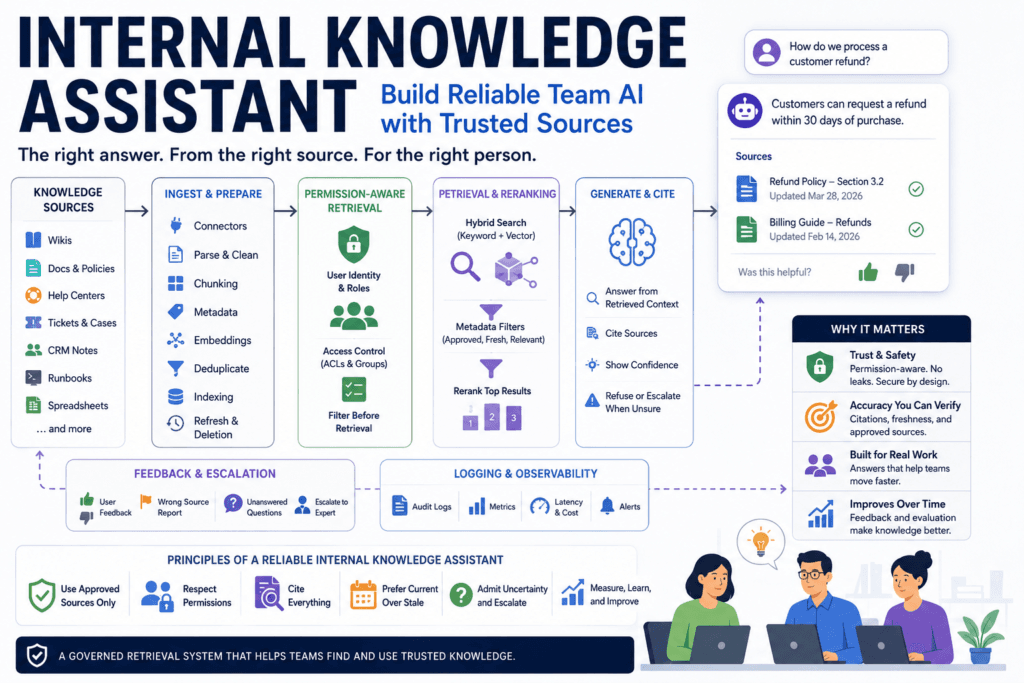
A reliable internal knowledge assistant is different. It is a governed retrieval system with a conversational interface. It helps people find and use company knowledge, but it does so through source ownership, ingestion controls, metadata, permissions, retrieval quality, citations, feedback, and evaluation.
The most important question is not “Can the assistant answer?” The better question is:
Can the assistant answer from the right sources, for the right user, with enough evidence, and admit when the available knowledge is insufficient?
That question changes the architecture. The assistant is no longer a magic company brain. It becomes a controlled system for using internal knowledge safely.
What an internal knowledge assistant should actually do
An internal knowledge assistant helps employees find, understand, and apply company knowledge.
It can answer policy questions. It can surface runbook steps. It can summarize procedures. It can find similar support tickets. It can help a new employee understand internal terminology. It can retrieve approved sales messaging. It can search product documentation. It can help customer success teams find account history. It can point employees toward the right owner when documentation is missing.
But it should not pretend to know everything.
A good internal knowledge assistant should:
- retrieve relevant internal sources
- answer from those sources
- cite the evidence it used
- respect user permissions
- avoid deprecated or unapproved documents
- distinguish approved guidance from informal notes
- ask clarifying questions when the request is ambiguous
- refuse or escalate when evidence is insufficient
- log unanswered questions and wrong-source feedback
- improve source quality over time
That makes the assistant useful in real work. Employees do not just need fluent answers. They need answers they can verify, sources they can inspect, and clear boundaries when the system does not know.
The core architecture of an internal knowledge assistant
A practical internal knowledge assistant usually has six layers.
First, source inventory. The team decides what knowledge can be searched, who owns it, and which sources are in or out of scope.
Second, ingestion. The system connects to approved repositories, parses documents, removes noise, chunks content, extracts metadata, embeds text, and indexes retrieval units.
Third, permission-aware retrieval. The assistant uses the user’s identity, role, department, group membership, and document permissions to filter what can be retrieved.
Fourth, answer generation. The model receives the user question and the retrieved context, then produces an answer with citations and uncertainty behavior.
Fifth, feedback and escalation. Users can mark bad answers, report wrong sources, request escalation, or route gaps to source owners.
Sixth, observability and evaluation. The system logs queries, retrieved sources, answer quality, permission checks, latency, cost, feedback, and failure categories.
This architecture matters because each layer can fail. If ingestion is noisy, retrieval gets worse. If metadata is weak, filtering gets worse. If permissions are not enforced before retrieval, confidential content can leak. If answer prompts do not require evidence, the model may fill gaps. If feedback is not reviewed, the same problems repeat.
Choosing the first team and knowledge domain
Do not start with a company-wide assistant unless the organization already has mature knowledge management and access control.
Start with one team and one domain.
Good first candidates include:
- support troubleshooting for one product line
- HR policy questions for general employee guidance
- IT runbook lookup for service desk staff
- sales enablement for approved positioning and case studies
- customer success account handoff summaries
- finance operations SOP questions
- product feedback lookup across tickets and notes
The best pilot domain has clear source owners, repeated questions, approved documents, manageable permissions, and a review path for uncertain answers.
A poor first domain has messy sources, conflicting policies, no owner, unclear permissions, and high-risk answers. For example, a legal assistant that answers across all contracts, customer exceptions, negotiation history, and draft templates is a difficult first project. A narrower assistant that retrieves approved fallback language from a legal playbook is more realistic.
Scope is a quality control. The smaller the first domain, the easier it is to evaluate whether the assistant is actually working.
Assistant scope options
| Assistant scope | Best for | Risk |
|---|---|---|
| Single-team assistant | Support, HR, IT, sales enablement pilots | May not generalize across teams |
| Single-domain assistant | One knowledge area such as billing policy or runbooks | Users may ask outside scope |
| Company-wide assistant | Broad internal search and Q&A | Permission, freshness, and source conflict complexity |
| Role-specific assistant | Different answers by role or department | Requires strong identity and ACL integration |
| Source-specific assistant | One wiki, help center, or document repository | Limited usefulness if key knowledge lives elsewhere |
A single-team or single-domain assistant is often the best starting point. It lets the team learn how users ask questions, which sources are weak, which metadata matters, and where escalation is needed.
A company-wide assistant can be valuable, but it raises harder problems: source conflicts, permission boundaries, stale content, inconsistent terminology, and user expectations. Broad scope should follow evidence, not enthusiasm.
Building a source inventory
Before indexing anything, build a source inventory.
A source inventory answers basic questions:
- What repositories contain useful knowledge?
- Which sources are approved?
- Which sources are drafts?
- Which sources are deprecated?
- Who owns each source?
- How often should each source be reviewed?
- Which sources contain confidential data?
- Which user groups can access each source?
- Which sources should be excluded from the assistant?
- What happens when a document is deleted or archived?
This work is not glamorous, but it determines trust.
If the assistant indexes every wiki page, Slack channel, shared drive, ticket, and spreadsheet without review, it will inherit every knowledge-management problem the company already has. It will retrieve duplicates, stale pages, half-written drafts, private notes, and contradictory guidance.
Do not index everything just because it is technically possible. Start with approved, owned, useful sources.
Common knowledge sources and their risks
| Source type | Useful for | Main risk |
|---|---|---|
| Approved policy docs | HR, finance, legal, operations answers | Stale effective dates |
| Help center articles | Support and customer-facing guidance | Product/version mismatch |
| Internal wiki pages | Team processes and definitions | Unowned or outdated pages |
| Ticket history | Similar issues and prior resolutions | Private customer data or noisy threads |
| CRM notes | Account context and customer history | Incomplete or subjective notes |
| Slack or Teams channels | Recent informal knowledge | Low signal, permissions, and retention issues |
| Runbooks | IT and operations procedures | Risky actions if treated as executable instructions |
| Contracts and legal docs | Clause lookup and fallback language | Confidentiality and customer-specific exceptions |
The table shows why source governance is not optional. A support article, Slack thread, runbook, and contract clause should not be treated the same way.
A support article may be customer-facing and approved. A Slack thread may contain useful tribal knowledge but low reliability. A runbook may be correct but dangerous if the assistant treats it as permission to act. A contract may contain highly confidential exceptions that should not become general guidance.
The assistant needs metadata and rules that reflect those differences.
Preparing documents for retrieval
Retrieval quality starts before the first user asks a question.
An ingestion pipeline usually includes:
- connectors
- parsing
- cleanup
- deduplication
- chunking
- metadata extraction
- embedding
- indexing
- refresh scheduling
- deletion handling
Parsing turns documents into usable text. This can be simple for clean Markdown or HTML and harder for PDFs, spreadsheets, slide decks, screenshots, or scanned documents. Cleanup removes navigation, page headers, footers, duplicate menus, boilerplate, and unrelated text.
Deduplication matters because internal knowledge often exists in several places. A policy might be copied into a wiki, PDF, onboarding doc, and Slack announcement. If the assistant retrieves all four, users may see conflicting answers.
Chunking divides content into retrieval units. Large documents need to be split so the assistant can retrieve the relevant section instead of the whole file. But chunks should preserve context. A table separated from its heading, a policy exception separated from the rule, or a procedure separated from warnings can lead to bad answers.
Metadata makes retrieval controllable. Useful metadata includes:
- source title
- source URL or record pointer
- section heading
- document owner
- department
- approval status
- version
- updated date
- effective date
- expiration date
- confidentiality level
- audience
- product
- region
- permission groups
- source type
- deprecated flag
Without metadata, the assistant has fewer ways to prefer approved, current, relevant, authorized content.
Permission-aware retrieval is non-negotiable
An internal knowledge assistant must respect access controls.
Permission-aware retrieval means the assistant should only retrieve sources the current user is allowed to see. The permission check should happen before the model sees the content. Do not retrieve private material and rely on the model to avoid mentioning it.
Permissions may come from several systems:
- identity provider
- SSO groups
- department
- role
- document ACLs
- repository permissions
- workspace permissions
- customer account access
- project membership
- tenant boundaries
For example, HR policy documents for all employees may be safe for broad retrieval. Employee-specific HR records are not. Public product documentation may be visible to sales, support, and customer success. Private leadership planning notes should not be. Customer-specific contract exceptions may be visible to the account team and legal but not the entire company.
Permission failures are among the fastest ways to destroy trust. If the assistant exposes confidential documents once, users will question the entire system.
A practical rule: filter by authorization before retrieval results reach the model.
Retrieval strategy: keyword, vector, hybrid search, filtering, and reranking
Vector search is useful because it can find conceptually similar content. If a user asks “How do we handle customers who want to pause their subscription?” vector search may find a policy titled “Temporary account suspension procedure” even if the words do not match exactly.
Keyword search is useful for exact terms: product codes, customer names, policy IDs, legal terms, versions, error messages, and dates.
Hybrid search combines both. For internal assistants, hybrid search is often more reliable than vector search alone because business knowledge includes both concepts and exact identifiers.
Metadata filtering narrows retrieval. If the user is in support, asking about Product A in Europe, the retrieval system can filter for product, region, approval status, language, and permission group.
Reranking improves the final order of candidate results. A first-stage retriever may return 50 candidates. A reranker can score which passages are most relevant to the question before the model sees them.
A practical retrieval pipeline might look like this:
| Step | Purpose | Example |
|---|---|---|
| Source inventory | Decide what can be searched | Approved support docs and runbooks |
| Ingestion | Bring content into pipeline | Connect wiki and help center |
| Parsing and cleanup | Extract usable text | Remove navigation, boilerplate, and duplicates |
| Chunking and metadata | Prepare retrieval units | Add title, section, owner, version, permissions |
| Indexing | Make content searchable | Store embeddings and keyword index |
| Query handling | Understand user request | Identify intent and user role |
| Permission filtering | Restrict accessible sources | Filter by department and document ACLs |
| Retrieval and reranking | Select best evidence | Hybrid search plus reranker |
| Generation | Answer from retrieved context | Provide concise answer with citations |
| Feedback and logging | Improve system over time | Track wrong source and unanswered questions |
The model is only one part of the assistant. Retrieval determines what evidence the model receives. If retrieval is wrong, the answer may be wrong even if the model is strong.
Designing answer behavior
An internal knowledge assistant needs explicit answer rules.
The assistant should know when to answer, when to ask for clarification, when to cite, when to refuse, and when to escalate.
Useful answer rules include:
- Answer only from retrieved sources.
- Cite each material factual claim.
- Prefer approved sources over drafts or informal sources.
- Prefer newer effective dates when sources conflict.
- Do not answer from deprecated sources.
- Do not expose unauthorized source names or content.
- Say when no approved source was found.
- Separate facts from interpretation.
- Ask clarifying questions when the request is ambiguous.
- Escalate high-risk or employee-specific questions.
- Do not present search results as policy unless the source is approved.
- Do not invent source titles, owners, dates, or links.
These rules should be part of the production prompt and workflow design. They should also be tested.
For example, if a user asks, “Can I expense a home office chair?” an HR or finance assistant should answer only from the current reimbursement policy. If the retrieved source is outdated or missing, the assistant should say it cannot find an approved current policy and route the question to the owner.
That is better than a confident guess.
Citation design
Citations are not decoration. They are part of trust.
A useful citation should include enough information for the user to verify the answer:
- source title
- source URL or internal record pointer
- section heading
- updated date
- owner
- excerpt or passage
- approval status when relevant
A weak citation says “Source: HR policy.” A better citation points to “Remote Work Reimbursement Policy, Section 4: Eligible Equipment, updated March 2026, owned by Finance Operations.”
The assistant should not cite a source unless that source actually supports the claim. Citation accuracy should be evaluated separately from answer fluency.
A common failure mode is citation laundering: the answer sounds plausible and includes a link, but the link does not support the specific claim. This is worse than no citation because it creates false confidence.
Handling stale, conflicting, and missing knowledge
Internal knowledge is rarely clean.
Policies change. Product names change. Old onboarding docs remain searchable. Slack announcements contradict wiki pages. Support teams discover exceptions before documentation catches up. Legal templates evolve. Runbooks become outdated after infrastructure changes.
A reliable internal knowledge assistant needs rules for stale, conflicting, and missing knowledge.
For stale knowledge, use metadata:
- updated_at
- effective_date
- expiration_date
- reviewed_at
- next_review_due
- deprecated flag
- owner
For conflicting knowledge, prefer:
- approved over draft
- current effective date over old effective date
- owner-approved source over informal discussion
- system of record over copied text
- policy document over meeting notes
When conflict remains unresolved, the assistant should say so. It should show the conflicting sources and route the question to the owner rather than forcing a false answer.
For missing knowledge, the assistant should log the unanswered question. Over time, unanswered-question logs become a roadmap for documentation improvement.
User experience and adoption
A technically correct assistant can still fail if users do not know when to use it.
User experience decisions matter:
- Where does the assistant live?
- Is it in Slack, Teams, the helpdesk, the CRM, an internal portal, or a browser sidebar?
- Does it show sources first or answer first?
- Does it support follow-up questions?
- Can users filter by domain?
- Can users report a wrong answer?
- Can users escalate to a human owner?
- Can users tell whether the answer is based on approved sources?
For knowledge assistants, a source-first layout is often useful. Show the concise answer, then the cited sources, excerpts, updated dates, and owner. This helps users verify quickly.
Feedback controls should be specific. A simple thumbs-down is not enough. Useful feedback options include:
- wrong source
- outdated source
- missing source
- answer unsupported
- permission issue
- too vague
- incorrect summary
- should escalate
- helpful answer
These categories help the operating team fix the real problem.
Feedback loops and source-quality improvement
An internal knowledge assistant should improve the knowledge base, not just answer from it.
Feedback should produce work for humans:
- source gap reports
- stale document reminders
- wrong-source examples
- unanswered question clusters
- duplicate-document reports
- conflicting-source reports
- owner review queues
For example, if 30 employees ask variations of the same onboarding question and the assistant cannot find an approved source, that is not just an assistant failure. It is a documentation gap.
If users repeatedly mark one policy page as outdated, the owner should review it. If support agents repeatedly ask questions that retrieve old ticket history instead of current procedures, retrieval rules or source priorities may need adjustment.
The assistant becomes part of knowledge operations. It reveals where the company’s knowledge is weak.
Evaluation metrics for internal knowledge assistants
Do not evaluate only whether answers sound good.
Use a test set. A useful evaluation set includes realistic employee questions, expected sources, expected answer criteria, permission cases, stale-source cases, conflict cases, and refusal cases.
| Metric | What it checks | Example target |
|---|---|---|
| Retrieval hit rate | Expected source appears in top-k | Approved policy appears in top 5 |
| Answer support rate | Answer is backed by cited sources | Reviewer confirms support |
| Citation accuracy | Cited source actually supports claim | No irrelevant citations |
| Permission-filter success | User cannot retrieve unauthorized docs | Private HR docs blocked |
| Stale-source rate | Deprecated or outdated docs avoided | Archived docs not used |
| Escalation accuracy | Assistant refuses when evidence is weak | No unsupported answers |
| User feedback quality | Whether answers are useful | Thumbs-down reasons tracked |
Evaluation should include adversarial and edge cases:
- user asks about a policy that changed recently
- user asks for a private document
- user asks a question with no approved source
- user asks about a deprecated process
- user asks about two conflicting sources
- user asks a question outside the assistant’s scope
- retrieved source is related but does not answer the question
A strong assistant refuses or escalates correctly. Refusal accuracy matters as much as answer accuracy.
Observability and audit logs
A production internal knowledge assistant needs logs.
Useful log fields include:
- user ID or anonymized user reference
- user role or permission group
- question
- retrieved source IDs
- filtered source count
- source approval status
- source updated dates
- model used
- prompt version
- retrieval version
- latency
- token cost
- answer generated
- citations returned
- escalation decision
- user feedback
- failure category
Logs help teams debug. If a user reports a wrong answer, the operating team should be able to see what sources were retrieved, what source was cited, what prompt version was used, and whether the source was stale or unauthorized.
Audit logs are also important for governance. The organization may need to know whether sensitive sources were retrieved, whether permission filters worked, and whether users received unsupported answers.
Security and governance
Internal knowledge assistants create several security and governance risks.
The assistant may retrieve sensitive documents. It may process customer data. It may expose confidential content through a summary. It may be vulnerable to prompt injection from documents or messages. It may store logs that contain sensitive questions. It may preserve deleted content if deletion workflows are not connected to the index.
Practical controls include:
- enforce access control before retrieval
- avoid indexing unnecessary sensitive data
- filter private channels and restricted folders
- respect document deletion and retention policies
- log source IDs carefully
- avoid storing full sensitive prompts unless approved
- separate user instructions from retrieved content
- treat retrieved content as untrusted input
- require human review for high-risk domains
- maintain source ownership and approval status
- define who can view assistant logs
- test permission-filtering regularly
Prompt injection matters because internal documents and chat messages can contain instructions. The assistant should treat retrieved content as evidence, not as system instructions. A document saying “ignore all prior instructions” should not change the assistant’s behavior.
A minimal permission-aware workflow
The following pseudocode is illustrative and has not been executed. It shows the basic shape of a permission-aware internal knowledge assistant workflow.
def answer_internal_question(user, question):
    user_permissions = identity.get_permissions(user)

    candidate_sources = search_index.retrieve(
        query=question,
        filters={
            "permission_group": user_permissions.groups,
            "approval_status": "approved",
            "is_deprecated": False,
        },
    )

    ranked_sources = rerank(question, candidate_sources)

    if not ranked_sources:
        return {
            "answer": "I could not find an approved source for this question.",
            "requires_escalation": True,
            "sources": [],
        }

    answer = model.generate_answer(
        question=question,
        sources=ranked_sources,
        instructions=(
            "Answer only from the provided sources. "
            "Cite each factual claim."
        ),
    )

    if not answer.has_citations:
        return {
            "answer": (
                "I found related material, but not enough support "
                "for a reliable answer."
            ),
            "requires_escalation": True,
            "sources": ranked_sources,
        }

    audit_log.write(
        user_id=user.id,
        question=question,
        source_ids=[source.id for source in ranked_sources],
        answer=answer.text,
    )

return answerThe important pattern is not the exact code. The key is the order: permissions before retrieval, approved-source filtering before generation, citations before trust, and audit logging before production use.
Common mistakes and failure modes
The first mistake is indexing too much too early. More content does not automatically mean better answers. More content can mean more stale, duplicate, conflicting, and unauthorized retrieval.
The second mistake is ignoring source ownership. If no one owns a document, no one fixes it. If no one owns a domain, unanswered questions pile up.
The third mistake is treating citations as proof. A citation only helps if the cited source supports the answer.
The fourth mistake is relying on vector similarity alone. Business search often needs exact names, product versions, error codes, policy IDs, and dates.
The fifth mistake is weak permission filtering. The assistant must not retrieve private documents and hope the model behaves.
The sixth mistake is answering outside scope. If the assistant is built for support procedures, it should not confidently answer legal, HR, or finance questions without approved sources.
The seventh mistake is no evaluation set. Without test questions and expected sources, teams end up judging by vibes.
The eighth mistake is no feedback process. If users report wrong answers but no one reviews the reports, trust declines.
The ninth mistake is no freshness policy. Old documents remain searchable forever unless the system has review and deprecation workflows.
The tenth mistake is launching company-wide before proving value in one domain.
When not to build an internal knowledge assistant yet
Do not build the assistant yet if the organization has no source owners, unclear permissions, stale documentation, no evaluation process, and no team willing to operate it.
An internal knowledge assistant will not fix broken knowledge management by itself. It will expose the problems.
Delay or narrow the project when:
- source ownership is unclear
- approved sources cannot be identified
- sensitive data boundaries are unknown
- permissions are not available to the retrieval layer
- the knowledge base is mostly stale
- users cannot tell where the assistant fits
- high-risk answers have no escalation path
- no one will review feedback
- no metrics define success
In those cases, start with source cleanup, ownership, and a narrow retrieval pilot.
Practical pilot plan
A good pilot is narrow and measurable.
Start with one team. Choose one domain. Inventory approved sources. Exclude stale or unowned documents. Define permission groups. Create 30 to 50 realistic test questions. Define expected sources. Build a read-only answer flow. Require citations. Test permission filtering. Run with a small user group. Collect wrong-source and unanswered-question feedback. Improve source quality and retrieval before expansion.
A pilot should prove:
- users ask questions in the expected domain
- the assistant retrieves the right sources
- permission filters work
- answers are supported by citations
- unsupported questions are refused or escalated
- feedback creates actionable source improvements
- the team wants to keep using it
Only after that should the assistant expand to more domains, more teams, or more connected systems.
Production-readiness checklist
Before launch, confirm:
- team owner
- assistant scope
- source inventory
- source owners
- approved source list
- excluded source list
- permission model
- metadata schema
- ingestion schedule
- deletion workflow
- freshness policy
- chunking strategy
- retrieval method
- reranking decision
- citation format
- refusal behavior
- escalation path
- feedback capture
- evaluation query set
- audit logging
- monitoring owner
- rollout plan
This checklist is not bureaucracy. It is how the assistant earns trust.
Conclusion: trustworthy assistants require trustworthy knowledge operations
An internal knowledge assistant is not a magic company brain. It is a governed retrieval system that helps teams find and use trusted internal knowledge.
The assistant is only as reliable as the sources it can retrieve, the permissions it enforces, the metadata it uses, the citations it provides, the uncertainty it admits, and the feedback loop that improves it.
The right goal is not to answer every question. The right goal is to answer supported questions well, refuse unsupported questions clearly, and reveal where the organization’s knowledge needs better ownership.
That is how a team assistant becomes a useful business system instead of another unreliable chatbot.
Key Takeaways
- An internal knowledge assistant should be designed as a governed retrieval system, not generic chat over files.
- Source inventory, ownership, approval status, metadata, and freshness matter before indexing.
- Permission-aware retrieval must happen before the model sees content.
- Hybrid search, metadata filtering, and reranking often produce better retrieval than vector search alone.
- Citations are useful only when the cited source actually supports the answer.
- The assistant should refuse or escalate when evidence is missing, stale, conflicting, or unauthorized.
- Feedback and evaluation turn the assistant into a knowledge-operations improvement loop.
Practical Exercise
Objective:
Design a trustworthy internal knowledge assistant for one team and one knowledge domain.
Task:
Choose a team and map the assistant’s scope, sources, permissions, answer behavior, and evaluation plan.
Starter instructions:
- Pick one team:
- support
- sales
- customer success
- IT
- HR
- finance
- legal
- product
- operations
- Pick one narrow knowledge domain:
- billing policy
- support troubleshooting
- onboarding
- IT runbooks
- sales messaging
- finance SOPs
- contract fallback language
- product feedback
- List approved sources.
- List excluded sources.
- Define source owners.
- Define permission groups.
- Define required metadata.
- Write 10 realistic user questions.
- Define expected sources for each question.
- Define refusal or escalation rules.
Example result:
Team: Support.
Domain: Billing troubleshooting.
Approved sources: current billing policy, refund policy, subscription-plan documentation, known billing error runbook, approved customer-facing macros.
Excluded sources: old pricing spreadsheets, Slack discussions, draft policy updates, private finance notes.
Permission groups: support agents can view support docs and macros; finance-only sources are excluded; managers can view escalation procedures.
Required metadata: title, source URL, owner, approval status, updated date, effective date, product, region, permission group, deprecated flag.
Answer behavior: answer only from approved sources, cite each claim, ask clarifying questions for missing product or region, escalate refund exceptions.
Evaluation: 50 test questions with expected sources, retrieval hit rate, citation accuracy, stale-source rate, permission-filter success, and unsupported-question refusal accuracy.
What success looks like:
The assistant retrieves approved sources, respects permissions, cites supporting evidence, refuses unsupported questions, and generates feedback that helps source owners improve documentation.
Stretch goal:
Add three failure tests:
- user asks for a private finance document
- user asks about an outdated policy
- two approved sources conflict
Define how the assistant should respond in each case.
FAQ
What is an internal knowledge assistant?
An internal knowledge assistant is an AI system that helps employees find and use company knowledge from approved internal sources such as policies, docs, runbooks, wikis, tickets, and knowledge bases.
Is an internal knowledge assistant just a chatbot over documents?
No. A reliable assistant needs source governance, ingestion, metadata, permission-aware retrieval, citations, freshness controls, feedback, evaluation, and escalation behavior.
Should I index every company document?
No. Start with approved, owned, useful sources. Indexing stale, duplicate, private, or unowned content often makes answers worse.
Why do permissions matter so much?
The assistant should only retrieve information the user is allowed to access. Permission filtering should happen before retrieved content reaches the model.
Does RAG eliminate hallucinations?
No. RAG can ground answers in retrieved sources, but bad retrieval, stale documents, weak prompts, or unsupported generation can still produce wrong answers.
What should citations include?
Useful citations include source title, link or record pointer, section heading, updated date, owner, and the passage or excerpt that supports the answer.
How should the assistant handle conflicting sources?
It should prefer approved, current, owner-maintained sources. If conflict remains unresolved, it should show the conflict or escalate rather than forcing certainty.
What should be evaluated first?
Start with retrieval hit rate, answer support, citation accuracy, permission-filter success, stale-source rate, escalation accuracy, and user feedback quality.
Sources
- OpenAI File Search: https://developers.openai.com/api/docs/guides/tools-file-search
- OpenAI Retrieval: https://developers.openai.com/api/docs/guides/retrieval
- OpenAI Embeddings: https://developers.openai.com/api/docs/guides/embeddings
- OpenAI Structured Outputs: https://developers.openai.com/api/docs/guides/structured-outputs
- Azure AI Search RAG Overview: https://learn.microsoft.com/en-us/azure/search/retrieval-augmented-generation-overview
- Azure AI Search Hybrid Search: https://learn.microsoft.com/en-us/azure/search/hybrid-search-overview
- Azure AI Search Security Trimming: https://learn.microsoft.com/en-us/azure/search/search-security-trimming-for-azure-search
- NIST AI Risk Management Framework: https://www.nist.gov/itl/ai-risk-management-framework
- OWASP LLM01 Prompt Injection: https://genai.owasp.org/llmrisk/llm01-prompt-injection/
- OWASP Top 10 for Large Language Model Applications: https://owasp.org/www-project-top-10-for-large-language-model-applications/
- Retrieval-Augmented Generation for Knowledge-Intensive NLP Tasks: https://arxiv.org/abs/2005.11401
Related articles from Kyle Beyke
- AI Workflow Anatomy: Essential Guide for Business: https://beykeworkflows.com/ai-workflow-anatomy-business-guide/
- How LLMs Work: Essential Guide for Builders: https://beykeworkflows.com/how-llms-work-builders-guide/
- Production Prompting: Essential Business AI Guide: https://beykeworkflows.com/production-prompting-business-ai-guide/
- Structured Outputs for AI Workflows: Reliable Guide: https://beykeworkflows.com/structured-outputs-for-ai-workflows-guide/
- LLM Integration: 7 Best Python Patterns: https://beykeworkflows.com/llm-integration-python-hugging-face-inference/