
Lesson
n8n workflow automation for practical business and AI workflows
Learning Objectives
- Define n8n in plain English and explain where it fits in workflow automation.
- Identify the core parts of an n8n workflow: triggers, nodes, data, credentials, webhooks, executions, and errors.
- Compare n8n with no-code automation tools, custom scripts, RPA, BPM systems, and AI agent frameworks.
- Evaluate whether a business process is a good candidate for n8n automation.
- Design a first workflow that includes validation, routing, logging, and human review.
- Recognize common production failure modes before a workflow affects real customers or business records.
Prerequisites
No prior n8n experience is required. It helps to understand basic business processes, common business systems such as email, CRM, ticketing, spreadsheets, or document storage, and the general idea that APIs allow software systems to exchange data.
Main Lesson Body
What Is n8n Workflow Automation?
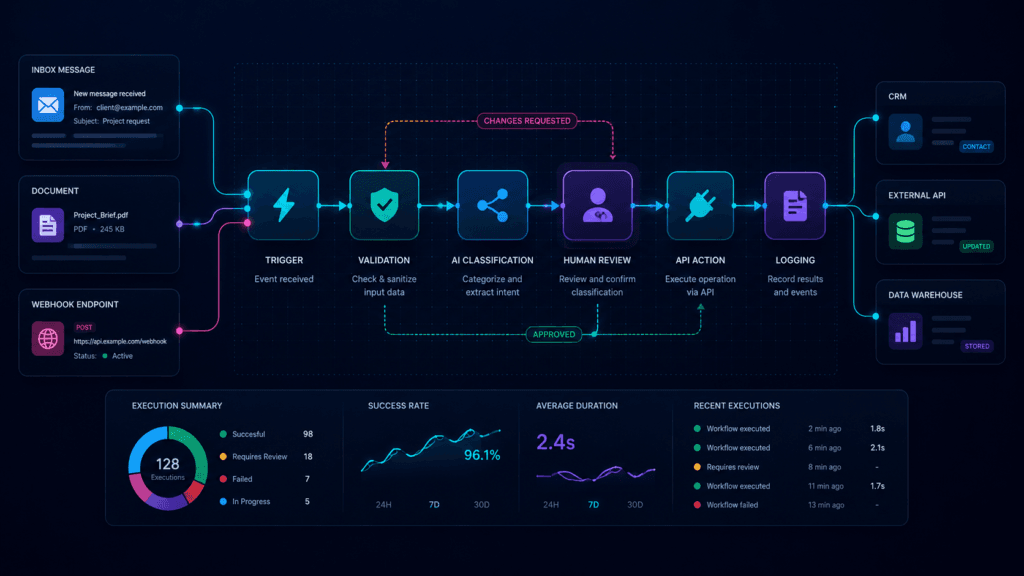
n8n workflow automation is a way to connect triggers, apps, APIs, data transformations, AI calls, decisions, and actions into visible workflows. In plain English: n8n lets you design an automated process as a chain of connected steps.
A workflow might start when a form is submitted, an email arrives, a webhook receives data, or a scheduled job runs. Then n8n passes data through nodes that validate inputs, call APIs, classify text, send notifications, update systems, or route work to a person.
That makes n8n useful for business automation because many real business problems are not solved by a single AI prompt or one script. They require a repeatable process: receive work, understand it, decide what to do, take the right action, handle exceptions, and keep a record.
The important mental model is this:
n8n is not the business process. n8n is the orchestration layer that helps run the process once the process is clear enough to automate.
That distinction matters. If the underlying process is vague, inconsistent, or politically unresolved, n8n will not fix it. It may only automate the confusion faster.
Why n8n Matters for Business Workflows
Many companies have the same operational problem in different forms: information arrives in one place, needs to be interpreted, and must be moved somewhere else.
A sales lead enters a website form and needs to be added to a CRM. A support email needs to become a ticket. A document needs to be classified, extracted, checked, and routed. A weekly report needs to gather information from several systems. A customer request needs to be summarized before a person responds.
Without automation, these workflows often become copy-paste work, inbox monitoring, spreadsheet updates, status chasing, and manual handoffs. That creates delays, errors, and invisible work.
n8n becomes useful when the workflow has:
- A clear trigger.
- Known input data.
- A repeatable sequence of steps.
- Systems that can be accessed through integrations or APIs.
- Rules or AI tasks that can be bounded.
- Review points for risky decisions.
- A business owner who can define what success looks like.
This is where n8n fits well with practical AI implementation. AI can classify, summarize, extract, draft, or choose among options, but the AI step still needs a surrounding workflow. If you are still learning that broader pattern, the article on how an AI workflow is structured inside a business system is the natural companion to this lesson.
The Core n8n Building Blocks
An n8n workflow is made of connected nodes. The official n8n documentation defines a workflow as a collection of nodes connected together to automate a process. That simple definition is enough to start, but each word matters.
Workflow
A workflow is the full automated process. It has a beginning, middle, and end. In a business context, the workflow should correspond to a real operational process, not just a tool experiment.
Example: “When a contact form is submitted, validate it, classify the request, add it to the CRM, notify the right person, and log the result.”
Node
A node is one step in the workflow. One node might receive data. Another might transform it. Another might call an API. Another might send an email.
Think of nodes as individual workstations on a digital assembly line. Each station should have a specific job.
Trigger
A trigger starts the workflow. Triggers can be manual, scheduled, app-based, or webhook-based. For example, a workflow might start when someone submits a form or when a new row appears in a spreadsheet.
Webhook
A webhook is a URL that another system can call to start a workflow or send data into it. n8n’s Webhook node supports separate testing and production URLs, and it can be configured with authentication methods such as basic auth, header auth, JWT auth, or no authentication.
For business use, that last option deserves caution. A public webhook with no meaningful authentication can become a risk if it accepts sensitive actions or writes to important systems.
Credential
A credential stores access information for another service, such as an API key, OAuth connection, or service account. Credentials are what let workflows read from or write to external systems.
The business translation is simple: credentials are permissions. Poorly scoped credentials can turn a small workflow mistake into a larger operational or security problem.
Execution
An execution is a workflow run. Execution history is useful because it lets you inspect what happened, what data moved through the workflow, and where an error occurred.
Error path
An error path defines what happens when something fails. Without an error path, a workflow may fail silently or leave work half-finished.
Where n8n Fits Compared With Other Approaches
n8n is not the only way to automate work. It sits between simple no-code automation and custom software engineering. Understanding that middle position helps teams use it well.
| Approach | What It Does Well | What It Does Not Do | Business Implication |
|---|---|---|---|
| n8n | Orchestrates visible workflows across apps, APIs, data, logic, and AI calls | Does not fix unclear processes or guarantee correct AI outputs | Strong fit when the process is understood and needs flexible integration |
| Zapier or Make | Connects common SaaS apps quickly with low-code or no-code flows | May be less flexible for complex branching, self-hosting, custom logic, or technical control depending on the case | Strong fit for simpler SaaS-to-SaaS automations |
| Custom scripts | Provide full control over code, testing, deployment, and architecture | Can take longer to build and may be harder for nondevelopers to inspect | Strong fit for critical, custom, or deeply integrated systems |
| RPA tools | Automate screen-based tasks in user interfaces | Can be fragile when interfaces change and may be less ideal when APIs exist | Useful for legacy systems without clean API access |
| BPM systems | Model and manage formal business processes | Can be heavier than needed for smaller automation projects | Useful for formal, enterprise-grade process management |
| AI agent frameworks | Let models reason, use tools, and make step-by-step decisions | Do not automatically provide business governance, permissions, or process ownership | Useful for reasoning-heavy systems, but still need workflow controls |
This table is not a ranking. It is a fit guide.
Use n8n when the workflow needs to be visible, connected, and flexible, but does not yet require a fully custom application. Use custom code when the workflow needs strict software engineering control, advanced testing, complex state management, or deep product integration. Use simpler automation tools when the task is straightforward and the business risk is low.
Good Use Cases for n8n
n8n is strongest when the process is repeatable and system-connected.
Good candidates include:
- Lead intake and routing.
- Contact form processing.
- CRM enrichment.
- Support ticket triage.
- Internal notifications.
- Report generation.
- Document intake routing.
- AI-assisted classification and summarization.
- Spreadsheet-to-system synchronization.
- API-to-API integration.
- Approval workflows.
- Research or monitoring workflows.
- Low-risk internal operations automations.
For AI workflows, n8n is especially useful when the AI task is one part of a larger process. Examples include classifying an inbound message, summarizing a long email, extracting fields from a document, generating a draft response, or deciding which queue should receive a request.
If you are deciding which workflows deserve automation at all, start with how to choose strong AI and automation use cases. n8n should usually come after use-case selection, not before it.
Poor Use Cases for n8n
n8n is not a good fit for every problem.
Be careful when the process:
- Has no clear owner.
- Changes every time it runs.
- Requires complex custom user interfaces.
- Requires strict transactional guarantees.
- Depends on unreliable or unstructured source data.
- Needs deep application logic better handled in code.
- Would create serious harm if it acts incorrectly.
- Requires sensitive write-back without human review.
- Involves credentials that cannot be scoped safely.
- Has no monitoring or support plan after launch.
A bad n8n workflow usually starts with the tool instead of the process. Someone says, “Let’s automate this,” before defining what “this” actually means.
A better starting question is:
“What exact business event should trigger the workflow, what data should it receive, what should happen next, what can go wrong, and who owns the result?”
How n8n AI Workflows Should Be Framed
n8n includes AI workflow capabilities, including AI Agent nodes and tools. The AI Agent documentation describes agents as systems that receive data, make decisions, and act within an environment using tools and APIs. n8n also states that an AI Agent node must connect to at least one tool sub-node.
That is useful, but it should not cause teams to skip basic workflow design.
In practical business terms, an AI step inside n8n should be treated as one controlled component in a larger process. It may classify, summarize, extract, draft, or choose a route. The workflow still needs deterministic checks around that model output.
A safe pattern looks like this:
- Receive input.
- Validate required fields.
- Prepare the AI prompt or context.
- Ask the model for a bounded output.
- Validate the output format.
- Route low-confidence or high-risk cases to review.
- Take a downstream action only when the output passes checks.
- Log what happened.
This is why structured outputs matter in automated AI workflows. Free-form text is useful for a person reading an answer. It is less reliable when another system must act on the result. For routing, extraction, or write-back, the workflow should prefer constrained categories, schemas, validation rules, and exception paths.
n8n as a Business Workflow Layer
A useful way to picture n8n is as a controlled workflow layer between business events and business systems.
A customer submits a form. A vendor emails a document. A support ticket arrives. A scheduled report is due. These events happen at the edge of the business. n8n can receive the event, normalize the data, decide what path it should follow, call services, and update systems.
The business value comes from reducing the gap between “something happened” and “the right next step occurred.”
That does not mean everything should be fully automated. Some workflows should produce a draft. Some should prepare a review packet. Some should route work to a person. Some should update records automatically only after passing strict validation.
A good n8n workflow makes these boundaries visible.
| Business Use Case | Implementation Requirement | Risk If Ignored |
|---|---|---|
| Lead intake and routing | Form or webhook trigger, validation, duplicate check, CRM update, owner notification | Duplicate records, lost inquiries, poor follow-up |
| Support ticket triage | Email or helpdesk trigger, classification, urgency rules, review path | Misrouted tickets, wrong priority, frustrated customers |
| Document intake | File capture, document classification, extraction schema, evidence preservation, exception queue | Bad data, missing evidence, unsafe write-back |
| Internal report generation | Scheduled trigger, source-system reads, data transformation, delivery, logging | Stale reports, broken assumptions, silent failure |
Security and Production Reality
The fastest way to misuse n8n is to treat workflow automation as a private productivity hack when it is actually touching real business systems.
Security and operations matter because workflows often sit near sensitive data and privileged actions. A workflow may read customer records, call an API, send messages, update a CRM, create tickets, or move documents. That means permissions, authentication, and logging are not optional details.
For webhook workflows, authenticate incoming requests when the workflow performs meaningful actions. For credentials, use the least privilege that still allows the workflow to do its job. For self-hosted n8n, plan for operational responsibilities such as SSL, SSO or two-factor authentication where appropriate, security audits, API exposure, task runner hardening, and execution-data controls.
OWASP’s API Security Top 10 is a useful reminder that broken authorization and broken authentication are persistent API risks. In workflow automation, those risks show up when a workflow endpoint accepts requests it should reject or when a credential can do more than the workflow requires.
AI adds another layer. NIST’s AI Risk Management Framework emphasizes trustworthiness considerations across the design, development, use, and evaluation of AI systems. For n8n AI workflows, that means the model call is not the only concern. You also need to manage the workflow context, the action being taken, the human review point, the logs, and the consequences of error.
Demo Workflow vs. Production Workflow
A demo workflow proves that something can work once. A production workflow must work repeatedly, visibly, and safely.
| Demo Workflow | Production Workflow |
|---|---|
| Uses sample data | Handles real data variation |
| Runs manually | Has a clear trigger and activation plan |
| Assumes success | Handles errors and exceptions |
| Uses broad credentials | Uses scoped credentials |
| Accepts AI output directly | Validates AI output before action |
| Has no owner | Has business and technical ownership |
| Measures excitement | Measures cycle time, error rate, review rate, and completion |
That is the core lesson for any business team evaluating n8n. The canvas can make workflow design feel simple, but the operational questions still matter.
How to Think About Your First n8n Workflow
A good first workflow should be useful but not dangerous.
Do not start with a workflow that sends customer-facing messages automatically, deletes records, changes financial data, or updates critical systems without review. Start with a workflow that saves time while keeping a human in control.
Good first workflows include:
- Internal notification after a form submission.
- Draft creation for review.
- Lead enrichment with human approval.
- Support ticket summary added as an internal note.
- Document classification routed to a person.
- Weekly report collection and delivery.
- Spreadsheet row validation with exception alerts.
A practical first workflow can follow this structure:
- Trigger: a form submission, webhook, schedule, or new record.
- Validate: check required fields and expected values.
- Transform: normalize names, dates, categories, or message content.
- Decide: use rules or an AI step to choose a route.
- Review: pause or notify a person when risk is high.
- Act: update a system, create a task, or send a message.
- Log: record what happened and whether it succeeded.
- Measure: track whether the workflow improved the process.
For model-based steps, use production prompting for business AI systems rather than casual chat-style prompts. A workflow prompt should define the task, input, allowed output, constraints, examples, and failure behavior.
What Leaders Should Evaluate
Leaders do not need to know every n8n node before approving an automation pilot. They do need to understand the operating model.
Ask:
- What business outcome does this workflow support?
- What manual work does it reduce?
- What system or record can it change?
- What data does it access?
- Who owns it after launch?
- What happens when it fails?
- Which actions require review?
- What metric tells us whether it helped?
If those questions cannot be answered, the team is probably not ready to automate the process.
What Technical Teams Should Verify
Technical teams should look past the workflow diagram and verify the system behavior.
Check:
- Authentication for incoming webhooks.
- Credential scope for each connected service.
- Input validation before processing.
- Output validation after AI steps.
- Retry and error behavior.
- Duplicate-event handling.
- Logging and data retention.
- Versioning or change control.
- Access controls for workflow editing.
- Monitoring and alerting.
- Safe fallback when an API is unavailable.
This is where visual automation still needs engineering discipline. n8n can speed implementation, but it does not remove the need to reason about system behavior.
A Better Mental Model
The best mental model for n8n is a digital operations assembly line.
A trigger starts the line. Each node performs one job. Data moves from station to station. Some stations apply rules. Some call APIs. Some ask AI to classify, summarize, or extract. Some require a person to approve the next step. The workflow ends by updating a system, notifying someone, logging a result, or routing an exception.
That model keeps the lesson grounded.
n8n is not valuable because it makes a workflow look impressive. It is valuable when the workflow makes a real business process clearer, faster, safer, and easier to operate.
Worked Example
AI-Assisted Business Inquiry Router
Imagine a small consulting business receives inquiries through a website form. Some are sales leads. Some are partnership messages. Some are support requests. Some are spam or incomplete. The current process is manual: someone checks the inbox, reads each message, decides what it is, copies details into a spreadsheet or CRM, and sends a notification.
A practical n8n workflow could automate the first layer without removing human judgment.
| Step | Purpose | Example |
|---|---|---|
| Webhook trigger | Receive form submission | Website sends name, email, company, message, and source URL |
| Validate input | Reject or flag incomplete submissions | Missing email or empty message goes to review |
| Normalize data | Clean and prepare fields | Trim whitespace, standardize lowercase email, format timestamp |
| Classify request | Identify inquiry type | Sales, support, partnership, spam, unclear |
| Confidence check | Decide whether automation is safe | Low-confidence classification goes to human review |
| Create record | Save structured data | Add to CRM, ticketing tool, or spreadsheet |
| Notify owner | Alert the right person | Send internal email or chat message |
| Log execution | Preserve traceability | Store classification, action taken, and review status |
The AI step should not be allowed to do everything. It can classify the message and summarize the request. The workflow should still validate the input, restrict output categories, route uncertain results to a person, and log the final action.
A safer version might not send any external response automatically. It could create a draft or internal note instead. That keeps the workflow useful while limiting business risk.
A simplified pseudo-pipeline would look like this:
receive_form_submission
validate_required_fields
normalize_contact_data
classify_inquiry_type
if classification_is_uncertain:
    send_to_review_queue
else:
    create_internal_record
    notify_assigned_owner
log_execution_result
The important point is not the exact node list. The important point is the control structure. A useful workflow has checks before action, not just action after input.
Implementation Checklist
| Step | What to Do | How to Verify It |
|---|---|---|
| Define the process | Write the current workflow as trigger, inputs, decisions, outputs, and owner | A stakeholder can confirm the workflow matches reality |
| Choose a low-risk first use case | Start with internal routing, drafting, notification, or review support | The workflow does not perform high-risk actions without review |
| Identify systems and credentials | List every app, API, account, token, and permission needed | Credentials are scoped to the minimum required access |
| Define input validation | Specify required fields, allowed values, and rejection rules | Bad inputs stop or route to review |
| Bound the AI task | Use AI for classification, summarization, extraction, or drafting, not unlimited action | The AI output has constrained categories or structure |
| Add human review | Decide which cases require approval before action | Sensitive, uncertain, or external-facing actions pause for review |
| Add error handling | Route failures to an alert, retry path, or queue | A test failure creates a visible notification |
| Log the result | Keep enough execution detail to troubleshoot and measure | The team can see what happened and why |
| Measure value | Track time saved, response time, error rate, review rate, and completion rate | Metrics are reviewed after real workflow runs |
| Assign ownership | Name a business owner and technical maintainer | Someone is responsible after launch |
Common Mistakes and Failure Modes
Starting With the Tool Instead of the Process
The most common mistake is opening n8n before defining the process. The workflow canvas can make a vague idea feel concrete too early.
Avoid this by writing the process in plain language first. Define the event, input, decision, action, exception, owner, and metric before building nodes.
Treating AI Output as Automatically Safe
AI outputs can be useful without being safe for direct write-back. A model may misclassify a request, summarize poorly, omit context, or produce output that looks structured but fails business rules.
Use validation, constrained categories, structured outputs, confidence thresholds where appropriate, and human review for sensitive actions.
Exposing a Webhook Without Enough Protection
Webhook workflows are powerful because they can receive events from other systems. They can also be risky if anyone can call them and trigger business actions.
Use authentication where appropriate, validate payloads, and avoid connecting public webhooks directly to privileged actions.
Using Overprivileged Credentials
A workflow that only needs to create a task should not use credentials that can delete records, export customer data, or administer an entire system.
Use the least privilege available. Review credentials when workflows change.
Skipping Error Paths
If an API call fails, a document is malformed, or an AI classification returns an unexpected value, the workflow needs a visible fallback. Silent failure is worse than no automation because people may assume the workflow handled the work.
Route failures to a queue, notification, or review process.
Confusing a Successful Test With Production Readiness
A workflow that runs once with clean sample data has not been proven in production. Real inputs are messy. APIs fail. Users submit incomplete forms. Permissions expire. Business rules change.
Test with realistic variation before trusting the workflow.
Forgetting Ownership
Every production workflow needs an owner. Someone must know what it does, why it exists, what systems it touches, and what to do when it breaks.
No-owner automation eventually becomes operational debt.
Knowledge Check
- What is the difference between a trigger node and an action node?
- Why should a webhook that performs business actions usually require authentication or validation?
- When is n8n a better fit than a one-off script?
- When might custom code be a better fit than n8n?
- Why should AI-generated workflow outputs be validated before write-back?
- What makes a workflow production-ready instead of only demo-ready?
Practical Exercise
Objective
Practice converting a real business process into an n8n-style workflow design.
Task
Choose one repetitive process from your work or business. Map it into a workflow with:
- Trigger
- Input data
- Required systems
- Credentials or permissions
- Processing steps
- Decision points
- AI or rule-based steps
- Output actions
- Human review points
- Error handling
- Success metrics
Starter Instructions
Pick a workflow that happens at least weekly, involves at least two tools or systems, and has a clear owner. Good examples include contact form routing, support email triage, weekly reporting, document intake, CRM updates, or internal approval requests.
Create a table like this:
| Workflow Element | Your Answer |
|---|---|
| Trigger | What event starts the workflow? |
| Input data | What information enters the workflow? |
| Systems involved | Which tools, databases, inboxes, or APIs are touched? |
| Validation | What must be checked before processing continues? |
| Decision logic | What rules or AI steps decide the route? |
| Human review | Which cases should pause for approval? |
| Action | What system is updated or who is notified? |
| Error handling | What happens when something fails? |
| Measurement | How will you know whether the workflow helped? |
What Success Looks Like
A successful answer should be specific enough that another person could understand the workflow without you explaining it live. It should clearly show where data enters, where decisions happen, what actions are taken, and where risk is controlled.
Reflection Questions
- Which step is most likely to fail in production?
- Which credential or permission would be riskiest if misused?
- Which action should require human review before write-back?
- What metric would prove this workflow is worth keeping?
Optional Stretch Goal
Add one AI step, such as classification, summarization, or extraction. Then define exactly how its output would be validated before the workflow takes action.
Key Takeaways
- n8n workflow automation is best understood as orchestration, not magic.
- A workflow should begin with a clear business process, not a tool experiment.
- n8n is useful when a process has a trigger, data, decisions, actions, and systems to connect.
- AI steps inside n8n should be bounded, validated, and surrounded by deterministic controls.
- Webhooks and credentials require security discipline because they can trigger real business actions.
- Demo workflows are not production workflows until they have error handling, logging, ownership, and review paths.
- The best first workflows are useful, low-risk, measurable, and easy to inspect.
- n8n creates value when it makes business work clearer, faster, safer, and easier to operate.
FAQ
What is n8n used for?
n8n is used to automate workflows across apps, APIs, data sources, and business systems. Common uses include lead routing, ticket triage, notifications, CRM updates, data synchronization, document intake, reporting, and AI-assisted classification or summarization.
Is n8n the same as Zapier?
No. n8n, Zapier, and Make all support workflow automation, but they differ in flexibility, technical depth, hosting options, integrations, and control. n8n is often attractive to technical teams that want visual automation with deeper customization and deployment control.
Do you need to know how to code to use n8n?
Not always. Many workflows can be built visually with nodes and configuration. Coding becomes useful when you need custom transformations, advanced logic, unusual API behavior, or more precise control than prebuilt nodes provide.
Can n8n build AI workflows?
Yes, n8n can orchestrate AI workflows by connecting AI-related nodes, tools, APIs, and ordinary business systems. The safest pattern is to treat AI as one step inside a controlled workflow with validation, human review, logging, and bounded actions.
Should a business use n8n Cloud or self-host n8n?
That depends on the team’s security, infrastructure, compliance, cost, and operational needs. n8n Cloud can reduce hosting burden. Self-hosting can provide more infrastructure control but requires technical responsibility for deployment, security, updates, and operations.
Is n8n safe for production business workflows?
n8n can be used for production workflows, but safety depends on implementation. Production use requires scoped credentials, authenticated webhooks where appropriate, input validation, error handling, logging, monitoring, human review for risky actions, and workflow ownership.
Sources
- n8n Official Website: https://n8n.io/
- n8n Docs: https://docs.n8n.io/
- n8n Workflows Documentation: https://docs.n8n.io/workflows/
- n8n Webhook Node Documentation: https://docs.n8n.io/integrations/builtin/core-nodes/n8n-nodes-base.webhook/
- n8n Credentials Documentation: https://docs.n8n.io/integrations/builtin/credentials/
- n8n AI Agent Node Documentation: https://docs.n8n.io/integrations/builtin/cluster-nodes/root-nodes/n8n-nodes-langchain.agent/
- n8n Tools AI Agent Node Documentation: https://docs.n8n.io/integrations/builtin/cluster-nodes/root-nodes/n8n-nodes-langchain.agent/tools-agent/
- n8n Hosting Documentation: https://docs.n8n.io/hosting/
- n8n Securing Documentation: https://docs.n8n.io/hosting/securing/overview/
- OWASP API Security Top 10: https://owasp.org/API-Security/editions/2023/en/0x00-header/
- NIST AI Risk Management Framework: https://www.nist.gov/itl/ai-risk-management-framework
Related articles from Kyle Beyke
- AI Workflow Anatomy: Essential Guide for Business: https://beykeworkflows.com/ai-workflow-anatomy-business-guide/
- AI Use Cases: 7 Smart Rules for Business: https://beykeworkflows.com/ai-use-cases-rules-business/
- Structured Outputs for AI Workflows: Reliable Guide: https://beykeworkflows.com/structured-outputs-for-ai-workflows-guide/
- Production Prompting: Essential Business AI Guide: https://beykeworkflows.com/production-prompting-business-ai-guide/
- Powerful Text Classification, Extraction, and Summarization with AI: https://beykeworkflows.com/text-classification-extraction-summarization-ai/
- AI Document Processing: Reliable Guide for Business: https://beykeworkflows.com/ai-document-processing-invoices-contracts-forms-business-guide/
- LLM Integration: 7 Best Python Patterns: https://beykeworkflows.com/llm-integration-python-hugging-face-inference/
- How Modern Agentic AI Systems Are Built for Business: https://beykeworkflows.com/how-modern-agentic-ai-systems-are-built-for-business/