
Lesson
When to use RAG, fine-tuning, and tool use in production AI systems.
Learning Objectives
- Distinguish RAG, fine-tuning, and tool use by the problem each pattern solves.
- Diagnose whether an AI failure is caused by missing knowledge, inconsistent behavior, or the need for live data or action.
- Choose an implementation pattern for realistic business workflows.
- Recognize when a hybrid design is better than choosing only one technique.
- Evaluate RAG, fine-tuning, and tool use separately before measuring the whole workflow.
Prerequisites
Helpful background: basic familiarity with LLMs, prompts, APIs, business systems, and AI workflows. You do not need deep machine learning experience, but it helps to understand that a production AI system is more than one model call. It usually includes input handling, context retrieval, model calls, validation, human review, downstream actions, logging, and evaluation.
Main Lesson Body
RAG vs fine-tuning is one of the most common architecture questions teams ask once they move beyond simple prompting. The missing third option is tool use. Many real business workflows do not need only retrieval or only a tuned model. They need a system that can decide when to look up knowledge, when to follow a learned behavior pattern, and when to call an external system.
The simplest useful mental model is this:
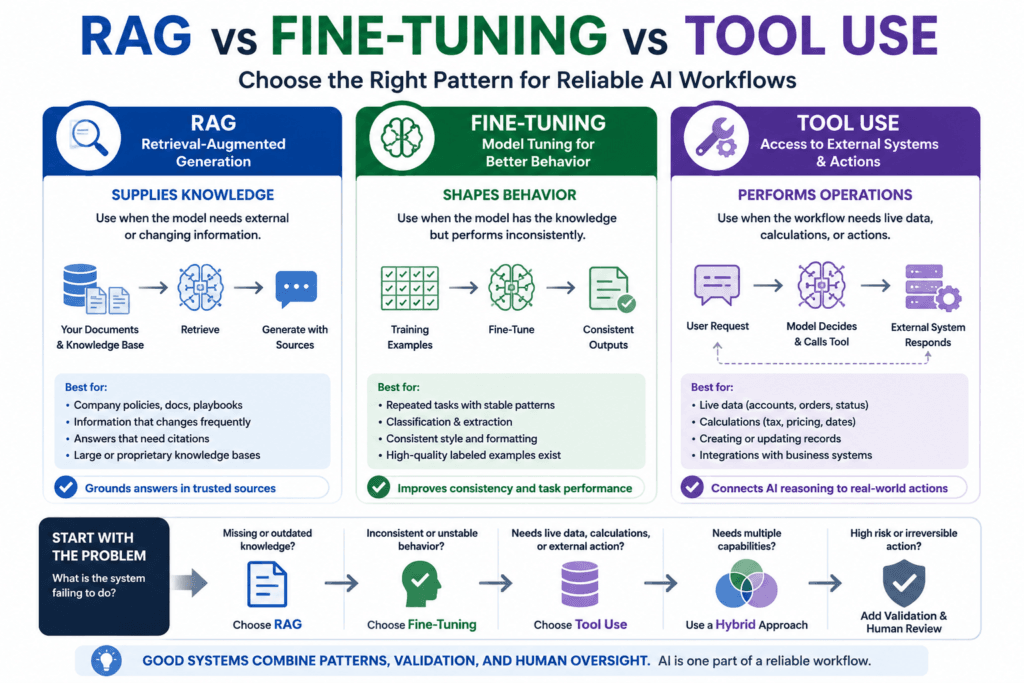
RAG supplies knowledge.
Fine-tuning shapes behavior.
Tool use performs operations.
That distinction prevents expensive design mistakes. A team that treats fine-tuning as a way to upload changing company knowledge into a model will likely create a maintenance problem. A team that treats RAG as a universal reliability fix may retrieve the wrong information and still produce confident unsupported answers. A team that treats tool use as “agent magic” may give a model too much authority to affect live systems without validation, approval, or audit trails.
The goal of this lesson is not to crown a winner. RAG vs fine-tuning is not a popularity contest. It is a diagnosis problem. First identify the failure mode. Then choose the architecture that addresses it.
The core distinction: knowledge, behavior, and action
RAG, fine-tuning, and tool use sit in different parts of an AI system.
Retrieval-augmented generation, usually shortened to RAG, retrieves external information before generation. In a business setting, that external information might come from help center articles, policy documents, product documentation, sales enablement material, contracts, tickets, transcripts, or internal knowledge bases. Microsoft describes RAG as a pattern that extends LLM capabilities by grounding responses in proprietary content, and OpenAI’s file search documentation describes retrieval from uploaded files through semantic and keyword search. The original RAG research framed the pattern as a combination of parametric model memory and non-parametric external memory.
Fine-tuning changes how a model behaves on a task by training it on examples. OpenAI’s supervised fine-tuning documentation describes training with example inputs and known good outputs so a model more reliably produces the desired style and content. That is a behavior-shaping pattern. It is useful when you can define “good output” repeatedly and provide high-quality examples.
Tool use gives the model access to functions or systems outside the model. The model does not directly know the weather, update the CRM, charge a customer, query inventory, calculate tax, or create a support ticket from its own weights. In a tool-using workflow, the model selects or requests a tool call, the application executes the tool, and the result is returned to the model or workflow. OpenAI describes tool calling as a multi-step flow where the application provides tools, receives a tool call, executes code, returns tool output, and then receives a final response or more tool calls. Anthropic similarly describes tool use as allowing a model to call functions defined by the developer or provided by the platform, with structured calls executed by the surrounding system.
These three patterns can work together, but they should not be confused.
RAG vs fine-tuning: what RAG is best for
Use RAG when the model needs external knowledge that should remain outside the model weights.
That includes knowledge that is proprietary, changing, permissioned, source-dependent, or too large to fit reliably in a prompt. A support assistant should not depend on the base model’s general memory for refund rules. It should retrieve the current policy. A policy assistant should not answer from old training data. It should retrieve the current policy document, the effective date, and the relevant exception. A sales assistant should not invent a case study. It should retrieve approved messaging and current customer proof.
RAG is especially useful when the answer needs citations or source traceability. If a compliance reviewer asks why the assistant said a contractor is not eligible for a reimbursement, the system should be able to point to the policy section it used. That does not make the answer automatically correct, but it gives reviewers something concrete to inspect.
RAG is also useful when knowledge changes faster than a model should be retrained. Product documentation changes. Pricing pages change. support articles change. Legal templates change. Security runbooks change. Even if a model could memorize some of that knowledge during training, updating weights every time a source document changes is usually the wrong operating model.
RAG fits best when the source of truth is a document, record, or knowledge base and the model’s job is to interpret, summarize, compare, or explain the retrieved evidence.
Where RAG fails
RAG can fail before generation starts.
The most common failure is retrieving the wrong context. The model may be fluent, but fluency does not rescue bad evidence. If a support copilot retrieves a semantically similar article for the wrong product, the answer can be polished and still wrong. If a technical assistant retrieves the API documentation for version 2 when the customer is using version 3, the answer may be confidently obsolete.
Weak chunking is another common failure. A policy exception may live just outside the retrieved chunk. A table may be separated from its heading. A code sample may be retrieved without the surrounding explanation. A transcript may be indexed as one huge chunk, causing irrelevant conversation history to crowd out the actual issue.
Metadata failures are just as damaging. If documents do not include product, region, version, owner, approval status, permission group, or updated date, the retrieval layer cannot filter reliably. Microsoft’s Azure AI Search RAG guidance emphasizes content preparation, chunking, vectorization, hybrid queries, semantic ranking, scoring profiles, and security controls such as access filtering and document-level trimming as part of building useful grounding data.
RAG also fails when teams assume vector similarity is enough. Vector search is good at conceptual similarity, but exact terms, product codes, names, dates, legal terms, and technical identifiers often benefit from keyword or hybrid search. Azure AI Search describes hybrid search as combining full-text and vector queries, running them in parallel, and merging results through reciprocal rank fusion. It also notes that keyword search can be better for exact-match scenarios such as product codes, specialized jargon, dates, and names.
Use RAG carefully when the content base is messy, stale, contradictory, or permission-sensitive. The retrieval system must be engineered and evaluated. It is not a document dump.
What fine-tuning is best for
Fine-tuning is best when the model’s behavior is the problem.
A model may already have the information it needs but still produce inconsistent output. It may classify tickets inconsistently, write summaries in the wrong style, ignore a stable extraction convention, or fail to follow a domain-specific response pattern even after prompt improvements. In that case, the failure is not primarily missing knowledge. The failure is repeated task behavior.
Fine-tuning can help with tasks such as:
- classifying support tickets into a stable taxonomy
- extracting fields from consistent document types
- following a required response style
- using domain-specific language consistently
- producing a specific summary format
- reducing long repeated instruction prompts
- adapting a smaller model to a narrow workflow
- improving consistency when high-quality examples exist
The phrase “high-quality examples” matters. Fine-tuning is not magic. The training set teaches the model what good looks like. If the examples are inconsistent, outdated, noisy, or biased toward edge cases, the resulting model may become more confidently wrong. If the evaluation set is weak, a fine-tuned model may look better in a demo but fail in production.
A good fine-tuning candidate has three traits.
First, the task recurs frequently. Fine-tuning is rarely worth it for a one-off workflow.
Second, the expected output pattern is stable. If the taxonomy, format, or business rule changes every week, retrieval, prompting, or deterministic logic may be easier to maintain.
Third, there is enough labeled example data to test improvement. You need examples for training and separate examples for evaluation. Do not train on everything and then declare success because the model performs well on examples it has already seen.
Where fine-tuning fails
The most dangerous misconception in RAG vs fine-tuning decisions is the idea that fine-tuning is the best way to store facts.
Fine-tuning can influence behavior, style, and task performance, but it is usually a poor fit for fast-changing knowledge. If the answer depends on the current refund policy, current product availability, today’s account status, or a live invoice balance, fine-tuning is the wrong starting point. The source of truth belongs in a retrieval layer, database, API, or business system.
Fine-tuning also does not solve deterministic computation. Do not fine-tune a model to calculate tax, compare exact prices, compute discounts, check inventory, or validate compliance thresholds. Use software. A model can help explain results, but deterministic operations should live in deterministic code or trusted systems.
Fine-tuning is also weak for actions. A fine-tuned model may learn when a ticket should be escalated, but it does not create the ticket safely by itself. A workflow needs a tool, authorization, validation, and possibly human approval.
Finally, fine-tuning can make maintenance harder if teams use it too early. Many problems should start with clearer prompts, better examples, structured outputs, better retrieval, or routing logic. Fine-tuning becomes more attractive after you have evidence that prompting and retrieval are not enough and that the task behavior is stable enough to train.
What tool use is best for
Tool use is best when the AI system needs live data, deterministic computation, or external action.
A model may be good at language, but it should not guess a customer’s subscription status. It should call a subscription API. It should not invent an order status. It should call the order system. It should not estimate tax from memory. It should call a tax calculation service or internal pricing function. It should not claim to update Salesforce unless the application actually executes a controlled write through an authorized integration.
Tool use is the right pattern for:
- checking account status
- retrieving current order information
- querying a database
- calculating price, tax, discounts, or dates
- creating support tickets
- updating CRM records
- sending approved messages
- retrieving live system status
- opening internal tasks
- triggering workflow automations
- checking permissions
- validating an identifier against a system of record
The practical point is that tool use connects language reasoning to operational systems. That is powerful, but it also creates risk. A bad generated answer is one kind of failure. A bad tool call that changes a customer record, sends an email, deletes data, or triggers a refund is a different class of failure.
Where tool use fails
Tool use fails when teams give the model vague tools, too many tools, or tools with unsafe authority.
A tool should have a narrow purpose, clear parameters, clear validation rules, and predictable behavior. “Update customer” is too broad. “Create internal support note for ticket_id with body text after validation” is much safer. “Refund customer” is dangerous without approval gates. “Prepare refund recommendation for human review” may be appropriate.
Common tool-use failure modes include:
- ambiguous tool names
- overlapping tool responsibilities
- missing required parameters
- weak input validation
- overbroad permissions
- no separation between read and write actions
- no approval step for irreversible actions
- no idempotency protection
- poor error handling
- hidden latency
- missing audit logs
- tool output injected into prompts without sanitization
- tool results trusted without checking source or status
Tool use should be designed like software integration, not like a clever prompt trick. The model can suggest or request a tool call. The application should decide what is allowed, execute the call, validate the result, and log what happened.
RAG vs fine-tuning vs tool use decision table
The fastest way to choose is to ask what kind of failure you are fixing.
| Problem | Better starting point | Why |
|---|---|---|
| The model lacks current company knowledge | RAG | The source of truth should remain external and updateable |
| The answer needs citations | RAG | Retrieved evidence can be attached to the response |
| The model retrieves related but wrong documents | Improve RAG | The retrieval layer, not the model behavior, is failing |
| The model follows the task inconsistently | Prompting, then fine-tuning | The problem is repeated behavior |
| The model must classify tickets into a stable taxonomy | Fine-tuning or examples | The task is repetitive and measurable |
| The model needs current account status | Tool use | The source of truth is a live system |
| The model needs to calculate price or tax | Tool use | Deterministic computation should happen outside the model |
| The workflow must update a CRM | Tool use with controls | The system needs an authorized external action |
| The workflow needs documents and live account data | RAG plus tool use | Static knowledge and live records are different sources |
| The workflow needs consistent outputs from retrieved context | RAG plus fine-tuning | Retrieval supplies evidence; tuning shapes behavior |
This table is intentionally practical. RAG vs fine-tuning decisions should not start with model preference. They should start with source of truth, change frequency, action requirements, and failure cost.
A business workflow example: support copilot
Consider a support copilot for a SaaS company.
A customer asks: “Why did my renewal price change, and can I downgrade before the next invoice?”
This workflow needs several different capabilities.
The assistant may use RAG to retrieve current billing policy, renewal terms, downgrade rules, and approved customer-facing language. It may use tool use to check the customer’s subscription plan, renewal date, invoice status, account tier, and region. It may use a fine-tuned model or strong examples to classify the request as billing, renewal, downgrade, and retention risk.
Those are not interchangeable jobs.
RAG answers: “What policy applies?”
Tool use answers: “What is true for this specific customer right now?”
Fine-tuning helps answer: “How should this kind of request be classified or formatted consistently?”
A bad design would fine-tune on old billing policy and let the model guess the customer’s current plan. A better design retrieves current policy, calls the billing system for live account facts, drafts a response using approved language, validates the output, and routes risky cases to human review.
A second example: contract review assistant
Now consider a contract review workflow.
A legal operations team wants help identifying risky clauses and comparing them to approved fallback language.
RAG is useful for retrieving the clause library, playbook guidance, fallback positions, and prior approved language. Fine-tuning may help classify clause risk or produce consistent issue summaries if the team has enough reviewed examples. Tool use may create a legal review task, attach the contract record, update workflow status, or notify the assigned reviewer.
Again, each layer has a job.
RAG supplies approved reference material.
Fine-tuning shapes the review behavior.
Tool use updates the workflow system.
The system should not rely on a model’s memory of contract policy. It should not let the model invent fallback clauses. It should not automatically accept redlines without legal approval unless the organization has explicitly designed and validated that level of automation.
How prompting fits before all three
Before debating RAG vs fine-tuning, ask whether the problem is simply an under-specified prompt.
A lot of early failures come from vague instructions, missing examples, unclear output formats, or no validation. Strong prompting can often improve behavior without retrieval, training, or tools. Structured outputs can make model responses easier to validate and route. A small set of examples can clarify format and tone.
A practical escalation path looks like this:
- Write a clear task prompt.
- Add examples of good and bad output.
- Use structured outputs when downstream systems need fields.
- Evaluate failure cases.
- Add RAG if the model lacks external knowledge.
- Add tool use if the system needs live data or action.
- Consider fine-tuning when the task is stable, repeated, and still inconsistent.
This order is not universal, but it prevents overbuilding. Fine-tuning should not be the first response to every inconsistency. RAG should not be added when the model already has the needed information but ignores the format. Tool use should not be added when the workflow only needs a grounded explanation from existing documents.
A simple routing sketch in Python
The following example is illustrative. It has not been executed here. It shows how an application might route an AI task based on the problem profile before choosing retrieval, fine-tuning, tool use, or a hybrid flow.
from dataclasses import dataclass
from enum import Enum
from typing import Optional


class Pattern(str, Enum):
    PROMPT_ONLY = "prompt_only"
    RAG = "rag"
    TOOL_USE = "tool_use"
    FINE_TUNED_MODEL = "fine_tuned_model"
    HYBRID = "hybrid"


@dataclass
class WorkflowRequest:
    user_request: str
    source_of_truth: str
    needs_current_knowledge: bool = False
    needs_citations: bool = False
    needs_live_data: bool = False
    needs_calculation: bool = False
    needs_external_action: bool = False
    repeated_stable_task: bool = False
    has_training_examples: bool = False
    high_risk_action: bool = False


@dataclass
class ArchitecturePlan:
    pattern: Pattern
    use_rag: bool
    use_tools: bool
    use_fine_tuned_model: bool
    require_human_review: bool
    reason: str


def choose_architecture(request: WorkflowRequest) -> ArchitecturePlan:
    use_rag = request.needs_current_knowledge or request.needs_citations

    use_tools = (
        request.needs_live_data
        or request.needs_calculation
        or request.needs_external_action
    )

    use_fine_tuned_model = (
        request.repeated_stable_task
        and request.has_training_examples
    )

    selected_patterns = [
        use_rag,
        use_tools,
        use_fine_tuned_model,
    ]

    if sum(selected_patterns) > 1:
        pattern = Pattern.HYBRID
    elif use_rag:
        pattern = Pattern.RAG
    elif use_tools:
        pattern = Pattern.TOOL_USE
    elif use_fine_tuned_model:
        pattern = Pattern.FINE_TUNED_MODEL
    else:
        pattern = Pattern.PROMPT_ONLY

    require_human_review = request.high_risk_action or request.needs_external_action

    reason = build_reason(
        request=request,
        use_rag=use_rag,
        use_tools=use_tools,
        use_fine_tuned_model=use_fine_tuned_model,
    )

    return ArchitecturePlan(
        pattern=pattern,
        use_rag=use_rag,
        use_tools=use_tools,
        use_fine_tuned_model=use_fine_tuned_model,
        require_human_review=require_human_review,
        reason=reason,
    )


def build_reason(
    request: WorkflowRequest,
    use_rag: bool,
    use_tools: bool,
    use_fine_tuned_model: bool,
) -> str:
    reasons = []

    if use_rag:
        reasons.append(
            "Use RAG because the workflow needs approved, current, or citable knowledge."
        )

    if use_tools:
        reasons.append(
            "Use tools because the workflow needs live data, deterministic computation, "
            "or an external system action."
        )

    if use_fine_tuned_model:
        reasons.append(
            "Consider fine-tuning because the task is repeated, stable, and has "
            "training examples."
        )

    if not reasons:
        reasons.append(
            "Start with prompting and structured outputs before adding RAG, tools, "
            "or fine-tuning."
        )

    return " ".join(reasons)


def retrieve_approved_sources(question: str) -> list[dict]:
    """
    Placeholder for RAG retrieval.
    In production, this would query an approved knowledge base or search index.
    """
    return [
        {
            "id": "billing-policy-2026",
            "title": "Renewal Billing Policy",
            "text": "Customers may downgrade before renewal if no invoice has been finalized.",
        }
    ]


def get_live_account_status(customer_id: str) -> dict:
    """
    Placeholder for tool use.
    In production, this would call a CRM, billing system, or account API.
    """
    return {
        "customer_id": customer_id,
        "plan": "Enterprise",
        "renewal_date": "2026-07-01",
        "invoice_status": "not_finalized",
    }


def classify_with_model(user_request: str, fine_tuned: bool = False) -> dict:
    """
    Placeholder for model behavior.
    A fine-tuned model may be used for stable repeated tasks like classification.
    """
    model_name = "fine_tuned_ticket_classifier" if fine_tuned else "base_model"

    return {
        "model": model_name,
        "issue_type": "billing",
        "urgency": "medium",
        "confidence": 0.91,
    }


def draft_response(
    user_request: str,
    sources: Optional[list[dict]] = None,
    live_data: Optional[dict] = None,
) -> dict:
    """
    Placeholder for final generation.
    The model should only use supplied sources and tool results.
    """
    return {
        "answer": (
            "Your renewal price changed because your account is on an Enterprise plan. "
            "Because your invoice is not finalized, a downgrade may still be possible "
            "before the renewal date."
        ),
        "citations": [source["id"] for source in sources or []],
        "used_live_data": live_data is not None,
    }


def run_support_billing_workflow(
    customer_id: str,
    user_request: str,
) -> dict:
    request = WorkflowRequest(
        user_request=user_request,
        source_of_truth="Billing policy plus live billing account",
        needs_current_knowledge=True,
        needs_citations=True,
        needs_live_data=True,
        needs_calculation=False,
        needs_external_action=False,
        repeated_stable_task=True,
        has_training_examples=True,
        high_risk_action=False,
    )

    plan = choose_architecture(request)

    sources = None
    live_account_status = None

    if plan.use_rag:
        sources = retrieve_approved_sources(user_request)

    if plan.use_tools:
        live_account_status = get_live_account_status(customer_id)

    classification = classify_with_model(
        user_request=user_request,
        fine_tuned=plan.use_fine_tuned_model,
    )

    response = draft_response(
        user_request=user_request,
        sources=sources,
        live_data=live_account_status,
    )

    if plan.require_human_review:
        status = "send_to_human_review"
    else:
        status = "ready_for_agent_review"

    return {
        "architecture_pattern": plan.pattern.value,
        "reason": plan.reason,
        "classification": classification,
        "response": response,
        "status": status,
    }


example = run_support_billing_workflow(
    customer_id="cust_123",
    user_request="Why did my renewal price change, and can I downgrade before the next invoice?",
)

print(example)In a real system, this routing logic would be supported by policy, evaluation results, user permissions, available data sources, and workflow risk. The important lesson is not the exact code. The important lesson is that the application should diagnose the work before handing everything to one model call.
Hybrid architectures are often the real answer
Many production workflows combine RAG, fine-tuning, and tool use.
A support copilot may retrieve documentation with RAG, call billing APIs with tools, and use a tuned classifier for routing. A sales assistant may retrieve approved messaging, call CRM tools, and follow a fine-tuned summary style. A compliance assistant may retrieve current policy, call a system of record for customer status, and use a trained extraction pattern to structure findings.
Hybrid systems are not automatically better. They are better only when each layer has a clear responsibility.
A useful hybrid design says:
- RAG retrieves policy, documentation, and approved reference material.
- Tools query or update live systems.
- The model drafts, summarizes, reasons over context, or transforms data.
- Fine-tuning improves repeated behavior after a baseline is measured.
- Structured outputs make responses machine-readable.
- Deterministic validation checks rules the model should not be trusted to enforce alone.
- Human review handles low-confidence, high-risk, or irreversible cases.
- Logs and evaluations show whether the workflow is improving.
That is the practical architecture mindset behind RAG vs fine-tuning decisions. The model is not the whole system. It is one component inside a controlled workflow.
Cost, latency, and maintenance tradeoffs
Each pattern has operational cost.
RAG requires indexing, chunking, metadata, retrieval evaluation, source freshness controls, and permission handling. It can also increase prompt token usage if the system retrieves too much context. Poor RAG often costs more because it sends large irrelevant chunks to the model.
Fine-tuning requires data preparation, training, evaluation, deployment, version control, and regression testing. It may reduce prompt length or improve consistency for repeated tasks, but it creates another model artifact to maintain. If business rules change, you may need to retrain or adjust surrounding prompts and validation.
Tool use requires integration work. APIs need authentication, authorization, error handling, retries, timeouts, idempotency, audit logs, and rollback plans. Tool calls also add latency and can fail for ordinary software reasons: network issues, rate limits, schema mismatches, missing records, or permission problems.
The cheapest prototype is not always the cheapest production system. A quick RAG demo over messy documents may become expensive to debug. A fine-tuned model trained on weak examples may save prompt tokens while increasing review burden. A tool-using assistant without guardrails may create operational risk that outweighs its automation value.
How to evaluate the choice
Evaluate each pattern separately before judging the whole workflow.
For RAG, measure retrieval quality. Use a test set of realistic questions with expected source documents or passages. Track whether the expected source appears in the top results, whether retrieved context is current, whether permission filters work, and whether the final answer is supported by the cited evidence.
For fine-tuning, compare against a strong prompt baseline. Track task accuracy, format adherence, classification precision and recall, extraction quality, style consistency, and failure cases on examples the model did not train on. Do not evaluate only on the training set.
For tool use, measure tool selection and execution quality. Track whether the right tool was called, whether arguments were valid, whether permissions were enforced, whether high-risk actions required approval, whether errors were handled safely, and whether the final workflow state is correct.
For the full workflow, measure business outcomes. Did the system reduce handling time? Did approval rates improve? Did human edits decrease? Did error rates stay within tolerance? Did customer-facing quality remain acceptable? Did the workflow create enough value to justify maintenance?
NIST’s AI Risk Management Framework is useful here because it treats AI risk management as an operational activity for organizations designing, developing, deploying, or using AI systems. That is the right lens for RAG vs fine-tuning vs tool use decisions: not “Can the model do it once?” but “Can the system do it reliably, safely, and measurably inside a real process?”
Common mistakes to avoid
Do not fine-tune to memorize changing facts. Use retrieval or tools for changing knowledge.
Do not use RAG when the real problem is inconsistent behavior. Improve prompts, examples, structured outputs, evaluation, and possibly fine-tuning.
Do not use tool use when the workflow only needs document-grounded explanation. Tools add integration risk and should have a clear purpose.
Do not treat RAG as a hallucination cure. Bad retrieval can still produce bad answers.
Do not treat fine-tuning as a substitute for evaluation. A tuned model can fail more consistently.
Do not let a model take high-risk external actions without validation and approval.
Do not ignore permissions. A retrieval system or tool call that exposes unauthorized information is a system failure even if the generated answer sounds good.
Do not measure only final answer quality. Measure retrieval, model behavior, tool execution, validation, and business outcomes separately.
A practical decision checklist
Use this checklist before choosing an architecture:
- What is the source of truth?
- Does the information change frequently?
- Does the answer need citations?
- Does the user need information from a live system?
- Does the workflow require a calculation?
- Does the workflow require an external action?
- Is the model failing because it lacks knowledge or because it behaves inconsistently?
- Can better prompting and examples solve the issue first?
- Is there enough high-quality data for fine-tuning?
- Are permissions required at retrieval or tool-call time?
- What actions are irreversible or high risk?
- What should be handled by deterministic software instead of model generation?
- How will each layer be evaluated?
- What will trigger human review?
- How will failures be logged and debugged?
The more clearly you answer these questions, the less tempting it becomes to choose technology by trend.
Conclusion: choose based on the failure mode
RAG vs fine-tuning is the wrong question when it is asked as a general preference. The right question is: what is the system failing to do?
If the system lacks the right external knowledge, use RAG.
If the system needs live data, deterministic computation, or external action, use tools.
If the system repeatedly performs a stable task inconsistently and you have high-quality examples, consider fine-tuning after building a strong prompt and evaluation baseline.
In production, many systems need all three. A reliable AI workflow may retrieve current policy, call a live system, generate a structured draft, validate it, and route risky cases to a human. That is not overengineering when the business process requires it. It is simply responsible system design.
The practical lesson is simple: choose the architecture that matches the failure mode. RAG supplies knowledge. Fine-tuning shapes behavior. Tool use performs operations. The strongest business AI systems keep those jobs separate, measurable, and controlled.
Key Takeaways
- RAG vs fine-tuning is a diagnosis question, not a universal ranking.
- Use RAG when the model needs external, changing, proprietary, permissioned, or citable knowledge.
- Use fine-tuning when a repeated task has stable behavior requirements and enough high-quality examples.
- Use tool use when the system needs live data, deterministic calculation, or external action.
- Hybrid systems are common, but each layer needs a clear job.
- Evaluate retrieval quality, model behavior, tool execution, and business outcomes separately.
- Do not use fine-tuning as a knowledge base, RAG as a magic reliability fix, or tools as uncontrolled autonomy.
Practical Exercise
Objective: Choose the right AI architecture pattern for a real business workflow.
Task: Pick one workflow from your company or a realistic client scenario. Examples: support response drafting, invoice review, HR policy Q&A, CRM update automation, sales call summarization, contract clause review, or operations runbook assistance.
Starter instructions:
- Write the user request the system must handle.
- Identify the source of truth for the answer.
- Decide whether the information changes frequently.
- Decide whether the workflow needs citations.
- Decide whether the workflow needs live data.
- Decide whether the workflow needs a calculation.
- Decide whether the workflow needs to update another system.
- Decide whether the model’s main failure is missing knowledge or inconsistent behavior.
- Choose RAG, fine-tuning, tool use, or a hybrid pattern.
- Define one evaluation metric for each selected pattern.
Example output:
Workflow: Support copilot for renewal billing questions.
Chosen pattern: RAG plus tool use, with possible fine-tuning later for ticket classification.
Why: RAG retrieves current billing policy and approved response language. Tool use checks the customer’s actual plan, renewal date, and invoice status. Fine-tuning may help classify request type only after enough reviewed tickets are available.
Evaluation:
- RAG: expected billing policy appears in top 5 retrieved passages.
- Tool use: correct account record retrieved with valid authorization.
- Model output: draft response cites policy and does not promise unauthorized discounts.
- Workflow: human approval rate and edit distance improve over baseline.
What success looks like: You can explain why each pattern is included, what it is responsible for, what it must not do, and how you will measure whether it works.
Stretch goal: Add one failure case. For example: “Customer asks for a refund under a policy that changed last week.” Explain how your architecture avoids answering from stale knowledge.
FAQ
Is RAG better than fine-tuning?
Not universally. RAG is better when the system needs external or changing knowledge. Fine-tuning is better when the system needs more consistent behavior on a stable repeated task.
Is fine-tuning a good way to upload company knowledge?
Usually no. Fine-tuning can shape behavior, style, and task performance, but changing company knowledge usually belongs in retrieval systems, databases, APIs, or other external sources of truth.
When should I use tool use instead of RAG?
Use tool use when the system needs live data, deterministic computation, or external action. Examples include checking subscription status, calculating tax, retrieving order status, or updating a CRM.
Can RAG and tool use work together?
Yes. A support assistant may use RAG to retrieve policy and tool use to check a customer’s live account data. Those are different sources of truth.
Can fine-tuning improve RAG?
Sometimes. Fine-tuning may improve how the model uses retrieved context, follows formatting rules, or classifies user intent. It does not fix bad retrieval by itself.
Should every AI workflow use all three patterns?
No. Use the simplest architecture that solves the failure mode. Many workflows only need prompting and structured outputs. Add RAG, fine-tuning, or tools when the task requires them.
What should I evaluate first?
Evaluate the suspected failure point first. For RAG, test retrieval. For fine-tuning, test task behavior against a baseline. For tool use, test tool selection, argument validity, permissions, and safe execution.
Sources
- OpenAI Supervised Fine-tuning: https://developers.openai.com/api/docs/guides/supervised-fine-tuning
- OpenAI Function Calling: https://developers.openai.com/api/docs/guides/function-calling
- OpenAI File Search: https://developers.openai.com/api/docs/guides/tools-file-search
- Anthropic Tool Use with Claude: https://platform.claude.com/docs/en/agents-and-tools/tool-use/overview
- Microsoft Retrieval-Augmented Generation in Azure AI Search: https://learn.microsoft.com/en-us/azure/search/retrieval-augmented-generation-overview
- Microsoft Hybrid Search in Azure AI Search: https://learn.microsoft.com/en-us/azure/search/hybrid-search-overview
- NIST Artificial Intelligence Risk Management Framework 1.0: https://www.nist.gov/publications/artificial-intelligence-risk-management-framework-ai-rmf-10
- Retrieval-Augmented Generation for Knowledge-Intensive NLP Tasks: https://arxiv.org/abs/2005.11401
- Toolformer: Language Models Can Teach Themselves to Use Tools: https://arxiv.org/abs/2302.04761
Related articles from Kyle Beyke
- AI Workflow Anatomy: Essential Guide for Business: https://beykeworkflows.com/ai-workflow-anatomy-business-guide/
- How LLMs Work: Essential Guide for Builders: https://beykeworkflows.com/how-llms-work-builders-guide/
- Production Prompting: Essential Business AI Guide: https://beykeworkflows.com/production-prompting-business-ai-guide/
- Structured Outputs for AI Workflows: Reliable Guide: https://beykeworkflows.com/structured-outputs-for-ai-workflows-guide/
- How Modern Agentic AI Systems Are Built for Business: https://beykeworkflows.com/how-modern-agentic-ai-systems-are-built-for-business/