
Lesson
Vector Databases and Semantic Search Basics
Learning Objectives
- Explain what vector databases are and how they support semantic search.
- Distinguish vector search from keyword search, database queries, hybrid search, and RAG.
- Describe how embeddings are stored, indexed, filtered, searched, and retrieved in production workflows.
- Identify practical business use cases for vector databases and semantic search.
- Recognize common vector search failures, including stale content, poor chunking, weak metadata, and permission leakage.
Prerequisites
Helpful background includes a basic understanding of AI embeddings, tokens, prompts, and business workflows. You do not need advanced database or machine learning knowledge. The most useful prerequisite is understanding that many AI systems need to retrieve relevant business information before they generate, summarize, classify, or act.
Vector databases turn embeddings into usable retrieval infrastructure
Vector databases are the storage and search layer that make embedding-based retrieval practical.
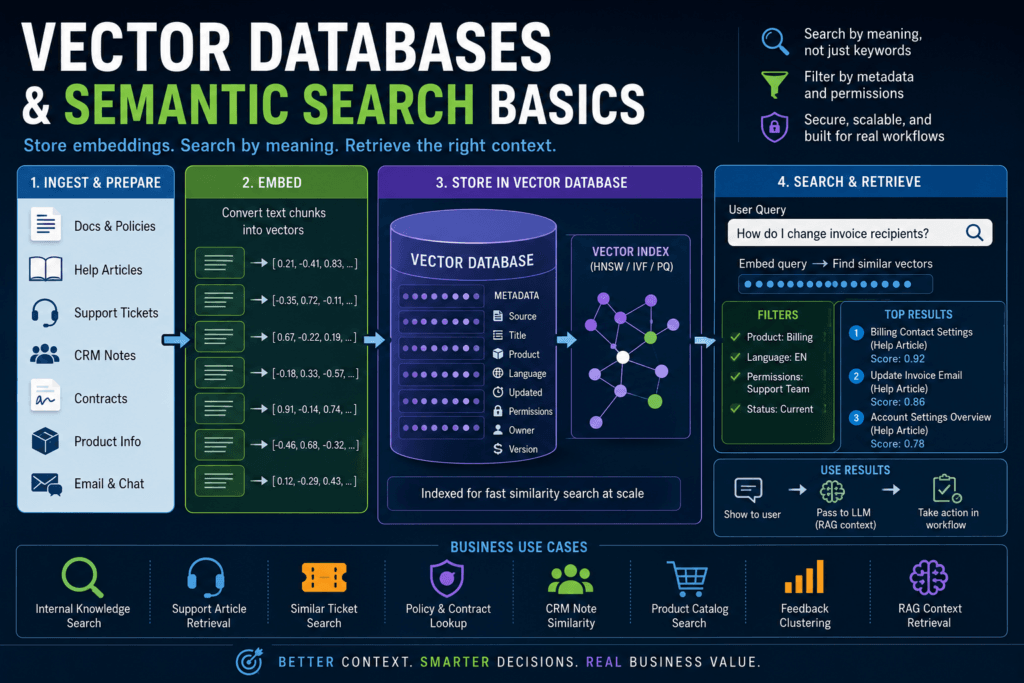
An embedding converts text, images, audio, or other data into a numerical vector. That vector can be compared with other vectors to find items that are similar in meaning or structure. But embeddings alone are not enough. A business system still needs somewhere to store those vectors, search them efficiently, filter them by metadata, update them when source documents change, delete them when records are removed, and retrieve the right items when users ask questions.
That is the job of a vector database.
A vector database stores vectors and makes it possible to search for nearest neighbors: records whose vectors are closest to a query vector under a similarity metric such as cosine similarity, dot product, or Euclidean distance. In business AI systems, this often means finding relevant documents, policies, help articles, support tickets, product descriptions, contract clauses, CRM notes, or prior cases even when the wording is different.
Semantic search is the user-facing capability this enables. Instead of searching only for exact terms, the system can search by meaning.
A user might ask, “How do I change who receives invoices?” The relevant help article might say, “Update billing contact email.” A pure keyword system may miss the connection. A semantic search system can embed the user’s query, compare it with stored document vectors, and retrieve passages that are close in meaning.
That is useful, but it is not magic.
Vector databases do not understand business documents like a human. They do not guarantee that retrieved information is true, current, complete, or authorized for the user. They are retrieval infrastructure. They make it easier to find likely relevant content. Production systems still need metadata, filters, permissions, freshness checks, evaluation, and human review for higher-risk workflows.
The right mental model is simple: embeddings make similarity possible; vector databases make similarity searchable and operational.
What vector databases are
A vector database is a database or search system designed to store vectors and retrieve similar vectors efficiently.
At minimum, a record in a vector search system usually includes:
- an ID;
- a vector;
- the original text or a pointer to the source content;
- metadata such as title, source, product, language, version, updated date, or permission group.
When a user enters a query, the system converts the query into a vector using the same or compatible embedding model. Then it searches the database for stored vectors that are close to the query vector. The top matches are returned as candidates.
For small datasets, a simple in-memory comparison may work. For production systems with thousands, millions, or billions of vectors, the system needs indexing. Vector indexes make search faster by avoiding a brute-force comparison against every vector in the database.
This is why vector databases matter. They are not just storage. They are search infrastructure.
Some products are purpose-built vector databases. Some are search engines with vector search support. Some are traditional databases with vector extensions. Some are libraries used to build similarity search into an application. The right choice depends on scale, latency, metadata needs, operations, security, existing stack, and team experience.
The core idea is the same: store vectors, search similar vectors, filter results, and return useful records.
What semantic search means
Semantic search means search by meaning rather than only by exact keyword overlap.
Traditional keyword search is still valuable. It works well for names, IDs, SKUs, legal phrases, product codes, exact terminology, and known terms. A database query is even better when the data is structured and the question is deterministic, such as “show unpaid invoices over $10,000 due next week.”
Semantic search is useful when wording varies.
Business users rarely phrase questions exactly the way documentation is written. Customers use informal language. Employees use internal slang. Sales notes are inconsistent. Product feedback arrives from many channels. Policies use formal language while users ask practical questions.
Semantic search helps bridge that gap.
It can connect:
- “Can I expense a second monitor?” with “remote work equipment reimbursement policy”;
- “customer got billed twice” with “duplicate charge refund workflow”;
- “SSO login loop” with “identity provider redirect troubleshooting”;
- “change invoice recipient” with “billing contact email settings”;
- “cancel after renewal” with “subscription termination window.”
The key word is “can.” Semantic search can retrieve better candidates when wording differs. It does not guarantee that the candidate is correct. A similar policy may apply to the wrong region. A similar support article may cover a different product. A similar contract clause may differ in a legally important detail.
That is why semantic search should be treated as retrieval, not truth.
Vector search versus keyword search
Vector search and keyword search solve different problems.
| Retrieval method | Best for | Weakness |
|---|---|---|
| Database query | Structured records, filters, exact conditions | Not designed for fuzzy meaning |
| Keyword search | Exact terms, IDs, names, legal phrases | Misses relevant results with different wording |
| Vector search | Semantic similarity and related concepts | Can retrieve plausible but wrong matches |
| Hybrid search | Combining exact and semantic relevance | Requires tuning, metadata, and evaluation |
A good business search system often combines them.
Keyword search is strong when exact words matter. Vector search is strong when meaning matters. Metadata filters are strong when business rules matter. Hybrid search combines multiple signals so the system can preserve exact matches while also finding semantically related content.
For example, a support search tool might use:
- metadata filters for product, plan, and language;
- keyword search for error codes and product names;
- vector search for natural-language customer descriptions;
- reranking to improve final ordering;
- access control to remove restricted content;
- logging and evaluation to track retrieval quality.
This is more reliable than assuming one retrieval method is always best.
How vector databases use embeddings
A vector database depends on embeddings.
The usual workflow looks like this:
- Collect source content.
- Clean and normalize it.
- Split it into chunks.
- Generate embeddings for each chunk.
- Store each embedding with text and metadata.
- Embed the user query.
- Search for similar vectors.
- Apply filters and permissions.
- Retrieve top results.
- Return results or pass them into a downstream workflow.
Here is the same pipeline in operational form:
| Step | What happens | Production concern |
|---|---|---|
| Ingest | Pull documents from source systems | Ownership, freshness, permissions |
| Clean | Remove noise and normalize text | Garbage in creates poor retrieval |
| Chunk | Split content into passages | Bad chunks reduce precision |
| Embed | Convert chunks into vectors | Model choice affects retrieval quality |
| Store | Save vectors and metadata | Metadata enables filtering and governance |
| Index | Build/search vector index | Speed and recall tradeoffs matter |
| Query | Embed the user query | Query wording affects retrieval |
| Filter | Apply metadata and permissions | Prevents wrong or unauthorized results |
| Retrieve | Return top-k candidates | Top-k results must be evaluated |
| Rerank | Optionally reorder candidates | Improves precision when needed |
| Use | Return results or pass to model | Grounding still requires validation |
| Evaluate | Measure relevance and failures | Prevents silent retrieval decay |
The production concerns are not optional. They are the difference between a demo and a useful system.
A demo can embed five documents and return something plausible. A production semantic search system must handle stale documents, bad chunks, deleted records, conflicting sources, user permissions, latency targets, evaluation, and business ownership.
Vector databases, semantic search, hybrid search, and RAG
These terms are related, but they are not the same thing.
Embeddings are the vectors.
Vector search is the process of comparing vectors to find similar items.
Vector databases store vectors and make vector search practical at scale.
Semantic search is a search experience that retrieves results by meaning.
Hybrid search combines semantic similarity with keyword or sparse retrieval signals.
RAG, or retrieval-augmented generation, is a broader architecture where retrieved information is passed into a generative model to help produce an answer.
A chat model is different again. It generates text. It does not automatically know your business documents unless those documents are provided through context, tools, retrieval, or training.
A production knowledge assistant may use all these pieces:
- an embedding model to convert documents and queries into vectors;
- a vector database to store and search those vectors;
- metadata filters to enforce business constraints;
- a reranker to improve final result ordering;
- a language model to generate an answer using retrieved context;
- a validation and logging layer to measure quality.
Vector search is often one part of RAG. It is not RAG by itself.
Why indexing matters
If you have 200 embedded documents, comparing a query vector against every stored vector may be fine.
If you have 20 million chunks, brute-force comparison becomes expensive and slow. A vector database uses indexing techniques to make nearest-neighbor search practical at scale.
A vector index is a data structure that speeds up similarity search. Instead of scanning every vector, the system narrows the search to likely candidates. Many systems use approximate nearest neighbor search because exact search over very large vector collections can be too slow or expensive.
Approximate search introduces a tradeoff. You may gain speed, but you need to monitor recall: whether the system is still finding the truly relevant results. Index settings, distance metric, vector dimensionality, filtering strategy, hardware, and dataset shape can all affect retrieval behavior.
For business users, the key lesson is this: search speed and search quality are connected. Faster retrieval is useful only if the right information still appears.
That is why production teams should test vector search on real queries, not just assume the index works.
Similarity metrics in plain English
Vector databases compare vectors using similarity or distance metrics.
The common ones include:
- cosine similarity;
- dot product;
- Euclidean distance.
Cosine similarity compares the direction of vectors. Dot product measures vector alignment and magnitude depending on normalization. Euclidean distance measures straight-line distance between vector points.
You do not need to be a mathematician to use vector databases, but you do need to know that the metric should match the embedding model and database configuration. Provider documentation usually explains which metrics are supported and which are recommended for a given embedding model or index.
Using the wrong metric can produce weaker retrieval.
This is another reason to avoid treating vector databases as magic. They are configurable systems. Configuration affects quality.
Why metadata matters
Vector similarity finds related content. Metadata controls eligibility.
That distinction is critical.
A vector search may find a semantically similar document, but metadata determines whether the document is current, relevant, authorized, and appropriate for the workflow.
Useful metadata can include:
- source system;
- document type;
- title;
- product;
- language;
- region;
- version;
- updated date;
- permission group;
- owner;
- approval status;
- customer segment;
- effective date;
- expiration date;
- confidentiality level.
Metadata lets the retrieval layer answer questions like:
- Is this result for the right product?
- Is this policy current?
- Is the user allowed to see this document?
- Is this content approved or still in draft?
- Does this apply to the customer’s region?
- Is this content from the official knowledge base or an old support note?
Without metadata, vector search can return plausible but wrong results.
For example, a query about “refund policy” might retrieve an old refund policy, a draft refund policy, or a refund policy for the wrong country. Those results may be semantically similar. They may still be operationally wrong.
Vector databases should store metadata because production retrieval is not only about similarity. It is about similarity inside business constraints.
Why permissions matter
Permission filtering should be built into the retrieval workflow from the beginning.
A common failure pattern is to embed all documents into one index and then try to handle access control later. That is risky. If restricted documents are retrieved and passed into a model, the model may include restricted information in an answer. Even if the user never sees the source document directly, the information can leak through generated text.
A safer approach is to design retrieval around authorization:
- store permission metadata with every chunk;
- filter by user role or group before returning results;
- separate indexes when risk requires it;
- log retrieval events;
- test for permission leakage;
- remove deleted or revoked content from the index;
- review access-control logic when source systems change.
Vector search does not replace access control. It makes access control more important because it can surface unexpected matches.
Why hybrid search often matters
Vector search is good at meaning. Keyword search is good at exactness.
Hybrid search combines the two.
This matters because many business queries include exact tokens that should not be blurred into general meaning:
- product names;
- model numbers;
- invoice IDs;
- legal clauses;
- customer names;
- error codes;
- acronyms;
- SKUs;
- contract terms;
- country codes.
If a query includes “SOC 2 Type II,” “SKU-7821,” “EU refund policy,” or “SAML error 403,” exact matching matters. A pure vector search might retrieve conceptually similar results while missing the exact term requirement.
Hybrid search can help preserve exact relevance while still supporting semantic matches.
For example, a customer may ask, “Why does SAML 403 happen after Okta login?” A good system should understand the semantic issue, but it should also preserve exact matches for “SAML,” “403,” and “Okta.”
Semantic search is powerful. Hybrid search is often more practical.
Business use cases for vector databases
Internal knowledge search
An internal knowledge portal can use vector databases to retrieve relevant policies, process docs, onboarding guides, support runbooks, and technical documentation.
This is useful when employees do not know the exact title of the document they need. A natural-language query can retrieve relevant sections by meaning.
The system still needs permissions, freshness, source ownership, and evaluation. Internal search can become worse if it retrieves outdated or unauthorized documents confidently.
Support article retrieval
Support teams can use semantic search to find help articles, known issue notes, troubleshooting guides, and prior resolutions.
A customer may describe a problem informally. The support knowledge base may use formal wording. Vector search helps bridge that gap.
This can power agent assist tools, suggested replies, ticket triage, and self-service search.
Similar-ticket search
When many customers report similar symptoms, vector search can help find related tickets. This can support incident detection, duplicate merging, root-cause analysis, and known-fix reuse.
For example, many tickets may describe the same login issue with different wording. Vector search can group them even when exact terms differ.
Product feedback clustering
Product teams can use vector search and clustering to group similar feature requests, bug reports, survey comments, and interview notes.
This helps identify repeated themes without relying only on manual tagging.
The system should still preserve source context. Grouping feedback by similarity does not prove that every request has the same priority, customer value, or product implication.
Contract and policy search
Legal, finance, operations, and compliance teams can use semantic search to find similar clauses, obligations, policy sections, or review notes.
This is useful for triage and comparison. It should not be treated as automatic legal interpretation. Similar clauses can differ in important details.
Product catalog search
Ecommerce or internal procurement systems can use semantic search to match user intent with product descriptions.
A user might search for “quiet headset for video calls,” while the catalog uses terms like “noise-canceling microphone” or “office conferencing.” Semantic search can improve discovery.
Hybrid search is especially useful here because exact product names, categories, compatibility requirements, and SKUs still matter.
RAG context retrieval
Many RAG systems use vector databases to retrieve candidate passages before passing them into a language model. The model then answers using the retrieved context.
The answer quality depends heavily on retrieval quality. If the vector database retrieves the wrong passages, the model may generate a polished but unsupported answer.
Minimal Python example: local semantic search
The following example is illustrative. It uses sentence-transformers and scikit-learn to show the core idea of semantic search with in-memory vectors. It is not production-ready and is not presented as executed output.
from sentence_transformers import SentenceTransformer
from sklearn.metrics.pairwise import cosine_similarity

# Teaching example only.
# In production, evaluate the embedding model, store vectors in a
# database or search index, apply metadata filters, and enforce permissions.
model = SentenceTransformer("sentence-transformers/all-MiniLM-L6-v2")

documents = [
    {
        "id": "doc_001",
        "title": "Billing contact settings",
        "product": "billing",
        "permission_group": "support",
        "text": "Admins can update invoice recipients and billing contact email addresses in account settings.",
    },
    {
        "id": "doc_002",
        "title": "Password reset process",
        "product": "identity",
        "permission_group": "support",
        "text": "Users can reset their password from the login page using the forgot password link.",
    },
    {
        "id": "doc_003",
        "title": "Enterprise contract termination",
        "product": "legal",
        "permission_group": "legal",
        "text": "Enterprise subscription termination terms depend on the signed order form and renewal window.",
    },
]

user_query = "How do I change who receives invoices?"

# Example metadata filter before similarity search.
allowed_permission_group = "support"
filtered_documents = [
    doc for doc in documents
    if doc["permission_group"] == allowed_permission_group
]

document_texts = [doc["text"] for doc in filtered_documents]

document_vectors = model.encode(document_texts)
query_vector = model.encode([user_query])

scores = cosine_similarity(query_vector, document_vectors)[0]

ranked_results = sorted(
    zip(filtered_documents, scores),
    key=lambda item: item[1],
    reverse=True,
)

for document, score in ranked_results:
    print(document["id"], document["title"], round(float(score), 3))
This example shows the basic shape:
- store records with text and metadata;
- filter records by business rules or permissions;
- embed the query;
- compare vectors;
- rank results.
A real vector database would add durable storage, indexing, scalable search, metadata filtering, update workflows, deletion workflows, observability, and performance controls.
How vector search fails
Vector search often fails quietly.
A bad search result may look plausible. A user sees a document that seems related and assumes it is authoritative. A generative model receives the wrong context and produces a fluent answer. A workflow routes a ticket based on a similar but incorrect prior case.
Common failure modes include:
Semantically similar but wrong documents
A document can be close in meaning but wrong in application. A refund policy for one country may be similar to a refund policy for another country. A cancellation article may be similar to a downgrade article. Similar is not the same as correct.
Stale documents
Old and current policies are often semantically similar. If the vector database does not track freshness, updated dates, status, or version, stale content may appear in top results.
Poor chunking
Bad chunking can split important context. A policy rule may appear without its exception. A troubleshooting step may appear without the error condition. A table may appear without its heading.
Missing metadata
Without metadata, the system cannot reliably filter by product, region, customer type, language, permission group, document status, or source.
Duplicate and conflicting content
Vector search may retrieve duplicate documents, old drafts, or conflicting versions. The system needs source ownership and content governance.
Permission leakage
A restricted document may be semantically relevant but unauthorized. Retrieval must enforce permissions before content is shown or passed to a model.
Weak evaluation
The biggest failure is assuming retrieval works because it returns results. Returning something is not the same as returning the right thing.
How to evaluate semantic search quality
Semantic search should be evaluated with real queries.
A practical evaluation set can include:
- query;
- expected document or passage;
- retrieved top-k results;
- relevance judgment;
- failure category;
- suggested fix.
Example:
| Query | Expected document | Retrieved top-k | Judgment | Failure category | Fix |
|---|---|---|---|---|---|
| How do I update invoice recipients? | Billing contact settings | Billing contact settings, password reset | Good | None | Keep |
| Can contractors expense monitors? | Remote equipment policy exception | Equipment overview, onboarding checklist | Partial | Missing exception | Improve chunking |
| EU enterprise refund rules | EU enterprise refund policy | US refund policy, billing FAQ | Bad | Metadata filter failure | Add region filter |
| SAML 403 after Okta login | SSO troubleshooting guide | General login help, SSO troubleshooting | Partial | Exact term underweighted | Add hybrid search |
Useful metrics include:
- top-k relevance;
- recall;
- precision;
- mean reciprocal rank;
- human relevance judgment;
- click-through rate;
- acceptance rate;
- answer support rate;
- stale-result rate;
- permission-filter success;
- retrieval latency.
For a business AI system, human relevance review is often necessary. A subject-matter expert should check whether the retrieved passages actually support the answer or workflow.
If semantic search feeds a RAG system, evaluate retrieval separately from generation. If the final answer is wrong, you need to know whether retrieval failed, generation failed, source content was wrong, or the prompt assembled context poorly.
Security and governance for vector databases
Vector databases are part of the data system. They should be governed accordingly.
Production questions include:
- Who owns the source documents?
- Which documents are approved for retrieval?
- Which users can access each document?
- How are deleted documents removed from the index?
- How are updated documents re-embedded?
- How are stale results detected?
- How are retrieval events logged?
- How are sensitive fields excluded or protected?
- How is cross-tenant leakage prevented?
- How are indexes backed up and restored?
- How are evaluation results reviewed?
This is not administrative overhead. It is what makes semantic search safe enough to use in real business workflows.
A vector database can surface information in unexpected ways because it searches by similarity. That increases the importance of permissions and metadata. If the system can find related documents users did not know existed, it must also know which documents users are allowed to see.
When not to use a vector database
Vector databases are useful, but they are not always necessary.
Do not use a vector database for exact lookup. If the user provides an invoice number, customer ID, order ID, or ticket number, use a database query.
Do not use a vector database for simple structured filters. If the workflow needs “all open tickets assigned to Team A,” use the helpdesk database or analytics layer.
Do not use vector search when keyword search is already good enough. If users know exact terms and the dataset is small, keyword search plus filters may be simpler.
Do not use vector search to cover up bad content governance. If documents are outdated, duplicated, contradictory, or unauthorized, vector search may make the problem more visible.
Do not use a vector database just because RAG is fashionable. Use it when semantic retrieval is actually needed.
A practical system may combine several retrieval methods: SQL for structured data, keyword search for exact terms, vector search for semantic matching, and business rules for permissions and routing.
Practical implementation checklist
Use this checklist before building a vector database or semantic search system:
- Source inventory: Which documents, records, or notes will be indexed?
- Business goal: Search, RAG, recommendation, deduplication, clustering, or similar-case retrieval?
- Data cleaning: What noise, duplicates, and stale content must be removed?
- Chunking strategy: What is the retrieval unit?
- Embedding model: Which model fits the language, domain, cost, and quality needs?
- Vector store: Which database or search system fits the scale and operations?
- Metadata schema: Which fields are required for filtering and governance?
- Permission model: How will access control be enforced at retrieval time?
- Index strategy: What index type and similarity metric are appropriate?
- Hybrid search decision: Should keyword and vector search be combined?
- Reranking decision: Is a second-stage ranker needed?
- Update schedule: How often are sources re-indexed?
- Deletion plan: How are removed documents deleted from the vector store?
- Evaluation set: Which real queries will test retrieval quality?
- Logging: Which query, retrieval, and user outcome events are tracked?
- Owner: Who is responsible for source quality and retrieval performance?
This checklist matters because vector databases are not one-click knowledge systems. They are infrastructure that needs a data pipeline around it.
How this prepares you for RAG
Vector databases are often the retrieval foundation for RAG, but RAG adds another layer of complexity.
A RAG system typically:
- receives a user question;
- retrieves relevant documents or chunks;
- assembles context;
- asks a generative model to answer;
- optionally cites sources;
- validates or reviews the answer;
- logs quality and user feedback.
The vector database helps with step two. It does not solve the whole problem.
If retrieval is weak, RAG fails before generation begins. If metadata is weak, the wrong content may be retrieved. If permissions are weak, restricted content may leak. If chunking is weak, the model may see incomplete context. If evaluation is weak, failures may go unnoticed.
Understanding vector databases and semantic search gives you the foundation needed for RAG fundamentals, chunking and metadata quality, internal knowledge assistants, and document-processing workflows.
Conclusion: vector databases are retrieval infrastructure, not magic memory
Vector databases are important because they make embedding-based retrieval practical. They store vectors, index them, search for similar items, filter by metadata, and return relevant candidates quickly enough to support real workflows.
That is valuable. It can improve internal search, support triage, policy lookup, product discovery, similar-case retrieval, feedback clustering, and RAG context retrieval.
But vector databases are not magic AI memory. They do not guarantee truth, freshness, authorization, or completeness. They do not replace keyword search, database queries, metadata, permissions, or governance.
The useful way to think about vector databases is operational:
Embeddings represent content as vectors.
Vector databases store and search those vectors.
Semantic search retrieves likely relevant information by meaning.
Business systems decide whether that information is eligible, current, authorized, useful, and safe to use.
When those layers are designed together, vector databases become one of the most practical foundations for business AI.
Key Takeaways
- Vector databases store embeddings and make similarity search practical at scale.
- Semantic search retrieves information by meaning, not only by exact keyword overlap.
- Vector search is useful for messy language, but it can retrieve plausible wrong matches.
- Keyword search, database queries, metadata filters, and vector search solve different retrieval problems.
- Hybrid search is often better than pure vector search for business workflows with exact terms, IDs, acronyms, or legal language.
- Metadata is essential for filtering by product, region, language, version, source, and permission group.
- Permissions must be enforced at retrieval time, not added as an afterthought.
- Vector databases are often part of RAG, but they are not the same thing as RAG.
- Production semantic search requires evaluation, logging, update workflows, deletion workflows, and source ownership.
Practical Exercise
Objective:
Design a semantic search system for one real business knowledge problem.
Task:
Choose one workflow:
- internal policy search;
- support article retrieval;
- similar-ticket search;
- product catalog search;
- contract clause lookup;
- CRM note similarity;
- RAG context retrieval;
- product feedback clustering.
Create a one-page design with the following sections.
- Source inventory
List the content that will be indexed.
Examples:
- help-center articles;
- internal policy documents;
- CRM notes;
- support tickets;
- product descriptions;
- contract clauses;
- sales-call notes;
- implementation runbooks.
- Retrieval goal
Define what the search system should return.
Example:
“For a support question, return the top five current help articles for the correct product and language, excluding restricted internal notes.”
- Chunking strategy
Define the retrieval unit.
Examples:
- one FAQ question and answer per chunk;
- one policy section per chunk;
- one troubleshooting step group per chunk;
- one contract clause per chunk;
- one support ticket summary per chunk.
- Metadata schema
List the metadata fields needed.
Examples:
- source system;
- document type;
- product;
- language;
- region;
- owner;
- updated date;
- permission group;
- approval status;
- version;
- URL or record ID.
- Search method
Choose one:
- keyword search;
- vector search;
- hybrid search;
- database query;
- a combined approach.
Explain why.
- Evaluation set
Create 10 realistic queries. For each query, define:
- expected relevant document;
- allowed sources;
- required filters;
- what would count as a bad result.
- Failure review
For failed searches, classify the issue:
- bad chunking;
- stale document;
- missing metadata;
- permission failure;
- weak keyword handling;
- irrelevant semantic match;
- duplicate content;
- wrong source priority.
What success looks like:
A successful result is a semantic search design that clearly defines the source data, retrieval goal, chunking strategy, metadata schema, search method, evaluation queries, and likely failure modes. It should be clear how the system will be tested before anyone trusts it in production.
Stretch goal:
Build a small local prototype with 20 documents using sentence-transformers and cosine similarity. Add metadata filtering for product or permission group. Compare results with and without the metadata filter, then document which queries improved and which still failed.
FAQ
What is a vector database?
A vector database stores embeddings and supports similarity search, allowing systems to retrieve records whose vectors are close to a query vector.
What is semantic search?
Semantic search retrieves information by meaning rather than only by exact keyword overlap. It commonly uses embeddings and vector similarity.
Are vector databases the same as RAG?
No. Vector databases can support the retrieval step in RAG, but RAG also includes context assembly, generation, grounding, validation, and evaluation.
Are vector databases AI memory?
Not by themselves. A vector database stores and retrieves vectors. It does not understand, verify, or govern knowledge automatically.
When should a business use vector search?
Use vector search when the workflow needs to find semantically related documents, tickets, notes, product descriptions, policies, or cases where wording varies.
When should a business not use vector search?
Avoid vector search for exact lookup, simple structured queries, small static datasets, deterministic filters, or cases where keyword search already works well.
Why is metadata important in vector databases?
Metadata lets the system filter results by source, product, region, language, version, permission group, and other business constraints.
What is hybrid search?
Hybrid search combines vector similarity with keyword or sparse search so systems can capture both semantic meaning and exact term relevance.
How do you evaluate semantic search?
Evaluate with real queries, expected relevant documents, top-k relevance, precision, recall, human relevance judgment, stale-result rate, permission-filter success, and retrieval latency.
Sources
- Pinecone Semantic Search Documentation: https://docs.pinecone.io/guides/search/semantic-search
- Pinecone Metadata Filtering Documentation: https://docs.pinecone.io/guides/search/filter-by-metadata
- Weaviate Hybrid Search Documentation: https://docs.weaviate.io/weaviate/search/hybrid
- Qdrant Filtering Documentation: https://qdrant.tech/documentation/search/filtering/
- Qdrant Vector Search Overview: https://qdrant.tech/documentation/overview/vector-search/
- Milvus Basic Vector Search Documentation: https://milvus.io/docs/single-vector-search.md
- Milvus Filtered Search Documentation: https://milvus.io/docs/filtered-search.md
- FAISS Documentation: https://faiss.ai/index.html
- pgvector GitHub Documentation: https://github.com/pgvector/pgvector
- OpenAI Vector Embeddings Guide: https://developers.openai.com/api/docs/guides/embeddings
- Sentence Transformers Semantic Textual Similarity Documentation: https://sbert.net/docs/sentence_transformer/usage/semantic_textual_similarity.html
- Scikit-learn Cosine Similarity Documentation: https://scikit-learn.org/stable/modules/generated/sklearn.metrics.pairwise.cosine_similarity.html
- NIST AI Risk Management Framework: https://www.nist.gov/itl/ai-risk-management-framework
Related articles from Kyle Beyke
- AI Workflow Anatomy: Essential Guide for Business: https://beykeworkflows.com/ai-workflow-anatomy-business-guide/
- How LLMs Work: Essential Guide for Builders: https://beykeworkflows.com/how-llms-work-builders-guide/
- Production Prompting: Essential Business AI Guide: https://beykeworkflows.com/production-prompting-business-ai-guide/
- Powerful Text Classification, Extraction, and Summarization with AI: https://beykeworkflows.com/text-classification-extraction-summarization-ai/
- LLM Integration: 7 Best Python Patterns: https://beykeworkflows.com/llm-integration-python-hugging-face-inference/