
Lesson
AI Embeddings Explained for Business Applications
Learning Objectives
- Explain what AI embeddings are and why they matter in business AI systems.
- Distinguish embeddings from keywords, vector databases, chat models, and RAG.
- Identify business workflows where embeddings improve search, retrieval, clustering, and similarity matching.
- Design a basic embedding workflow from source content to retrieval and evaluation.
- Recognize common embedding failure modes, including weak chunking, stale data, poor metadata, and permission leakage.
Prerequisites
Helpful background includes basic familiarity with LLMs, tokens, prompts, structured outputs, and business workflows. You do not need advanced machine learning knowledge. The main prerequisite is understanding that many AI systems need to find relevant information before they can generate, summarize, route, or answer anything useful.
AI embeddings turn business language into searchable meaning
AI embeddings are one of the most useful building blocks in business AI, but they are also one of the easiest to misunderstand.
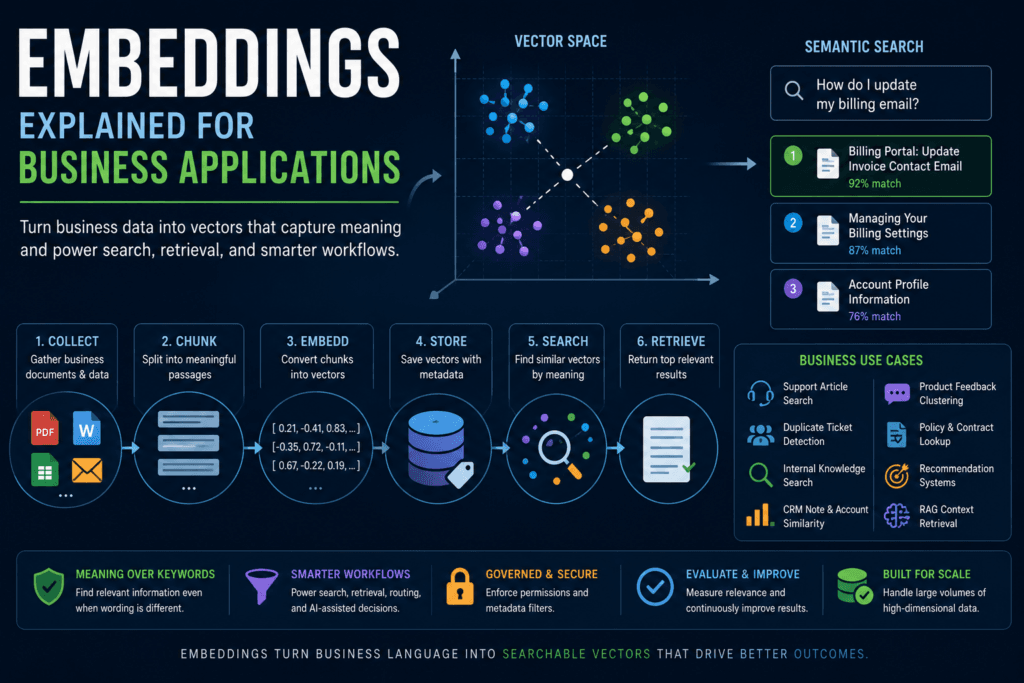
An embedding is a numerical representation of data. For text, that means a model converts a phrase, sentence, paragraph, document chunk, product description, support ticket, or customer note into a vector: a list of numbers. Similar pieces of text tend to end up closer together in that vector space. Different pieces of text tend to end up farther apart.
That simple idea unlocks a large set of business workflows.
A customer may ask, “How do I update my billing email?” while the help article says, “Change the invoice contact address.” A keyword system may miss the match because the wording is different. An embedding-based search system can recognize that the two pieces of text are related because their vectors are close in meaning.
That does not mean the model understands the text like a human. It means the embedding model has learned a representation that makes similarity comparison useful.
This distinction matters.
Embeddings are not facts. They are not a database. They are not a chatbot memory. They do not guarantee truth. They do not replace permissions, metadata, freshness checks, or evaluation. They are a way to represent information so software can compare it by learned similarity.
That is exactly what many business AI systems need.
Before a model answers a question, it often needs relevant context. Before a support workflow drafts a response, it may need the right help article. Before a sales tool recommends the next action, it may need similar historical accounts. Before a product team prioritizes feedback, it may need to group duplicate feature requests written in different words.
AI embeddings make those workflows possible by turning messy language into vectors that can be searched, compared, clustered, ranked, and retrieved.
Why AI embeddings matter for business AI
Most business data is not neatly structured.
Companies have support tickets, contracts, CRM notes, policies, sales-call transcripts, product documentation, Slack messages, help-center articles, proposals, emails, invoices, research notes, implementation logs, and customer feedback. Some of that data lives in databases. Much of it lives as language.
Traditional software is good at exact lookup. It can find customer_id = 12345. It can filter invoices where status = unpaid. It can sort accounts by renewal_date. It can enforce deterministic business rules.
But traditional software struggles when the user does not know the exact words, field names, or document titles.
That is where embeddings become valuable. They let software ask, “Which pieces of content are most similar to this query?” instead of only asking, “Which documents contain these exact words?”
In business terms, AI embeddings help with:
- finding relevant knowledge articles even when user wording differs;
- retrieving policy sections related to a question;
- identifying duplicate customer issues;
- grouping similar product feedback;
- finding comparable sales opportunities;
- matching support tickets to known resolutions;
- recommending related documents;
- preparing context for RAG workflows;
- improving discovery across messy internal knowledge.
This is why embeddings are so important in the knowledge-and-context layer of AI systems. A chat model can generate text, but generation is not enough. If the system does not retrieve the right information first, the final answer may be fluent and wrong.
Embeddings are often the retrieval layer that sits before generation.
AI embeddings versus keywords
Keyword search is still useful. It is not obsolete.
If a user searches for an exact invoice number, SKU, customer ID, ticket number, or legal term, keyword search may be the right tool. If a workflow needs deterministic filtering, a normal database query is usually better than vector search. If a taxonomy is small and fixed, simple classification rules may be enough.
The value of AI embeddings appears when wording varies.
A keyword search system looks for term overlap. An embedding search system compares vector similarity. A hybrid system can use both.
| Approach | Best for | Weakness |
|---|---|---|
| Keyword search | Exact terms, names, IDs, filters | Misses meaning when wording differs |
| Embedding search | Semantic similarity and related concepts | Can retrieve plausible but irrelevant matches |
| Hybrid search | Combining exact terms and semantic similarity | Requires tuning and evaluation |
| Database query | Structured records and deterministic filters | Not designed for fuzzy meaning |
For many business systems, the best answer is not “keyword or embeddings.” It is both.
A support search tool might use metadata filters to limit results to the right product and customer segment, keyword search to preserve exact matches, and embedding search to find semantically similar articles. A legal search system might require exact clause names, dates, jurisdictions, or contract types before using vector similarity inside the filtered set.
AI embeddings add meaning-based retrieval. They do not remove the need for exact search.
How text becomes a vector
At a practical level, an embedding workflow looks like this:
- Take a piece of text.
- Send it through an embedding model.
- Receive a vector, which is a list of numbers.
- Store that vector with the original text and metadata.
- Compare it later with other vectors.
For example, the sentence “customer cannot access billing portal” might become a vector with hundreds or thousands of numeric values depending on the model. Those individual numbers are not usually meaningful to humans. The value is in how the vector behaves when compared with other vectors.
If another sentence says “user locked out of invoice settings,” the two vectors may be relatively close. If another sentence says “company picnic menu options,” that vector should be far away.
This is the operational idea behind semantic similarity.
The system does not need to know the exact phrase the user will type. It needs a representation that lets it compare the query against stored content and rank likely matches.
That is why AI embeddings are useful even when no text is generated. A system can use embeddings for search, grouping, matching, deduplication, recommendations, clustering, and routing without asking a language model to write anything.
What semantic similarity actually means
Semantic similarity is a measurement of relatedness between vectors.
A common method is cosine similarity. Scikit-learn’s documentation defines cosine similarity as the normalized dot product of two vectors. In plain English, cosine similarity compares the direction of two vectors. Vectors pointing in similar directions are considered more similar.
Business users do not need to calculate the math by hand, but they do need the mental model.
An embedding system does not ask, “Do these texts share the same words?” It asks, “Are these vectors close under the chosen similarity metric?”
That is powerful, but it has limits.
Two things can be semantically similar and still not be the right match. A query about “canceling an enterprise subscription” may retrieve articles about “downgrading an enterprise plan.” Those are related, but they may have different policies and different operational steps. A policy from last year may be similar to the current policy but no longer valid. A support article for Product A may be similar to Product B but not applicable.
AI embeddings retrieve candidates. They do not prove correctness.
That is why production systems need metadata, filtering, citations, freshness checks, access controls, and evaluation.
Where AI embeddings fit in an AI workflow
Embeddings usually sit in the retrieval and similarity layer of a workflow.
A production workflow may look like this:
| Step | What happens | Why it matters |
|---|---|---|
| Clean content | Remove noise and normalize text | Prevents garbage vectors |
| Chunk documents | Split content into useful passages | Improves retrieval precision |
| Generate embeddings | Convert chunks into vectors | Makes similarity search possible |
| Store vectors with metadata | Save vector plus source, date, permissions, tags | Supports filtering and governance |
| Embed query | Convert user question into a vector | Allows query-to-document comparison |
| Retrieve top matches | Find similar vectors | Supplies relevant context |
| Evaluate results | Check relevance and usefulness | Prevents silent retrieval failure |
A simple semantic search system may stop after retrieval. It returns the top documents or passages to the user.
A RAG system goes further. It retrieves relevant passages and then passes them into a generative model so the model can answer using that context.
That distinction is important.
Embeddings are not RAG. Vector search is not RAG. A vector database is not RAG. RAG is a broader architecture that usually includes retrieval, context assembly, generation, grounding, and evaluation. AI embeddings are one component that can power the retrieval step.
Business use cases for AI embeddings
Support article matching
A support team can use AI embeddings to match customer questions to relevant help-center articles. This is useful because customers often describe problems differently than documentation does.
A customer might write, “I can’t get into my invoice page.” The article might be titled “Troubleshoot billing portal access.” Keyword overlap may be weak. Semantic similarity can still surface the right article.
This can support agent copilots, self-service search, ticket deflection, and suggested replies.
Duplicate ticket detection
Support teams often receive many versions of the same issue. One customer says “login keeps spinning.” Another says “auth page never loads.” Another says “stuck after SSO redirect.”
AI embeddings can help group similar tickets so the team can identify incidents, merge duplicates, route related cases, and reuse known fixes.
This should not replace incident management, but it can improve discovery.
Internal knowledge retrieval
Companies often have policies, handbooks, onboarding docs, process guides, and technical documentation spread across many tools. Embedding-based search can help employees find relevant sections even when they do not know the exact title.
For example, “Can I expense a home office monitor?” might retrieve the right equipment policy even if the document uses “reimbursable remote-work peripherals.”
The system still needs access control. An employee should not retrieve confidential HR, legal, or executive documents just because the vectors are similar.
CRM note similarity
Sales and customer success teams can use embeddings to find similar accounts, opportunities, objections, or implementation issues.
If a rep is working with a healthcare buyer concerned about integration risk, the system might retrieve similar past opportunities, notes, or playbooks. This can help teams reuse institutional knowledge that would otherwise remain buried in CRM text fields.
Product feedback clustering
Product feedback is messy. Customers describe the same feature request in different words. AI embeddings can group related requests so product teams can see themes, duplicates, and emerging patterns.
This is especially useful when feedback arrives from support tickets, sales calls, surveys, app reviews, chat logs, and customer interviews.
Policy and contract lookup
Legal and operations teams can use embeddings to find similar clauses, comparable contracts, or relevant policy sections. This can speed up review and triage.
However, this is a higher-risk use case. Similarity is not legal equivalence. A contract clause that looks similar may differ in a critical phrase. Embedding retrieval should support qualified review, not replace it.
RAG context retrieval
In retrieval-augmented generation, embeddings can help retrieve relevant passages before a model answers. This is one of the most common business uses.
A knowledge assistant might embed a user question, search a vector store, retrieve the top passages, and pass those passages into a language model. The model then writes an answer based on the retrieved context.
The quality of the answer depends heavily on the quality of retrieval. If the wrong context is retrieved, the generated answer may still be polished but unsupported.
Embeddings, vector search, vector databases, and RAG
These terms are often blurred together. They should be separated.
AI embeddings are the numerical vectors.
Vector search is the process of comparing vectors to find similar ones.
A vector database or vector store saves vectors and makes similarity search efficient. It may also store metadata, document IDs, permissions, timestamps, source URLs, and other fields.
Semantic search is a search experience that uses meaning-based similarity instead of only exact keyword matching.
RAG is a broader pattern where retrieved information is passed into a generative model to produce an answer.
A chat model generates text. An embedding model generates vectors. Those are different jobs.
A production knowledge assistant may use all of them:
- An embedding model converts documents into vectors.
- A vector database stores the vectors and metadata.
- A search layer retrieves relevant passages.
- A chat model uses those passages to answer.
- A validation or review layer checks quality, grounding, and safety.
The architecture matters because each layer can fail in a different way.
Implementation pattern: embed, store, search, retrieve, evaluate
A basic embedding implementation has five phases.
Phase 1: Prepare source data
Start with a data inventory. Identify the sources that should be searchable: help-center articles, internal docs, policies, support tickets, CRM notes, product descriptions, contracts, or transcripts.
Then clean the content. Remove navigation text, duplicate boilerplate, broken markup, signatures, irrelevant menus, and stale content. Bad input creates bad embeddings.
Phase 2: Chunk documents
Most business documents are too long to embed and retrieve as one unit. Chunking splits documents into smaller passages.
Chunking matters because retrieval happens at the chunk level. A huge chunk may include too much irrelevant content. A tiny chunk may lose necessary context. A bad chunk boundary may separate a policy rule from its exception.
Good chunks are usually meaningful units: sections, paragraphs, headings with body text, FAQ entries, policy blocks, or ticket summaries.
Phase 3: Generate embeddings
Use an embedding model to convert each chunk into a vector. The embedding model should match the use case: language, domain, cost, latency, dimensionality, and retrieval quality all matter.
Avoid hard-coding model assumptions without checking current provider documentation. Model dimensions, limits, pricing, and API behavior can change.
Phase 4: Store vectors with metadata
A vector without metadata is not enough.
Store fields such as:
- document ID;
- source system;
- title;
- section heading;
- URL or record pointer;
- created date;
- updated date;
- content owner;
- document type;
- product;
- region;
- customer segment;
- permission group;
- version;
- status.
Metadata lets the system filter before or during retrieval. It also supports governance, freshness, debugging, and access control.
Phase 5: Search and evaluate
When a user asks a question, embed the query, search for similar vectors, apply filters, retrieve the top results, and evaluate whether the results are useful.
Do not assume retrieval works because the first demo looks good. Build a test set. Track failure cases. Review whether the retrieved chunks actually support the answer.
Minimal Python example: cosine similarity with embeddings
The following example is illustrative. It uses sentence-transformers, a real Python library documented for computing sentence embeddings and similarity scores. It is not presented as executed output.
from sentence_transformers import SentenceTransformer
from sklearn.metrics.pairwise import cosine_similarity

# Example model from the Sentence Transformers documentation ecosystem.
# In production, select and evaluate an embedding model for your task,
# domain, language, cost, latency, and deployment constraints.
model = SentenceTransformer("sentence-transformers/all-MiniLM-L6-v2")

documents = [
    {
        "id": "doc_001",
        "title": "Billing portal access",
        "text": (
            "Users can update invoice contacts and billing email addresses "
            "in the billing portal."
        ),
    },
    {
        "id": "doc_002",
        "title": "Password reset",
        "text": "Users can reset a forgotten password from the login page.",
    },
    {
        "id": "doc_003",
        "title": "Team permissions",
        "text": (
            "Admins can invite team members and change account permission levels."
        ),
    },
]

query = "How do I change the email address for invoices?"

document_texts = [doc["text"] for doc in documents]

document_vectors = model.encode(document_texts)
query_vector = model.encode([query])

scores = cosine_similarity(query_vector, document_vectors)[0]

ranked_results = sorted(
    zip(documents, scores),
    key=lambda item: item[1],
    reverse=True,
)

for document, score in ranked_results:
print(document["id"], document["title"], round(float(score), 3))This is a teaching example, not a production system.
A production version would include error handling, logging, metadata filtering, access control, chunking, evaluation, versioned embeddings, update jobs, and a vector database or search index. It would also avoid printing sensitive content to logs.
The useful lesson is the shape of the workflow:
- Embed documents.
- Embed the query.
- Compare vectors.
- Rank results by similarity.
- Retrieve the best candidates.
- Evaluate whether those candidates are actually useful.
Why chunking matters
Chunking is one of the most important design choices in embedding systems.
If chunks are too large, retrieval may pull in broad sections with only one relevant sentence. That increases cost and can confuse downstream generation. If chunks are too small, the system may retrieve fragments that lack context.
For example, a policy document might say:
“Employees may expense one external monitor for remote work.”
The next paragraph might say:
“Contractors are excluded unless approved by the department head.”
If those lines are split into separate chunks, a retrieval system may return the first sentence without the exception. A downstream model could then give an incomplete answer.
Good chunking preserves meaningful context.
Practical chunking rules:
- keep headings with body text;
- avoid splitting policy rules from exceptions;
- keep FAQ questions with answers;
- keep table explanations with the table when possible;
- use document structure when available;
- test chunk sizes on real queries;
- review retrieval failures and adjust.
Chunking is not a one-time technical detail. It directly affects business reliability.
Why metadata matters
Embeddings are good at similarity. Metadata is good at control.
A vector search may find semantically related content, but metadata determines whether the content is eligible, current, relevant, and allowed.
Useful metadata can include:
- department;
- product;
- document type;
- customer segment;
- region;
- language;
- effective date;
- expiration date;
- author;
- source system;
- access group;
- approval status;
- version;
- confidentiality level.
Without metadata, a query about “refund policy” might retrieve a draft policy, an old policy, a policy for the wrong country, or a restricted internal document.
That is not an embedding failure alone. It is a system-design failure.
For business AI, metadata is part of the retrieval contract.
Security, permissions, and governance
Embedding systems can create security risks if they are designed casually.
A common mistake is to embed all documents into one vector index and then add permissions later. That can leak information if retrieval returns documents a user should not see, or if a downstream model uses restricted context in an answer.
Access control should be part of the retrieval design from the beginning.
Practical rules:
- store permission metadata with every chunk;
- filter retrieval results by user or role;
- avoid mixing public and confidential content without controls;
- track document source and version;
- remove or re-embed deleted documents;
- define update schedules;
- log retrieval events;
- test for permission leakage;
- separate indexes when required by risk or policy.
Embeddings can also preserve sensitive information indirectly because the original text and metadata often remain linked to the vector. Treat embedding pipelines as part of the data-handling system, not as harmless search utilities.
AI embeddings should be governed like any other component that touches business data.
How AI embeddings fail
Embeddings fail quietly. That is what makes them dangerous.
A system may retrieve five plausible results, and the user may assume they are correct. But plausible is not the same as relevant, current, authorized, or complete.
Common failure modes include:
Irrelevant but similar matches
A query about “canceling a subscription” may retrieve “downgrading a plan.” Those are close concepts, but the process and business rules may differ.
Stale documents
Old policies and current policies may be semantically similar. Without freshness metadata, the system may retrieve the wrong one.
Bad chunk boundaries
A chunk may contain a rule without the exception, an answer without the question, or a table without the explanatory heading.
Missing metadata
Without filters, the system may retrieve content from the wrong product, region, language, customer tier, or business unit.
Domain vocabulary gaps
Embedding models may struggle with specialized acronyms, product names, internal jargon, or industry-specific language unless the system is evaluated on real domain queries.
Multilingual mismatch
A system designed for English content may underperform when users query in Spanish, French, German, Japanese, or mixed-language text unless the embedding model supports the required languages well.
Duplicate and conflicting documents
If the same policy exists in multiple versions, vector search may retrieve the wrong copy. Similarity does not resolve governance conflicts.
Permission leakage
A semantically relevant document may be restricted. Retrieval must respect access rules.
Retrieval without evaluation
The biggest failure is assuming the system works because it returns something. Retrieval must be tested.
How to evaluate embedding-based retrieval
Embedding systems should be evaluated like production components.
A simple retrieval evaluation set can include:
- query;
- expected relevant document or passage;
- retrieved top-k results;
- relevance judgment;
- failure note;
- user role;
- allowed sources;
- freshness requirement.
Example:
| Query | Expected result | Retrieved top-k | Judgment | Failure note |
|---|---|---|---|---|
| How do I change invoice contact email? | Billing portal article | Billing portal, password reset, team permissions | Good | Top result correct |
| Can contractors expense monitors? | Remote equipment policy exception | Remote equipment overview, contractor onboarding | Partial | Exception missing |
| Refund policy for EU enterprise accounts | EU enterprise refund policy | US refund policy, EU billing FAQ | Bad | Region filter failed |
Useful retrieval metrics include:
- top-k accuracy;
- recall;
- precision;
- human relevance rating;
- click-through rate;
- acceptance rate;
- answer support rate;
- retrieval latency;
- coverage by document type;
- permission-filter success;
- stale-result rate.
For business workflows, human review is often essential. A subject-matter expert should review whether retrieved passages actually answer the query and whether anything important is missing.
If embeddings feed a RAG system, evaluate retrieval separately from generation. If the final answer is wrong, you need to know whether the model generated badly, the retrieval layer found bad context, or the source content itself was wrong.
When not to use AI embeddings
AI embeddings are useful, but they are not the right tool for every job.
Do not use embeddings when exact lookup is required. If the user provides an order ID, invoice number, SKU, transaction ID, or employee ID, use a database query or exact search.
Do not use embeddings for deterministic filters. If the workflow needs all unpaid invoices over $10,000 due next week, use a structured query.
Do not use embeddings when a small taxonomy and simple rules are enough. A clean dropdown, rules engine, or standard classifier may be simpler and more reliable.
Do not use embeddings as a substitute for data cleanup. If the knowledge base is outdated, duplicated, contradictory, or poorly governed, vector search will surface those problems in a new form.
Do not use embeddings to bypass permissions. Similarity is not authorization.
Do not use embeddings when keyword search is already sufficient. For some internal systems, exact search plus filters will outperform semantic search because the users know the right terms.
A practical business system often combines deterministic search, keyword search, metadata filters, and embeddings.
Production checklist for embedding systems
Use this checklist before building or buying an embedding-based system:
- Source data inventory: What content will be embedded?
- Business goal: Search, clustering, deduplication, recommendation, RAG, or routing?
- Data cleaning: What noise, duplicates, and stale content must be removed?
- Chunking strategy: What is the right passage size and boundary logic?
- Embedding model choice: Which model fits the language, domain, cost, and quality needs?
- Vector store choice: Where will vectors and metadata be stored?
- Metadata fields: What filters are required?
- Access control: How will permissions be enforced at retrieval time?
- Update schedule: How often are documents re-embedded?
- Deletion process: How are removed documents deleted from the index?
- Evaluation set: What queries and expected results will test retrieval quality?
- Logging: What queries, retrieved documents, scores, and user outcomes will be tracked?
- Monitoring: How will stale results, low relevance, and retrieval failures be detected?
- Governance: Who owns the index, source content, and retrieval quality?
This is the difference between a demo and an operational system.
A demo embeds a few documents and returns similar text. A production system manages content, permissions, freshness, evaluation, and user outcomes.
How embeddings set up the next layer of business AI
AI embeddings are the starting point for the knowledge-and-context phase of business AI systems.
Once readers understand embeddings, the next topics become easier:
- Vector databases store and search embeddings efficiently.
- Semantic search uses embeddings to find information by meaning.
- RAG uses retrieval to ground generated answers in business knowledge.
- Chunking and metadata determine whether retrieval is precise and governed.
- RAG versus fine-tuning versus tool use becomes a clearer architecture decision.
This is why embeddings are foundational. They are not the finished product. They are the representation layer that makes many later systems possible.
Conclusion: embeddings are the retrieval layer for business AI
AI embeddings are not magic memory. They are not human understanding. They are not a replacement for databases, permissions, metadata, or evaluation.
They are learned numerical representations that let software compare business information by similarity.
That capability is powerful. It lets support teams find relevant articles, product teams group related feedback, sales teams retrieve similar accounts, HR teams search policies, legal teams find similar clauses, and RAG systems retrieve context before generation.
The business value comes from using embeddings carefully: clean content, meaningful chunks, useful metadata, access control, good evaluation, and clear workflow goals.
The practical lesson is simple.
When the business problem is exact lookup, use exact lookup.
When the business problem is structured filtering, use a database.
When the business problem is finding related language across messy documents, tickets, notes, and knowledge bases, AI embeddings are often the right foundation.
Key Takeaways
- AI embeddings convert text and other content into numerical vectors that can be compared by similarity.
- Embeddings are useful for semantic search, retrieval, clustering, deduplication, recommendations, and RAG context retrieval.
- Embeddings are not the same as chat models, vector databases, vector search, or RAG.
- Semantic similarity does not guarantee correctness, freshness, or authorization.
- Chunking, metadata, access control, and evaluation are critical in production systems.
- Embedding search is strongest when paired with filters, governance, and clear workflow goals.
- Do not use embeddings where exact database queries or keyword search are simpler and more reliable.
Practical Exercise
Objective:
Design a practical embedding workflow for a business knowledge problem.
Task:
Choose one business use case:
- support article search;
- internal policy search;
- duplicate support ticket detection;
- CRM note similarity;
- product feedback clustering;
- contract clause lookup;
- RAG context retrieval.
Create a one-page embedding workflow plan with the following sections.
- Source content
List the documents or records you would embed.
Examples:
- help-center articles;
- support tickets;
- CRM notes;
- contracts;
- internal policies;
- onboarding guides;
- product feedback.
- Chunking strategy
Define how the content should be split.
Examples:
- one FAQ question and answer per chunk;
- one policy section per chunk;
- one support ticket summary per chunk;
- one contract clause per chunk;
- one CRM note per chunk.
- Metadata fields
List the metadata needed for filtering and governance.
Examples:
- source system;
- product;
- region;
- language;
- document type;
- updated date;
- permission group;
- status;
- owner;
- URL or record ID.
- Retrieval goal
Define what a good retrieval result looks like.
Example:
“For a support question, the top three results should include at least one article that directly answers the customer’s issue and is current for the correct product.”
- Evaluation set
Create 10 test queries. For each query, define the expected relevant document or passage.
- Failure review
For each failed query, classify the failure:
- bad chunking;
- stale source;
- missing metadata;
- wrong permissions;
- weak query;
- domain vocabulary issue;
- duplicate or conflicting document;
- embedding model mismatch.
What success looks like:
A successful result is a practical embedding design that identifies the source data, chunking strategy, metadata, retrieval target, evaluation set, and likely failure modes. The design should make it clear how the system will be tested before it is trusted in production.
Stretch goal:
Build a small local prototype with 10 to 20 documents using sentence-transformers and cosine similarity. Compare the top three retrieved results for each test query against your expected relevant document. Record where retrieval succeeds and where it fails.
FAQ
What are AI embeddings?
AI embeddings are numerical vector representations of data such as text, images, or audio. In business AI, text embeddings are commonly used to compare the meaning of documents, queries, tickets, notes, or passages.
Do embeddings mean the AI understands my documents?
No. Embeddings capture learned similarity patterns. They can support useful retrieval and comparison, but they do not prove human-like understanding or factual correctness.
Are embeddings the same as vector databases?
No. Embeddings are the vectors. A vector database stores and searches those vectors efficiently, often with metadata and filtering.
Are embeddings the same as RAG?
No. Embeddings can support the retrieval step in a RAG system, but RAG also includes context assembly, generation, grounding, and evaluation.
When should a business use embeddings?
Use embeddings when the workflow needs semantic similarity: finding related documents, matching support tickets, grouping feedback, retrieving knowledge, recommending similar records, or preparing context for a model.
When should a business avoid embeddings?
Avoid embeddings for exact lookup, simple database filters, deterministic rules, small known taxonomies, or cases where keyword search already works well.
Why does chunking matter?
Chunking determines what unit of text gets embedded and retrieved. Bad chunks can return incomplete, irrelevant, or misleading context.
Why does metadata matter in embedding systems?
Metadata enables filtering, permissions, freshness checks, document ownership, source tracking, and governance. Without metadata, vector similarity alone can retrieve the wrong content.
How do you evaluate an embedding system?
Evaluate retrieval with real queries, expected relevant documents, top-k results, human relevance judgments, permission checks, stale-result checks, retrieval latency, and downstream answer support.
Sources
- OpenAI Vector Embeddings Guide: https://developers.openai.com/api/docs/guides/embeddings
- OpenAI Create Embeddings API Reference: https://developers.openai.com/api/reference/resources/embeddings/methods/create/
- Google Machine Learning Crash Course: Embeddings: https://developers.google.com/machine-learning/crash-course/embeddings
- Amazon Bedrock Knowledge Bases: How It Works: https://docs.aws.amazon.com/bedrock/latest/userguide/kb-how-it-works.html
- Pinecone Semantic Search Documentation: https://docs.pinecone.io/guides/search/semantic-search
- Chroma Embedding Functions Documentation: https://docs.trychroma.com/docs/embeddings/embedding-functions
- FAISS Documentation: https://faiss.ai/index.html
- Sentence Transformers Semantic Textual Similarity Documentation: https://sbert.net/docs/sentence_transformer/usage/semantic_textual_similarity.html
- Scikit-learn Cosine Similarity Documentation: https://scikit-learn.org/stable/modules/generated/sklearn.metrics.pairwise.cosine_similarity.html
- NIST AI Risk Management Framework: https://www.nist.gov/itl/ai-risk-management-framework
Related articles from Kyle Beyke
- How LLMs Work: Essential Guide for Builders: https://beykeworkflows.com/how-llms-work-builders-guide/
- AI Workflow Anatomy: Essential Guide for Business: https://beykeworkflows.com/ai-workflow-anatomy-business-guide/
- Production Prompting: Essential Business AI Guide: https://beykeworkflows.com/production-prompting-business-ai-guide/
- Powerful Text Classification, Extraction, and Summarization with AI: https://beykeworkflows.com/text-classification-extraction-summarization-ai/
- LLM Integration: 7 Best Python Patterns: https://beykeworkflows.com/llm-integration-python-hugging-face-inference/